P-9000LT/F Low-Rise Pit Lift 33 P/N 5900022 — Rev. B — Nov. 2019
6. Holding the Microswitch and the Lower Nut in place, turn the Console Cover right side up.
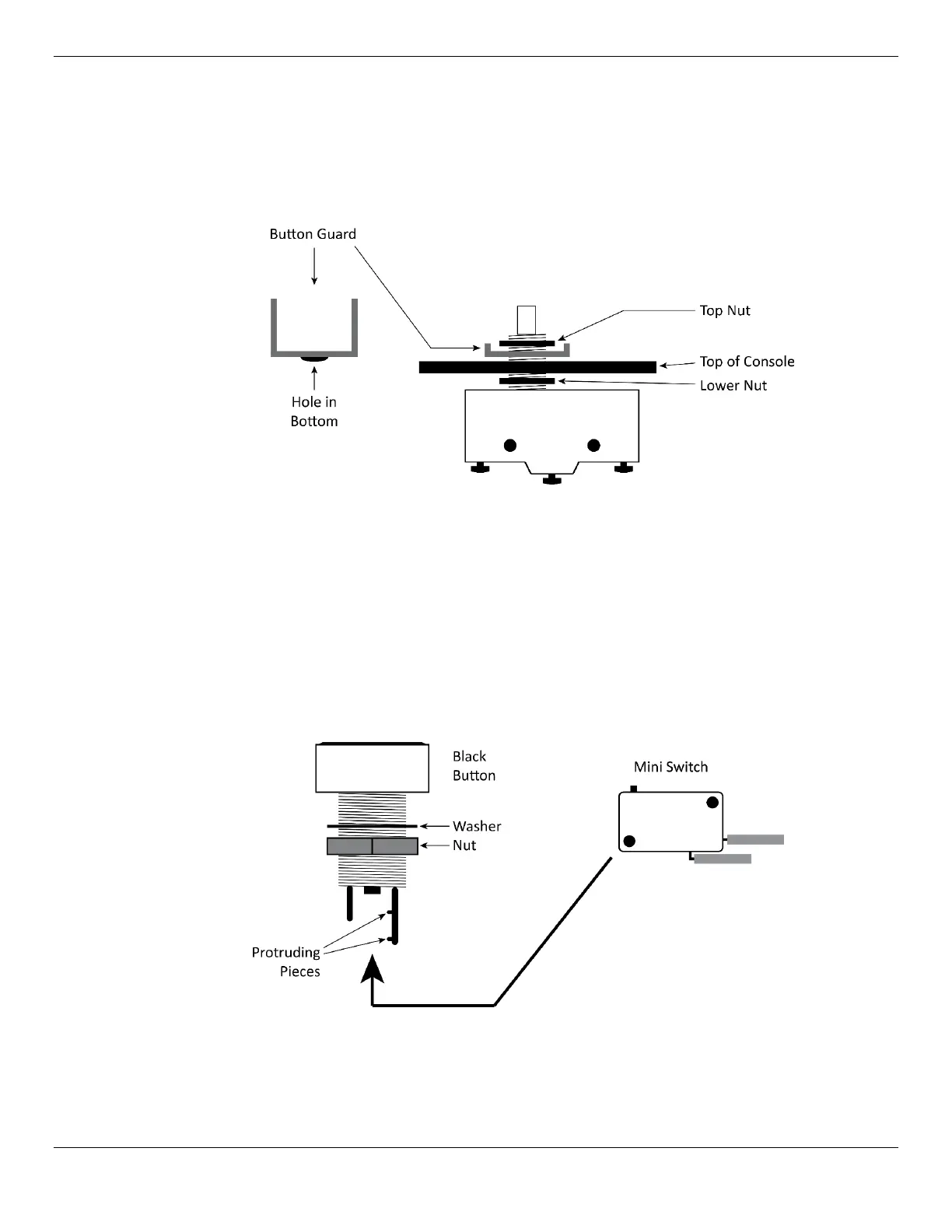
7. Put the Button Guard into position around the button portion of the Microswitch (through the hole
in the bottom of the Button Guard).
8. Put the Top Nut back into position on the threads on the Microswitch, then tighten it.
The following drawing shows how the Button Guard and the Microswitch go together.
9. With the Console Cover still right side up, locate the Black Button, then remove the black plastic
Nut and Washer from the Black Button.
10. Put the Black Button into the hole for the Lower button in the Console Cover.
11. Holding the Black Button in place, turn the Console Cover upside down again, put the black plastic
Nut and Washer back into place on the threads of the Black Button, then tighten them.
12. Take the Mini Switch and carefully push it into place at the bottom of the Black Button.
Make sure the protruding pieces on the bottom of the Black Button go into the holes in the Mini
Switch; the Mini Switch will
not
work correctly until the protruding pieces are in the holes. You
need to bend back the section holding the protruding pieces to seat the Mini Switch.
13. Turn the Console Cover right side up, then secure it in place.


 To Next Page