Parts of the display and their functions11
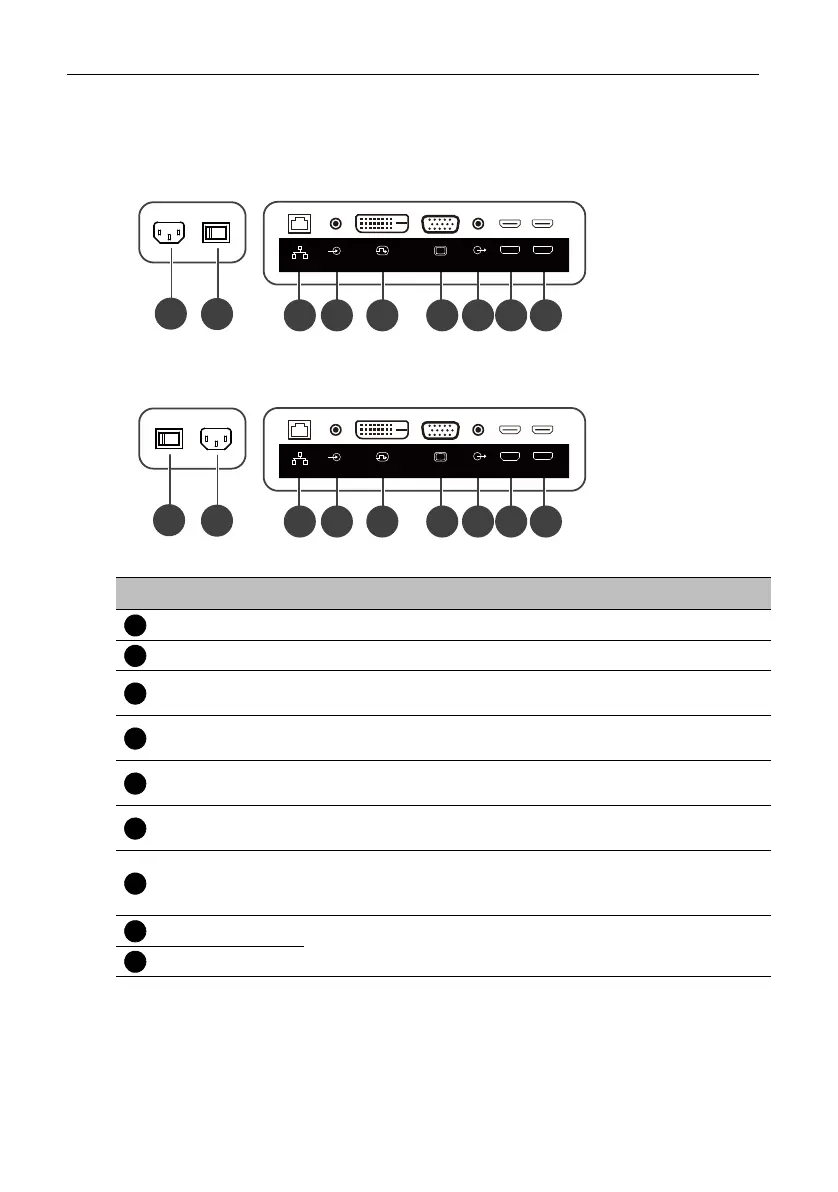
Input/output terminals
Bottom side
3
4
5 6 87 9
1
2
HDMI1 IN
HDMI2 IN
AUDIO OUT
DVI(DVI-D) IN
RJ45
PC LINE IN
VGA IN
ST4302S & ST5502S & ST6502S
3 4 5 6 87 9
1
2
HDMI1 IN
HDMI2 IN
AUDIO OUT
DVI(DVI-D) IN
RJ45
PC LINE IN
VGA IN
No. Name Description
AC IN Port Connects to a power outlet through the supplied power cord.
Power Switch Turns on/off the power supplied from the AC IN port.
RJ45
Connects with a local network using a standard Ethernet
cable.
PC LINE IN
Connects with the VGA video source (via a 3.5mm cable) to
receive audio from the device.
DVI (DVI-D) IN
Connects with devices transmitting video using the DVI-D
interface.
VGA IN
Connects with devices transmitting video using the VGA
interface.
AUDIO OUT
Connects with an external audio device (such as a speaker,
stereo system, or headphone) to output the audio that is
supplied by the video source.
HDMI1 IN
Connects with devices transmitting audio/video using the
HDMI interface.
HDMI2 IN



 To Next Page