Submenu extended parameters
TAB3
Setting of eigth extended inverter parameters.
To enter the submenu press both SHIFT and SELECT simultaneously.
Function SW1: DC - Brake
TAB3
This function controls the motor at the end of the DC-brake operation.
ON: The motor stops at the end of the DC-brake time. To restart the motor
open and than close START/STOP or ENABLE.
OFF: The motor will restart automatically at the end of the DC-brake time.
SUB XPAR
Range: ON, OFF
Default: ON
Function SW2: Input config. START/STOP and REVERSING
TAB3
OFF: Terminal 16 = START/STOP
Terminal 15 = REVERSING
ON: Terminal 16 = START CW
Terminal 15 = START CCW
SUB XPAR
Range: ON, OFF
Default: OFF
Function SW3: Error reset
TAB3
This function defines how the drive can be resetted after an error (except hardware er-
rors).
ON: To reset the drive open and then close START/STOP or ENABLE or set
the speed reference signal to zero. (This works only when f-min = 0 and with
no preset frequency selected).
OFF: To reset the drive execute a Soft - Reset or POWER ON - Reset.
SUB XPAR
Range: ON, OFF
Default: ON
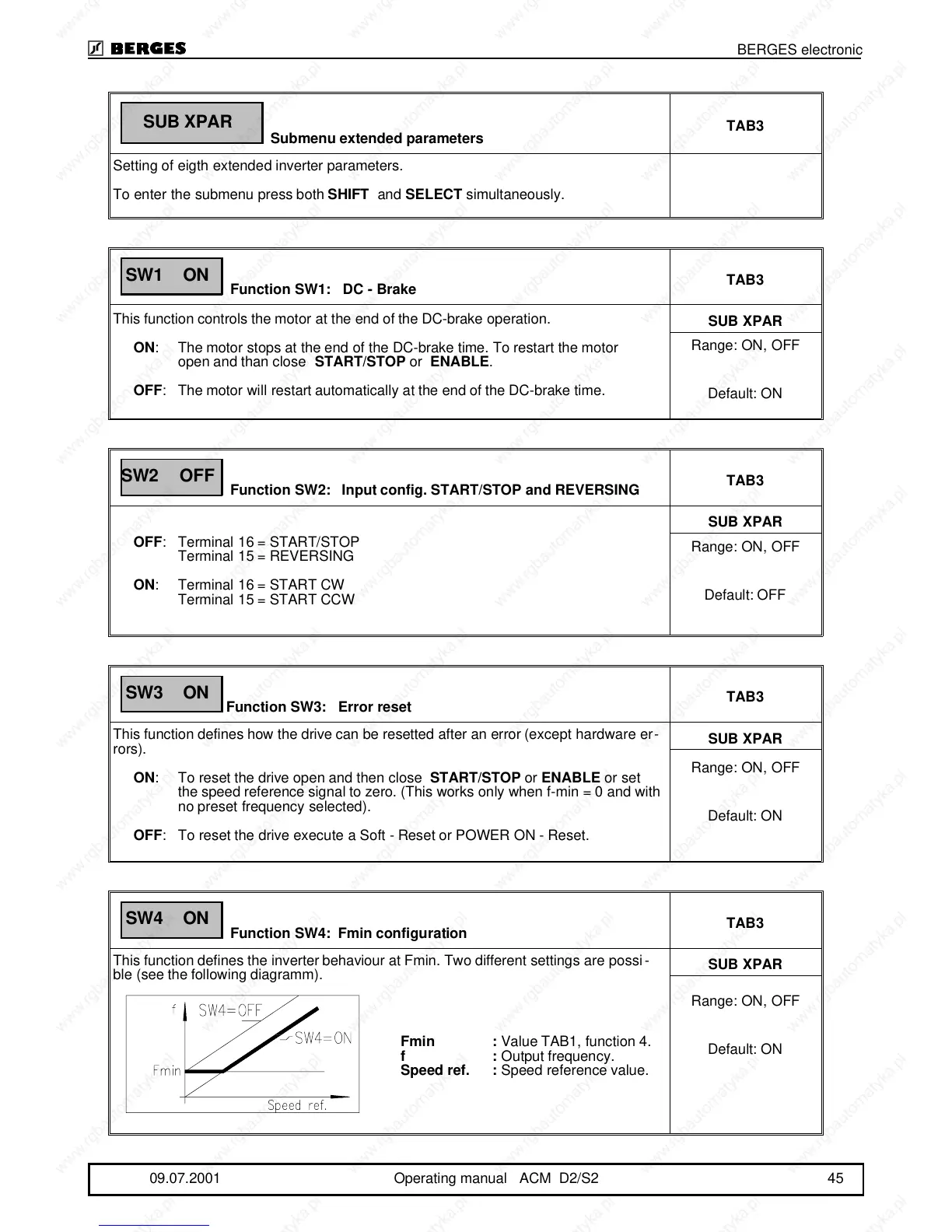
Function SW4: Fmin configuration
TAB3
This function defines the inverter behaviour at Fmin. Two different settings are possi-
ble (see the following diagramm).
SUB XPAR
Range: ON, OFF
Default: ON
SUB XPAR
SW1 ON
SW2 OFF
SW3 ON
SW4 ON
Fmin : Value TAB1, function 4.
f: Output frequency.
Speed ref. : Speed reference value.
BERGES electronic
09.07.2001 Operating manual ACM D2/S2 45



 To Next Page