FAULTS COMFORT AIR CURTAIN
58
5.5 Remedying faults without message
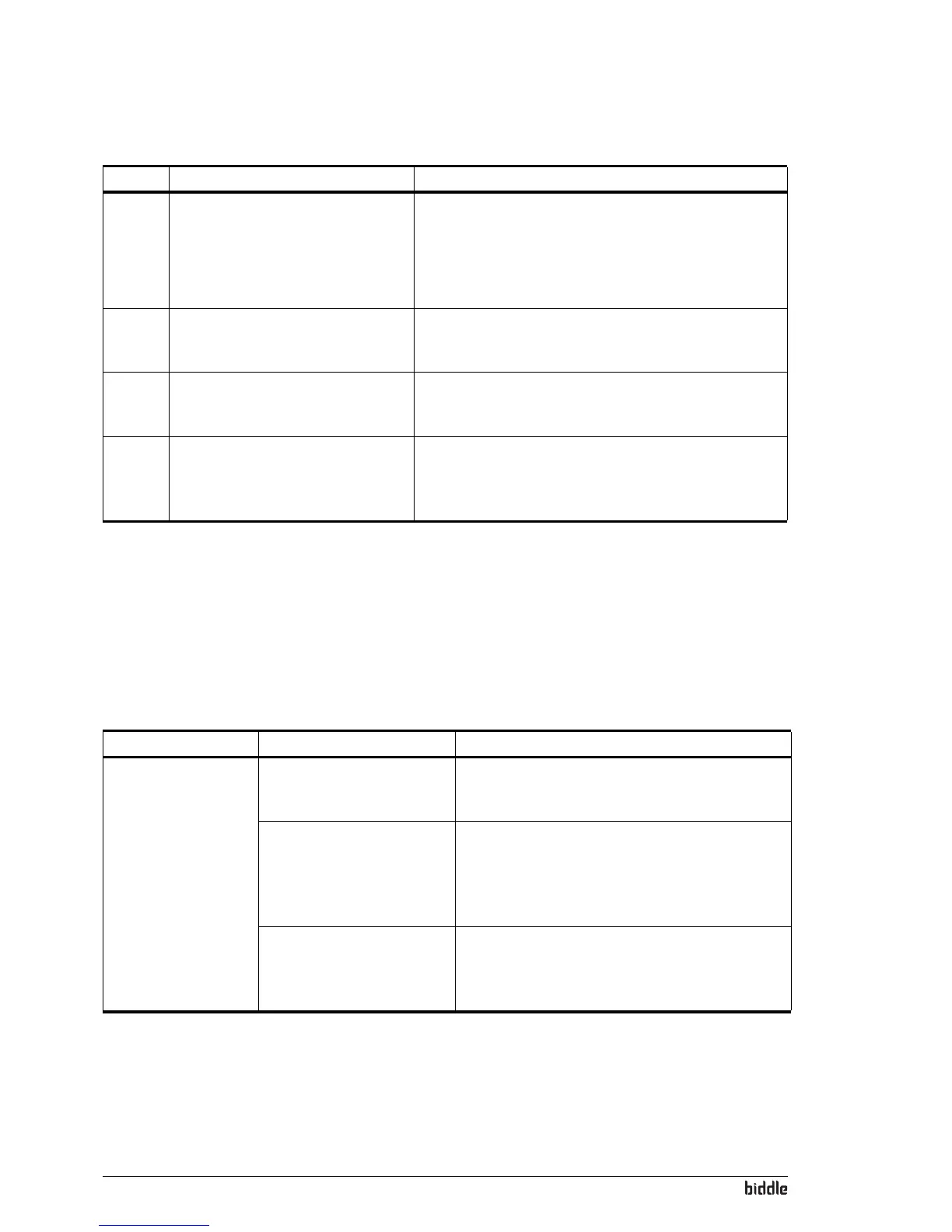
If you suspect a fault but no fault message is displayed:
1. Using section 5.2, check if you can easily resolve the
problem.
2. Try to resolve the problem using the below table. Technical
expertise is required for this.
F4 The temperature sensor in the
control panel is defective.
The room temperature control is
now based only on the sensor at the
unit’s air inlet.
Replace the control panel if you wish to have the room
temperature controlled with the sensor in the control
panel (if function
51. Indoor sensor is set to Control panel).
F5 The temperature sensor in the
discharge section does not work.
1. Check the sensor’s wiring and connection (connector
X350).
2. Replace the sensor.
F6 The temperature sensor in the inlet
section does not work.
1. Check the sensor’s wiring and connection (connector
X360).
2. Replace the sensor.
F8 Air flow sensor is defective. 1. Delete the fault message (see section 5.3.2).
2. Check the wiring of the air flow sensor and the
connection of the sensor (connector X370).
3. Replace the sensor.
CODE LIKELY CAUSE WHAT TO DO
PROBLEM LIKELY CAUSE WHAT TO DO
The control panel
works normally but
the unit does not
respond.
The unit is controlled by a
signal from an external
control.
1. Check the functions 60. Function of input and 76.
Release delay
in the menu Configuration.
The fans may be switched
off if there is only a small
difference in temperature
between indoors and
outdoors.
This is not a fault. If this is considered a problem,
the value of function
80. Fan off temperature can be
set to zero.
The fans are dead. 1. Check the transformer fuse.
2. Check the wiring between the transformer and
the fans (connectors X120 and X130).
3. Replace the transformer.



 To Next Page