CITY MANUAL INSTALLATION
Versie: 5.0 (04-06-2012) 23
Cabling
Note:
n Take the following into account, otherwise faults may
occur:
- The control cable between the control panel and the
(first) connected unit must not be more than 50 m
long.
- Keep control cables away from electromagnetic fields
and interference sources such as high-voltage cables
and fluorescent tube starters.
- Stretch control cables out or roll them up neatly.
- Do not remove the dummy plug, unless otherwise
stated.
Note:
n Use only control cables from Biddle. A standard
modular telephone cable is not suitable.
Multiple units operated from one control panel
• Up to 10 units can be connect
ed to one single control
panel. To do so, the units must be interlinked.
• The total length of the control cables must not exceed 100
m.
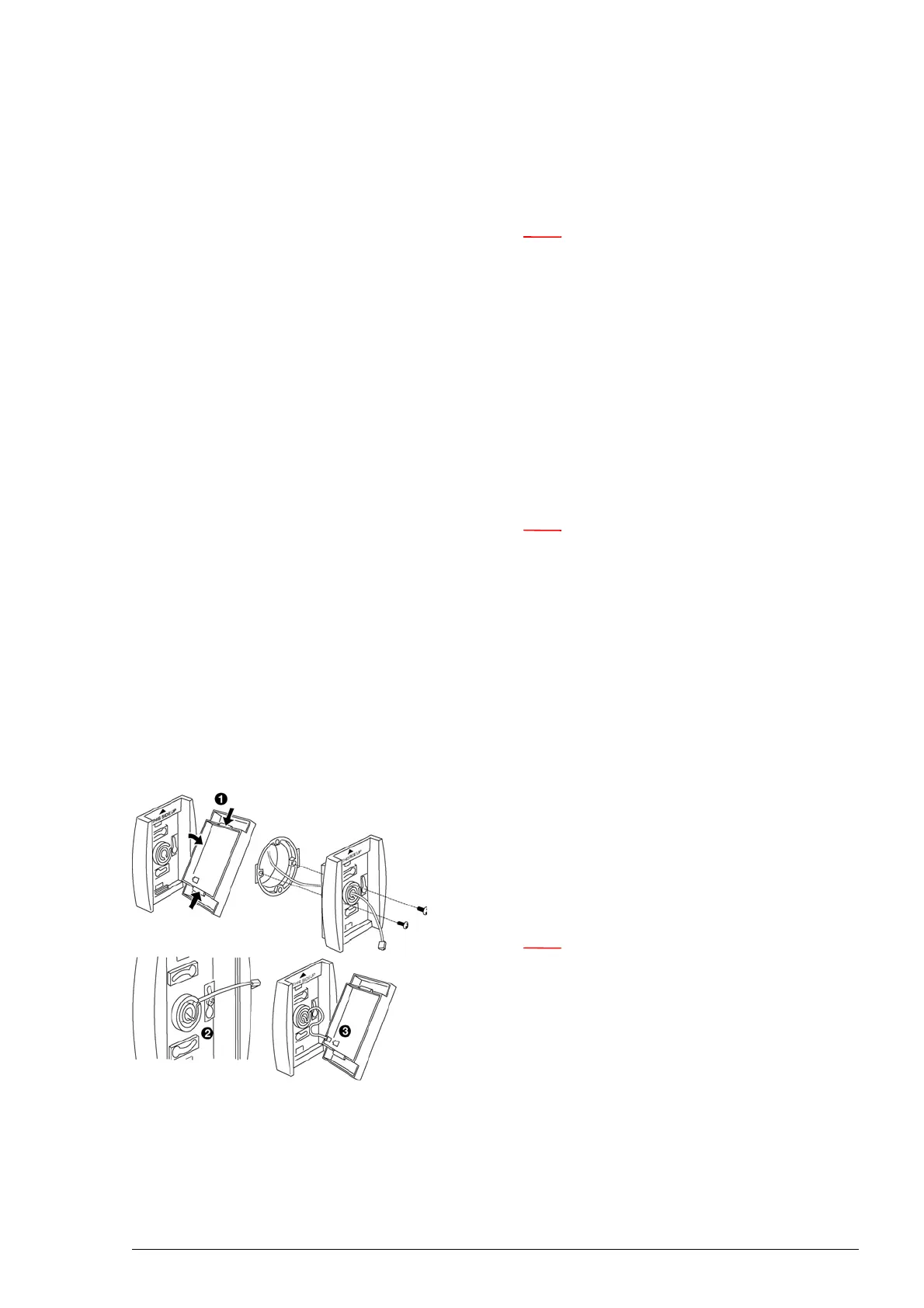
2.8.2 Installing the touch pad controller
1. Open the switch
2. Thread the cable through an
opening in the rear panel.
3. Fasten the rear panel to the wall.
4. Secure the cable with the stra
in relief clamp provided.
Note:
n The cable must protrude some9 cm from the strain
relief clamp.
5. Connect the connector of the control cable to the printed
circuit board.
6. Put the front panel onto the rear plate.



 To Next Page