INSTALLATION COMFORT AIR CURTAIN
26
Contacts on the terminals of block X72 only have a
function when the enable contact is closed by the
Daikin system.
Functions of inputs
Note:
n The functions which use terminals P and G are only
available from interface version V4.0 Rev.06 (IC10).
The global range for terminals P and G can only be
set from touch pad controller version V2.1 Rev.02
and interface version V4.0 Rev.07 (IC10). The
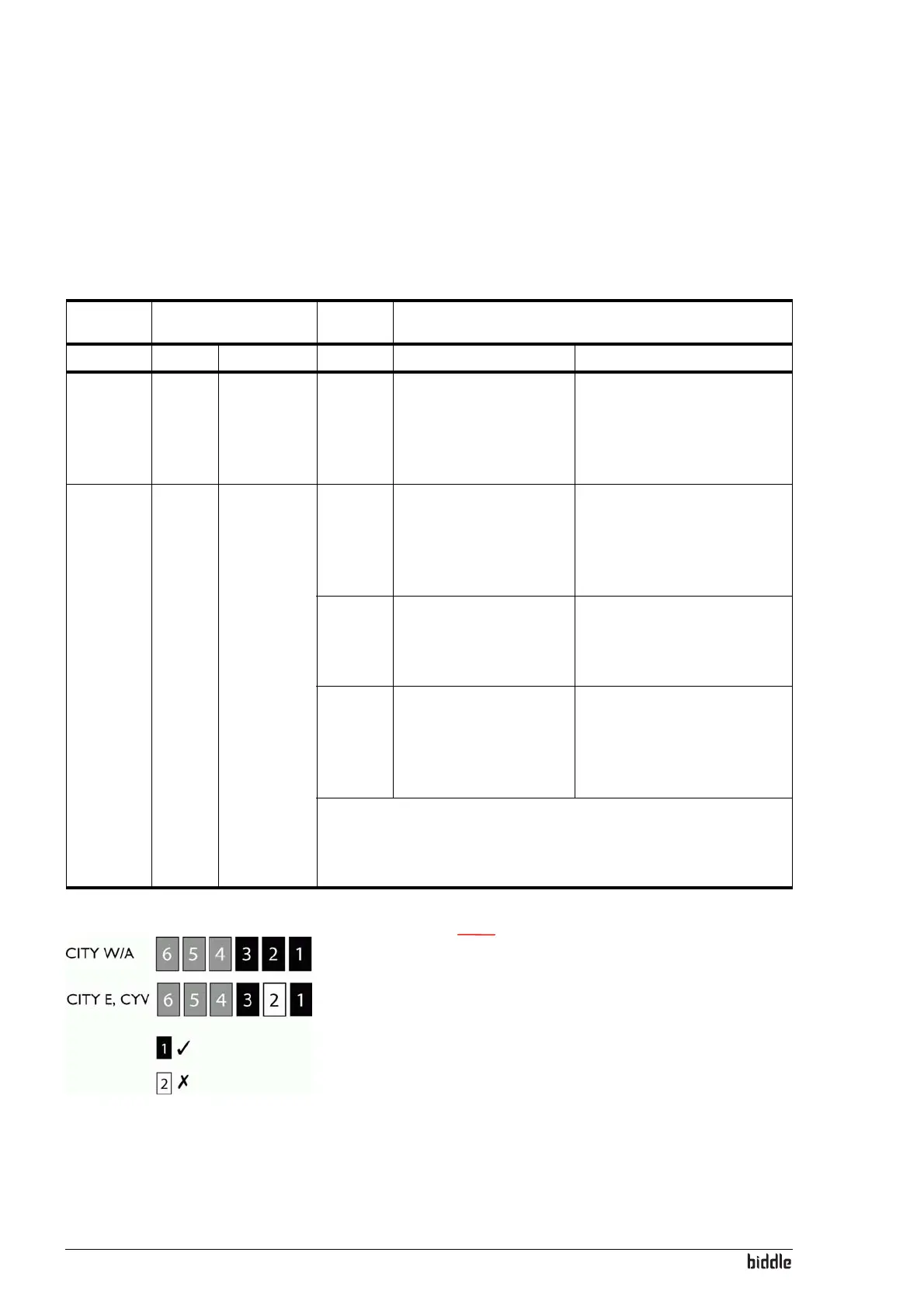
standard settings of the jumpers on block X64 are
shown in the figure opposite.
F
UNC-
TION
RANGE
TERMI-
NAL
FUNCTION
LOCAL GLOBAL CONTACT CLOSED CONTACT OPEN
Switching
unit ON
and OFF
No set-
ting
neces-
sary
Remove
jumper 6
from block
64 on the
interface.
T and G The unit is in stand-by.
The unit can be switched
ON and OFF via the
touch pad controller.
The unit is OFF and cannot be
switched ON or OFF via the
touch pad controller.
Change
setting.
No set-
ting
neces-
sary
Remove
jumper 5
from block
64 on the
interface.
D and G The unit operates 1 level
higher than indicated by
the touch pad controller.
On CITY E the electric
heating is also increased.
The unit operates as indicated
by the touch pad controller.
P and G The unit operates at the
highest level. On CITY E
the electric heating is not
increased.
The unit operates as indicated
by the touch pad controller.
D, P and
G
The unit operates at the
highest level. On CITY E
the electric heating is also
switched to the highest
level.
The unit operates as indicated
by the touch pad controller.
Caution: If the electric heating never has to be switched up at the same
time, jumper 4 must be removed. This setting has only a local function
and therefore has to be made on each unit for which this function is
desired.



 To Next Page