M (E2) 04/2019 page 29/71
9.2 Selecting between set-point ramp and set-point step
Temperature set-points always refer to the start of a program section, i.e., at the beginning of each pro-
gram section the entered temperature set-point is targeted. During program section operation, the tem-
perature gradually passes to the set-point entered for the next program section.
By appropriate planning of the program section timing, you can enter all kinds of temperature transitions.
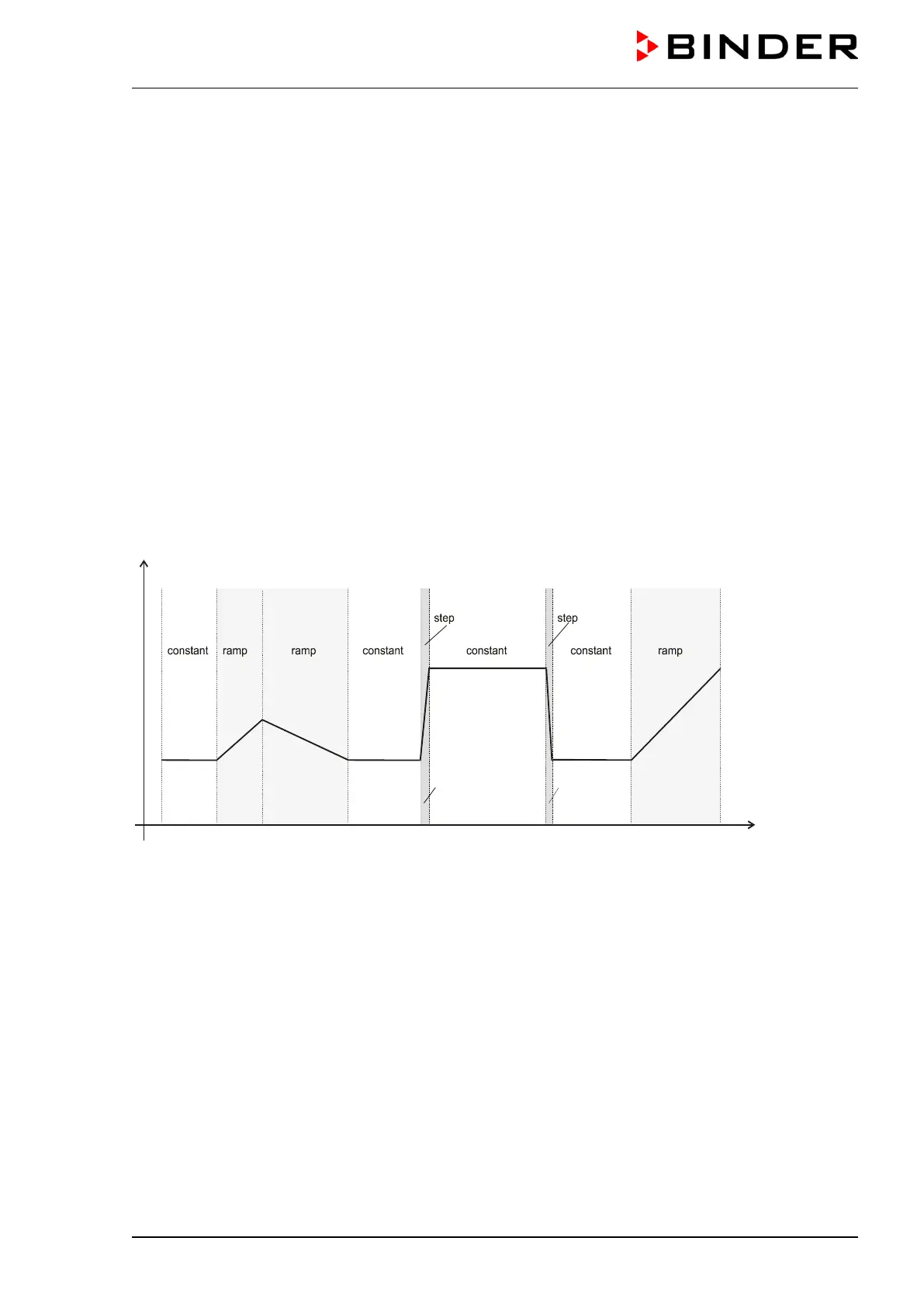
• Gradual temperature changes “set-point ramp”
The set-point changes its value gradually while proceeding from one program section to the next one
during the programmed section length. The actual temperature value (X) follows the continually mov-
ing set-point (W) at any time.
• Program sections with constant temperature
The initial values of two subsequent program sections are identical; so the temperature remains con-
stant during the whole time of the first program section.
• Sudden temperature changes “set-point step”
Steps are temperature changes (ramps) that occur during a very short interval. A section with a differ-
ent set-point follows two program sections with an identical set-point. If the duration of this transitional
program section is very short (minimum entry 1 sec), the temperature change will proceed rapidly
within the minimum amount of time.
Figure 7: Possible temperature transitions
The following chapter offers examples of programming a set-point ramp and a set-point step.
9.3 Program entry as set-point ramp or as set-point step
In order to avoid incorrect programming, we recommend plotting the temperature profile (chart template
in chap. 9.9) and entering the values into a table (templates in chap. 9.10).
The controller provides 8 operation lines that can be activated or de-activated for each program section.
Operating contact 1 is used to control the air flap position (ON = Air flap open, OFF = Air flap closed). The
other operation lines are non-functional.
The chamber does not provide active refrigeration, but you can program defined cooling down ramps
within the range of possible cooling-down times , e.g. in order to avoid tension in the material.



 To Next Page