59
Ending a Monitoring Session
58
Ending a Monitoring Session
END THE MONITORING SESSION
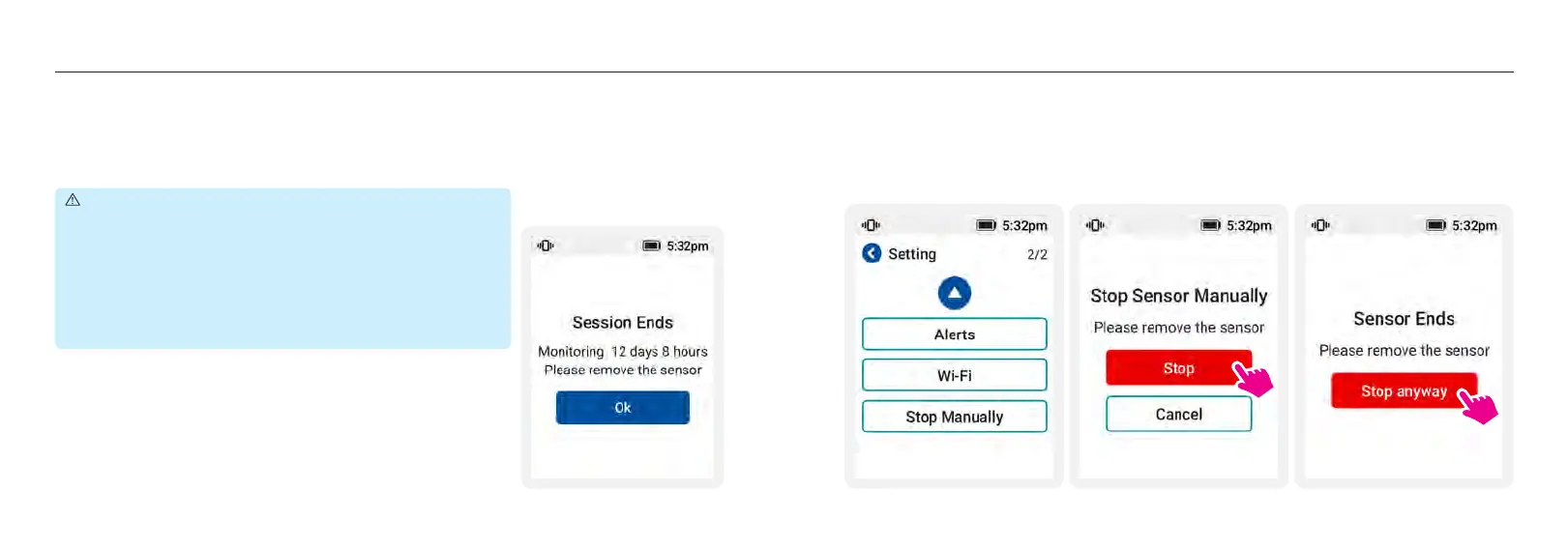
The monitoring session ends automatically when the sensor reaches its life of 14-day and the sensor
reading will no longer be shown on the receiver. A “Session is Ended” notification will pop-up to
let you know the session ends. You MUST remove or replace the sensor currently in use when you
receive the notification of sensor expiring. Press [Done] confirm you read this alert.
If you intend to or be asked to end the monitoring session before receiving “Session is Ended”
notification, you can do that by selecting the upper right in “My” menu. You will see a message
warning you that the sensor has not expired yet. Press [Stop anyway] to end the session.
PRECAUTIONS :
Do Not Reuse. Reuse of a sensor, sensor base or adhesive
patch may cause infection or irritation.
End Session Earlier. If any unexpected issues (irritation
or discomfort) happen at the application site, consult your
healthcare professional for further assistance to prevent
severe results. You may follow the instruction to uninstall you
sensor early under proper supervision.














 To Next Page