60
Ending a Monitoring Session
61
Ending a Monitoring Session
SENSOR AND TRANSMITTER REMOVAL
Do not remove your transmitter until your sensor session is over. Once the session has ended, follow
these steps to remove your sensor and transmitter:
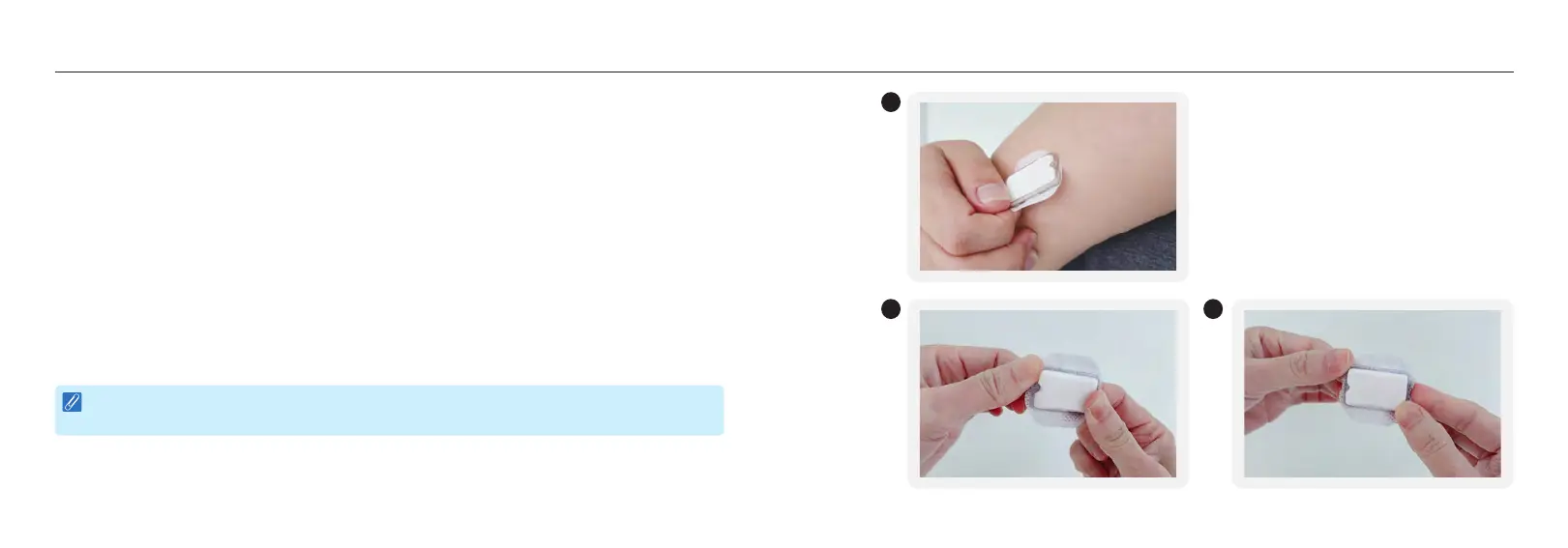
1. Grip the edge of the patch attached to your skin. Slowly pull upwards to peel it off in one motion.
2. Pick up the sensor base and transmitter. Note that one edge of the base has a notch.
3. Locate a point two-thirds along the length of the base and across from the notch. Then pinch
firmly at this point with your thumb and index fingers. While you do so, grip a corner of the
notched edge of the sensor base with your other hand.
4. Press down firmly and bend the base away from the transmitter with the hand gripping the corner
of the notched edge of the sensor base.
5. The transmitter will pop out as you bend the base. You will hear a click as the transmitter detaches.
6. Keep transmitter to use with next sensor. Discard the sensor, sensor base and adhesive patch
according to local regulations for disposal of sharps and blood-contacting components.
NOTE :
Do not throw away the Transmitter. Transmitters are reusable after recharging.
1
3 4














 To Next Page