Page 5
nGEN™ Pump User Manual
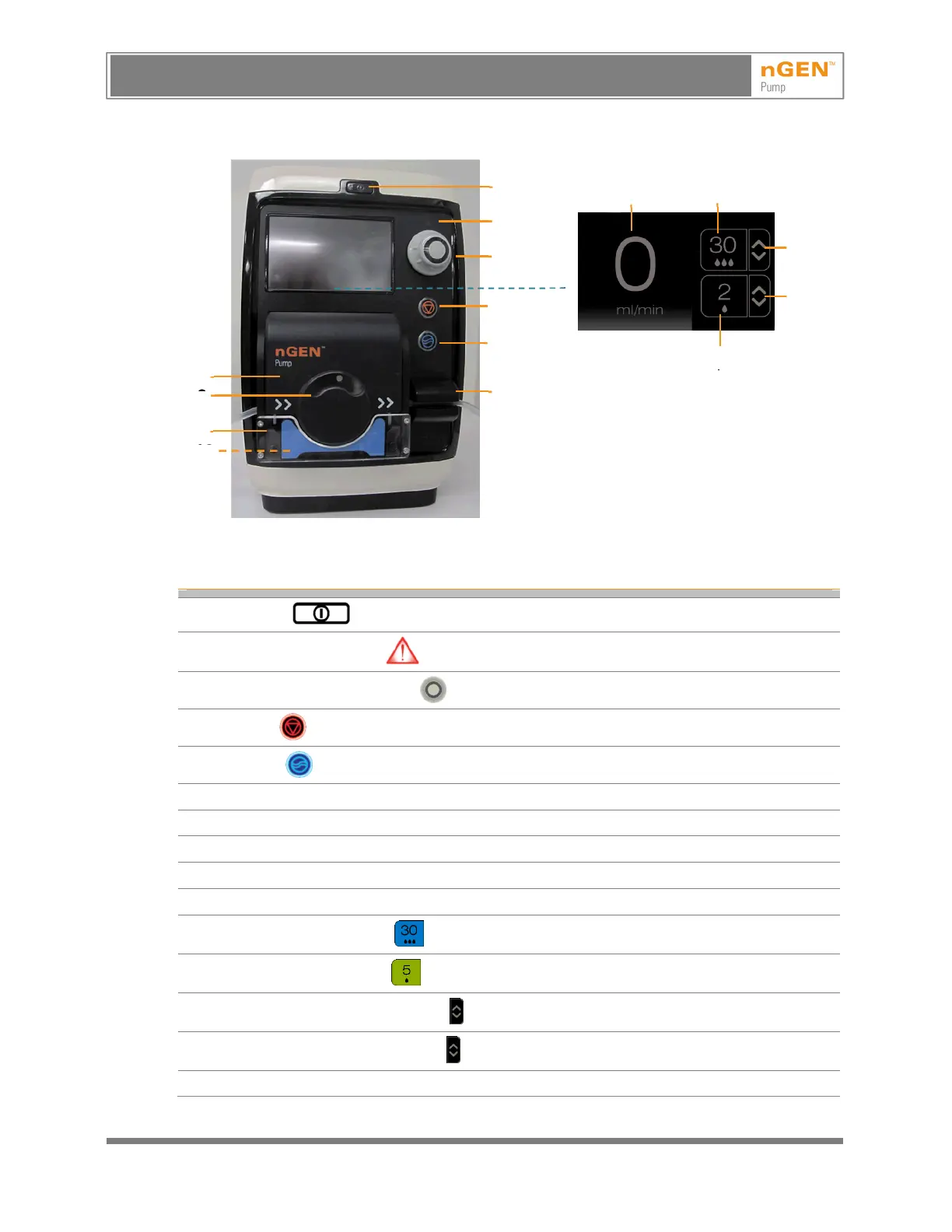
9.3 Controls on the Front of the Pump
Pump Screen in
Ready State
Note: The nGEN™ Pump may have an alternate appearance as mentioned in 18, Appendix.
Table 3 – Controls on the Front of the Pump
1
On/Off button
2
Internal error indicator (only visible when there is an internal error)
3
Flow Rate Adjustment knob
4
Stop button
5
Flush button
6 Bubble sensor
7 Pump head
8 Pump door
9 Pump rotor
10 Pump bed
11
Activate High Flow button
12
Activate Low Flow button
13
Change High Flow Setting button
14
Change Low Flow Setting button
15 Active flow rate display
Note: See 10.2, Explanation of Buttons and Indicators.
1
3
5
6
2
8
4
11
13
12
15
14
AVISO: Este es un documento controlado, confidencial, y con derechos reservados. Revisar si es la revision mas actualizada.
WARNING: This is a controlled proprietary and confidential document. Verify revision is current prior to use.
Release Date: 2/14/2024



 To Next Page