EasyManua.ls Logo

BIRD 4391A - User Manual

BIRD 4391A
46 pages
Print Icon
To Next Page IconTo Next Page
Loading...
Multi-purpose
Thruline
®
Wattmeter
Rf Power Analyst
®
Model 4391A
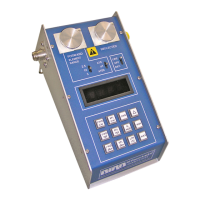
Cable And Antenna Tester
For Wireless Systems
Operation Manual
©Copyright 2016 by Bird Technologies, Inc.
Instruction Book Part Number 920-4391A Rev. K
Thruline® and Power Analyst® are Registered Trademark of
Bird Electronic Corporation

Questions and Answers

  • V
    variasAug 14, 2025
    Why are the power readings inaccurate on my BIRD Cable Tester?
    • S
      steven22Aug 15, 2025
      If your BIRD Cable Tester shows inaccurate power readings, it could be due to several reasons. The RF Power Analyst might need recalibration, so recalibrate it. There may be defective plug-in elements, which would need replacement. Also, check for an intermittent connection at the element wiper and adjust the wiper contact if necessary. Ensure the hold-down catch isn't loose; readjust it to securely hold the element. A worn line section should be replaced, as should a defective Data Acquisition PC board assembly.
  • F
    francosamanthaAug 18, 2025
    What to do if my BIRD Cable Tester display indicates '0' Power?
    • J
      John StoutAug 18, 2025
      If your BIRD Cable Tester displays '0' Power, the element wiper might not be contacting the element properly; readjust it to ensure good contact. Alternatively, you may have a defective Plug-in Element, which needs to be replaced. Another possibility is a defect on the Data Acquisition PC board assembly, in which case, replace the PC board assembly attached to the line section.
  • B
    Beverly RiveraAug 21, 2025
    Why does my BIRD Cable Tester have high standing waves?
    • J
      Joshua WhitneyAug 21, 2025
      If your BIRD Cable Tester has high standing waves, it might be caused by dirty connectors; clean them. Another cause could be worn or damaged connectors, which would need replacement. Also, check for any foreign objects in the line section and remove them.
  • J
    James VaughanAug 25, 2025
    What to do if my BIRD Cable Tester will not operate from AC line?
    • P
      Patrick BruceAug 26, 2025
      If your BIRD Cable Tester will not operate from the AC line, ensure that the 115/230V switch is in the correct position. If the problem persists, the fuse may be blown, and you should replace it. A defective line cord could also be the cause; repair or replace it as necessary.
  • M
    Michael ChandlerAug 28, 2025
    Why is the battery life so short on my BIRD Cable Tester?
    • W
      Willie MillerAug 28, 2025
      If your BIRD Cable Tester's battery life is short, ensure the 115/230V switch is in the correct position. If that doesn't solve the problem, the batteries may be damaged or worn, and you should replace them.
  • N
    nathanbaileyAug 31, 2025
    Why do all decimal points stay lit on my BIRD Cable Tester?
    • M
      Marcus DelgadoAug 31, 2025
      If all the decimal points stay lit on your BIRD Cable Tester, it could be due to a low charge on the batteries; try recharging them. If the issue persists, there may be a defective circuit component, requiring replacement of the Main circuit board assembly.
  • C
    Cynthia BennettSep 3, 2025
    How to fix a BIRD Cable Tester when one segment of a display does not light?
    • B
      bmasseySep 3, 2025
      If one segment of a display on your BIRD Cable Tester does not light up, the display is likely defective and needs to be replaced.
  • M
    Monica NicholsSep 7, 2025
    What causes the same segment on all displays to not light on my BIRD Cable Tester?
    • L
      Lindsey BarreraSep 7, 2025
      If the same segment on all displays of your BIRD Cable Tester doesn’t light up, this indicates a defective circuit component. Replace the Main circuit board assembly.
  • M
    Michael ReyesSep 10, 2025
    What to do if one or more keys do not function on my BIRD Cable Tester?
    • M
      marythompsonSep 10, 2025
      If one or more keys do not function on your BIRD Cable Tester, there is likely a defect on the Main PC board. Replace the Main circuit board assembly.

Summary

Safety Precautions

General Safety Warnings

Key warnings on avoiding hazards like live circuits, shock, and proper grounding.

Specific Warnings and Cautions

Highlights warnings on batteries, solvents, power capacitors, and operational cautions.

Introduction

Installation

Plug-In Element Installation

Explains the selection and installation of plug-in elements for accurate measurements.

Operating Instructions

Maintenance

Preventive Maintenance and Cleaning

Outlines preventive tasks, cleaning, inspection, and long-term storage.

Calibration and Setup

Details calibration requirements, equipment, and initial setup steps.

Troubleshooting and Element Adjustment

Covers element wiper adjustment and a troubleshooting guide for common issues.

Disassembly and Component Replacement

BIRD 4391A Specifications

General IconGeneral
BrandBIRD
Model4391A
CategoryCable Tester
LanguageEnglish

Related product manuals