Multi-Purpose Thruline Wattmeter RF Power Analyst
13
Insertion Loss or Attenuation
Attenuation or insertion loss can be measured directly using an external single
port line section (P/N 4230-006-1), a DC feed-in adapter (P/N 4381-050), and a
DC cable (P/N 3170-058-6). The Model 4391A is inserted at the source end of
the device being measured. The second line section is inserted at the load end
and its DC output is routed by the DC cable to the adapter inserted in the
REFLECTED socket of the Model 4391A. Both elements are in this case pointed
in the direction of forward power flow. If the two elements do not have a ten to
one ratio, a correction factor must be added to or subtracted from the “return
loss” reading see
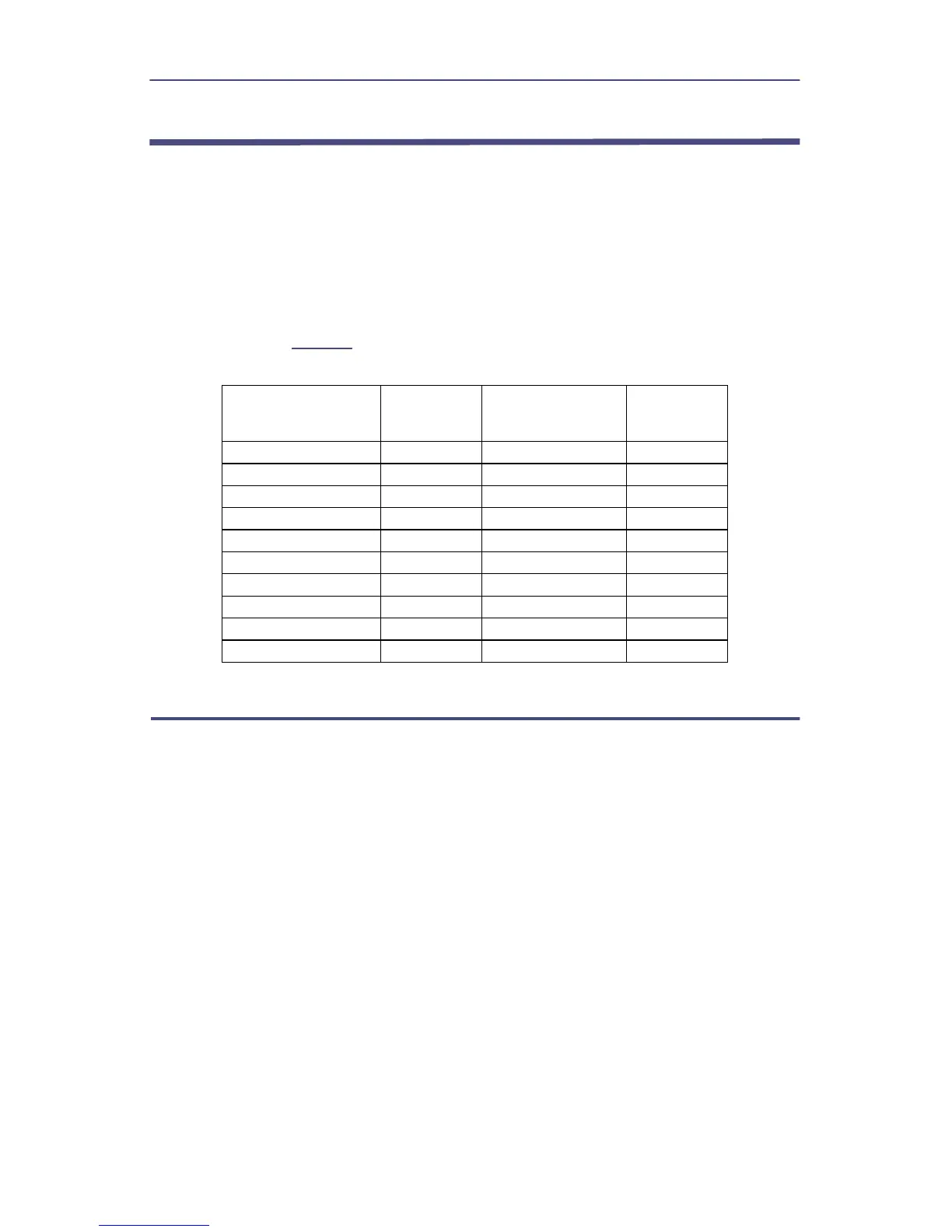
Table 5
, depending on the ratio of the elements.
Table 5 - Correction Factors
Ratio of
Elements
Added dB
Ratio of
Elements
Added dB
Monitoring Maximum and Minimum Readings
While operating in any of the modes described, the Model 4391A will continuously
keep track of the highest and lowest reading obtained. This action begins after ten
reading cycles to allow time for the peak detectors to settle from the previous mode.
To recall the maximum or minimum reading, depress and hold the MAX or MIN key.
When these keys are released, the meter goes back to displaying the current value of
the parameter being measured. Recalling max or min does not stop the meter from
continuing to monitor the current value and updating the minimum and maximum
registers. To clear the minimum and maximum register, the mode key must be
pressed again or a new mode selected. For example, if CW power deviations are
monitored, the Model 4391A is installed as described at the beginning of this section
and turned on, then the power source is turned on and allowed to stabilize. Once the
system has stabilized, press FWD CW to clear the MAX and MIN registers. At any time
during test the MAX and MIN keys can be used to recall the maximum and minimum
values without affecting the test. However, pressing the FWD CW key or changing
modes will clear the registers.
1:1 –10 100:1 10
2:1 –7 200:1 13
2.5:1 –6 250:1 14
4:1 –4 400:1 16
5:1 –3 500:1 17
10:1 0 1000:1 20
20:1 3 2000:1 23
25:1 4 2500:1 24
40:1 6 4000:1 26
50:1 7 5000:1 27


 To Next Page