ANTSPACE HK3 Water cooling container & Dry-Wet Tower Product Manual
54
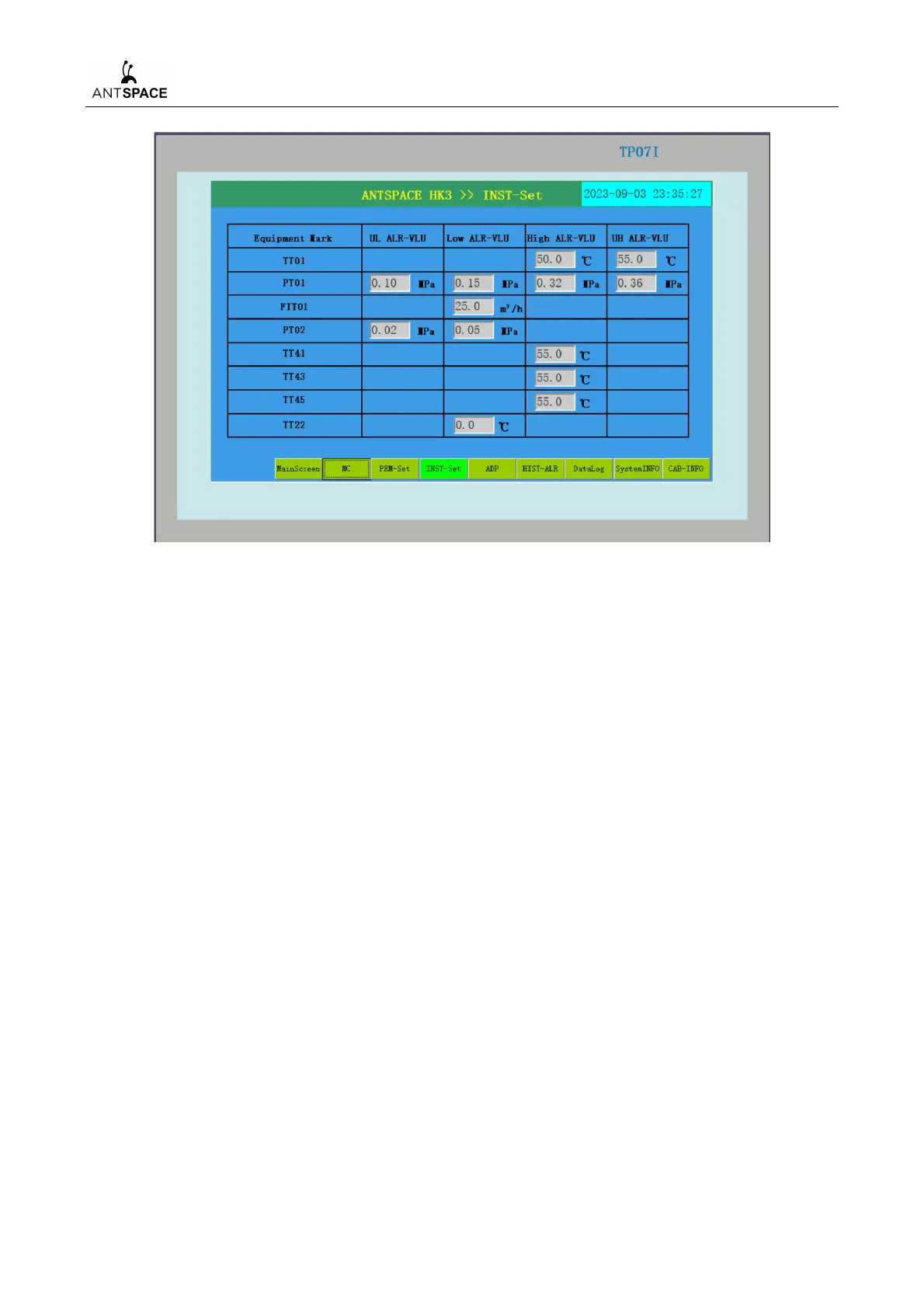
Figure 7-32 Instrument setting interface
The alarm thresholds for supply and return Water temperature, supply and return Water pressure,
flow rate, temperature inside the main control cabinet, temperature inside the distribution cabinet,
and cold side pressure difference can be set through the instrument setting interface. The values
shown in Figure 7-32 are the default initial alarm values. For the first start up, it is necessary to check
whether the parameter setting interface is consistent with Figure 7-32. If there are any differences,
they need to be reset according to the figure. If modifications are needed, please ask the operation
and maintenance personnel to determine the possible problems before making the modifications, and
confirm that they do not affect the system operation before making certain modifications to the
parameters.
6) Alarm Display Interface
After the system is running, if there is a fault in the system, it will be displayed on this screen.



 To Next Page