70
17. To edit the first step of the 4 steps, determine whether you
need short circuit testing on channel 3 and 5. For example, if
channel 3 needs short circuit testing, input 3. Then press Enter
to confirm your selection.
SEQ01 Short CH
0 : □□□ 5 □ Y □□
1 : □□□□□□□□
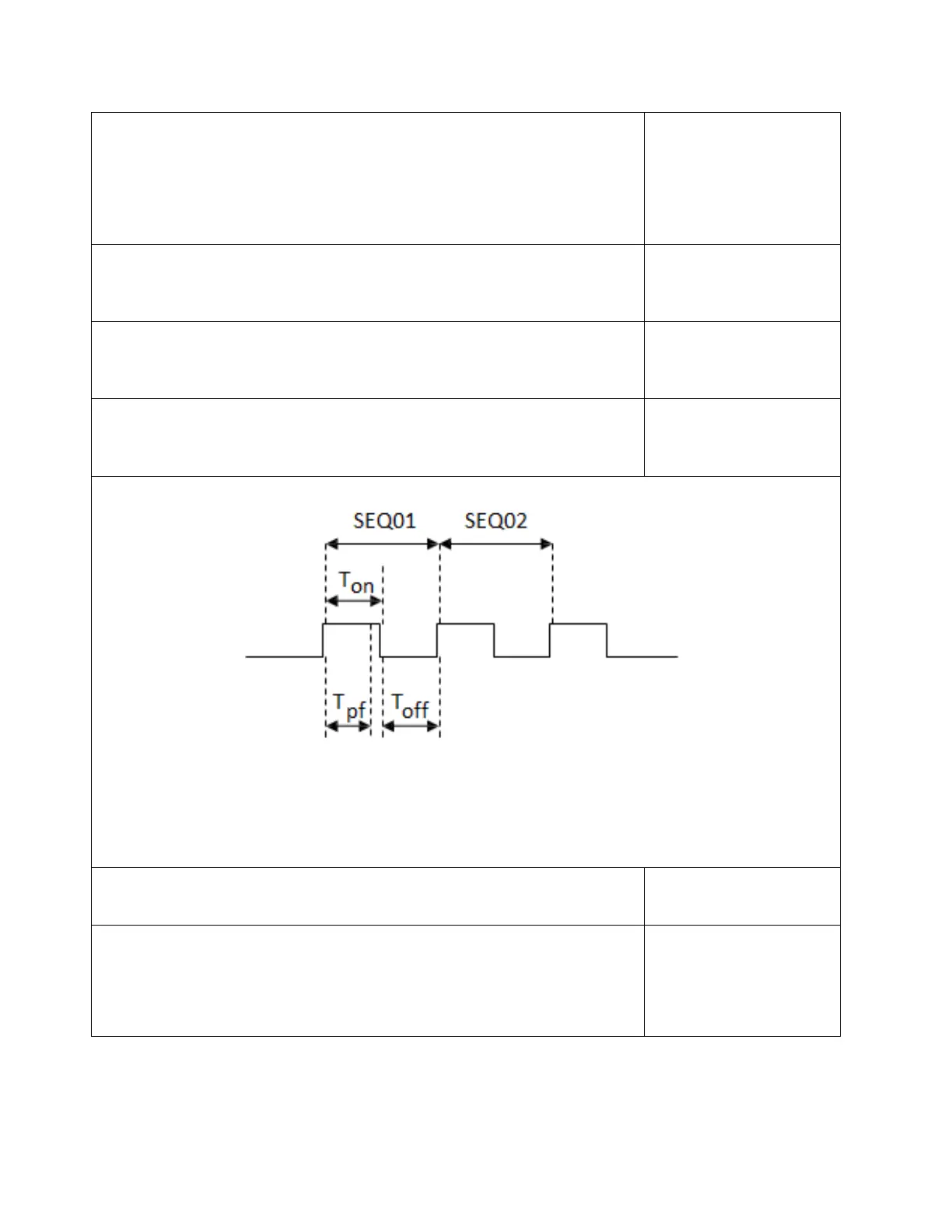
18. Set load on time (T
on
). For example, if you need 2s, input 2 and
then press Enter key to confirm.
SEQ01 On Time
= 2.0S
19. Set load off time (T
off
). For example, if you need 2s, input 2 and
then press Enter key to confirm.
SEQ01 Off Time
= 2.0S
20. Set test delay time (T
pf
). For example, if you need 1s, input 1
and then press Enter key to confirm.
SEQ01 P/F Delay Time
= 1.0S
0 ≤ T
pf
≤ (T
on
+ T
off
)
Tpf is test delay time
21. Repeat steps 17 through 20 and set the rest of the steps’ load
on/off time.
22. Set condition for when to stop testing. COMPLETE means to stop
test when all steps are completed. FAILURE means to stop test
when testing fails. Press keys to select condition and press
Enter to confirm.
Stop Condition
Complete
Failure


 To Next Page