INFORMATION ABOUT THE DEVICE
Access to the BODYSTAT
®
1500 unit serial number may be necessary from
time to time. This will be required for warranty purposes and when the upgrade
Bodystat
®
WINDOWS software programs are purchased.
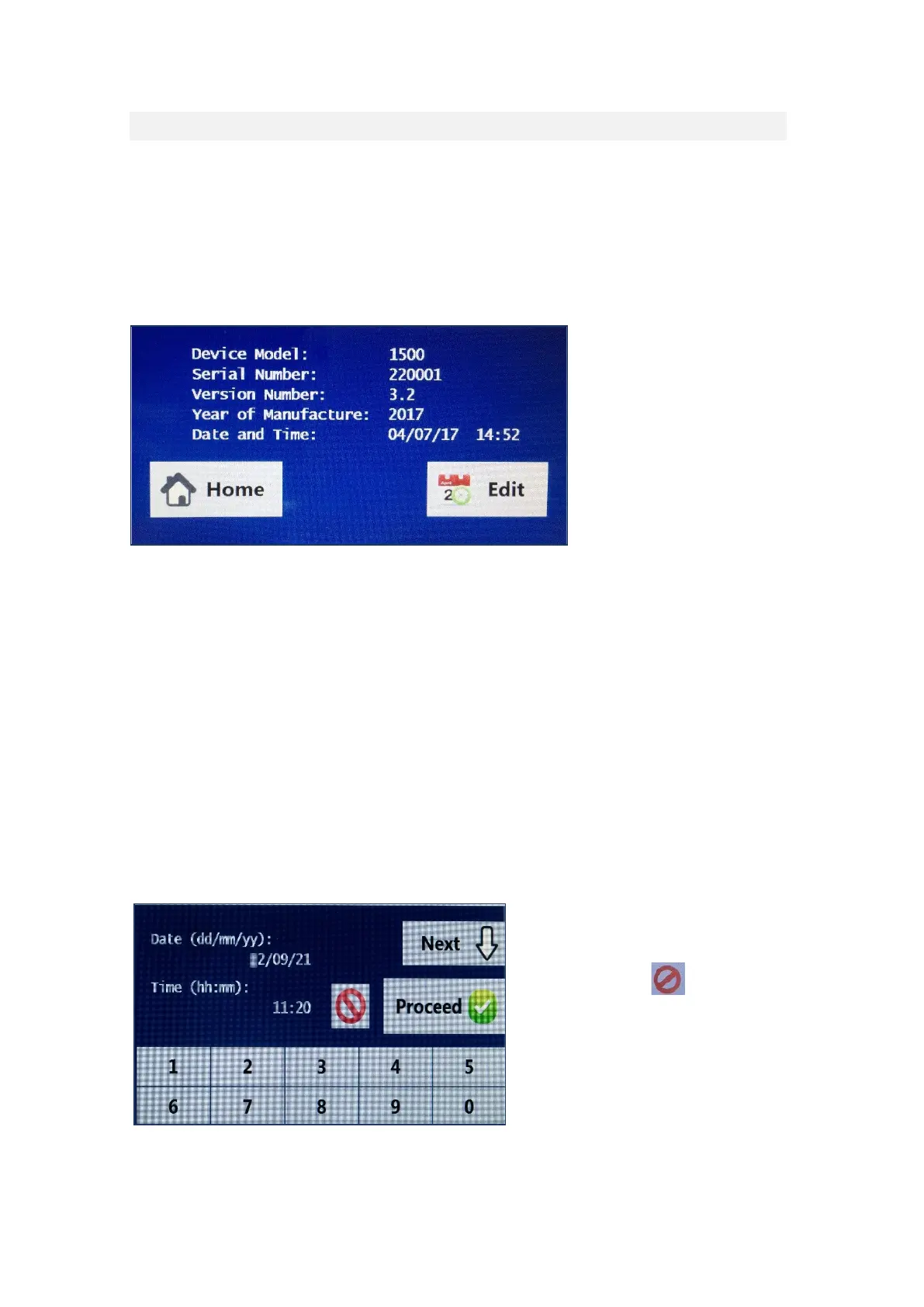
The serial number may be accessed as follows:
While switching the unit ON and then select the information button from the
home screen.
Press the home button to return to the main screen.
LABEL ON REVERSE OF DEVICE:
Each device has a label on the rear of the machine detailing the serial number
and the date of manufacturer. The number following the 10 is the serial number
of the device. The number following 11 is the date of manufacturer (year, month,
day).
EDIT DATE AND TIME
To edit the time, select the edit button at the bottom of the screen. The cursor
will flash over the number in question and use the numerical keypad at the
bottom of the screen to enter the date. Press the next key to move down the
time option and the numerical keypad can be used to change the time option.
To exit the screen without
entering a date or time, press
the red abort < > button.
Once complete select the
proceed button and the
information screen will again
be displayed.


 To Next Page