D6600 | Operation and Installation Guide | 10.0 D6600 Operation
.
Bosch Security Systems | 2/05 | 4998122704E 19
If the receiver is in the Automatic Mode and all of the
primary reporting devices (such as printers and
computers) fail, the receiver re-routes the messages to
the secondary reporting device(s). If the receiver
programs no secondary reporting devices or if all
secondary reporting devices fail, the D6600
automatically switches to Manual Mode. When the
receiver restores automation to normal operation, the
D6600 returns to the Automatic Mode if the user
manually acknowledges the last buffered signal.
10.2 Normal Operation Mode
In Normal Operation Mode, the D6600 Receiver sends
messages immediately or in blocks to reporting devices
(such as printers and computers) as soon as the devices
are ready to receive the information. Signals do not
remain visible in the display. If all reporting devices
fail, the D6600 reverts to Manual Mode until a device
returns to service. Normally, the D6600 sounds the
Operator Alert Buzzer for new events received when
the automation link fails.
Typical Alarm Receiving Sequence
1. An alarm occurs on Zone 3 at subscriber location
456. The user programs Account 456 to report to
Line 01 and does not assign Line 01 to report to a
call group.
2. The OL LED glows green when the receiver
answers the call and receives data.
3. The primary reporting device(s) (such as external
printer or automation computer) activates.
If the external printer is a primary reporting device
and Line 01 is not assigned to Group Reporting, it
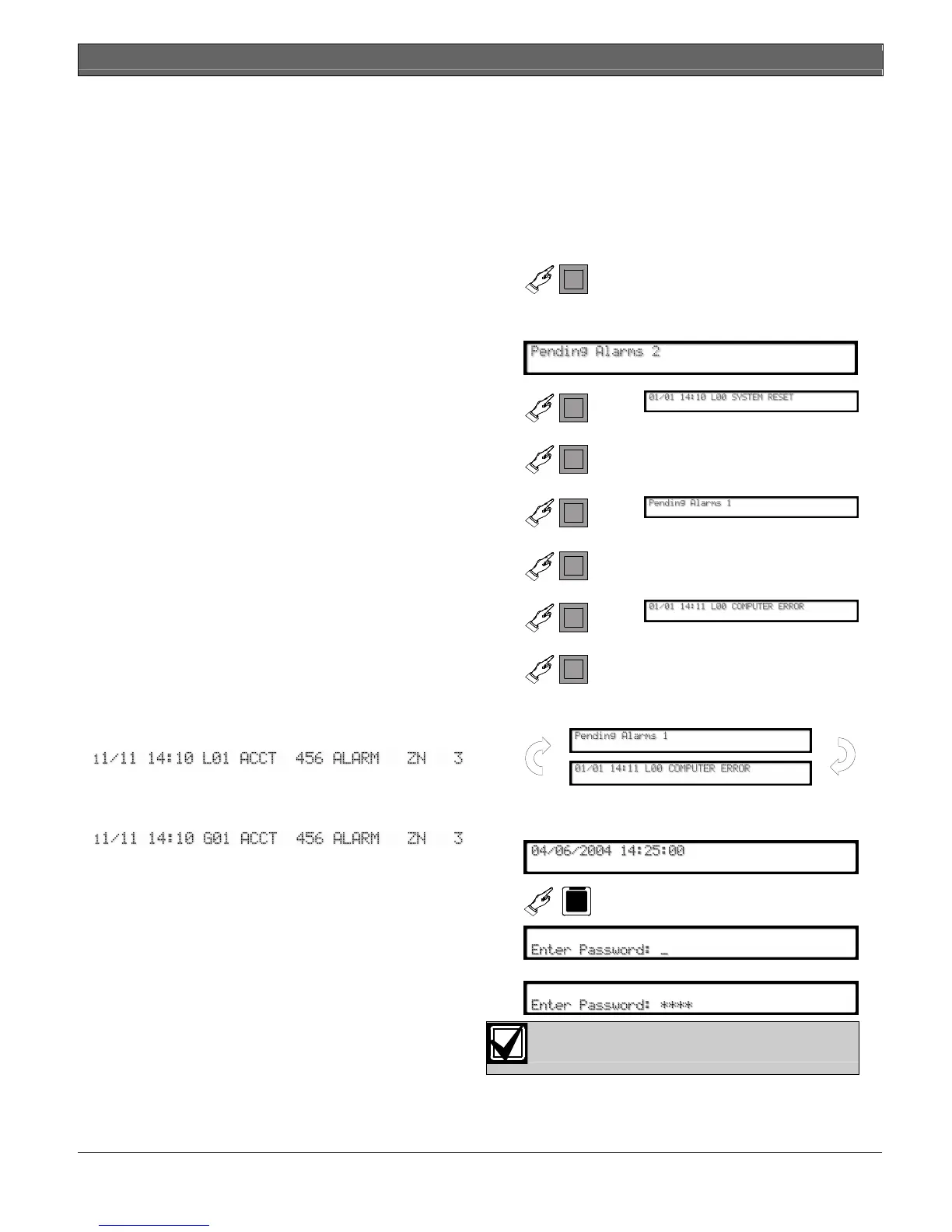
prints:
If Line 01 is assigned to Group 1 Reporting, the
receiver’s external printer prints:
4. Line 01 hangs up
10.3 Operating in Manual Mode
If all reporting devices (such as printers and computers)
fail, the D6600 reverts to Manual Mode until a device
returns to service.
When the D6600 receives signals while in Manual
Mode:
The Operator Alert Buzzer sounds.
1.
D6600
Shuts off the operator alert
buzzer
Compare the display to the printout to confirm
you correctly read the data.
2.
D6600
3.
D6600
Sends the message to a
connected printer
4.
D6600
5.
D6600
Sends the message to a
connected printer
6.
D6600
7.
D6600
Sends the message to a
connected printer
8.
Repeat until the reporting device(s) records all
outstanding messages and the display clears.
9.
10.4 Keypad Menu Operation
10.4.1 Log In
1.
D6600
M/E
2.
Enter password.
D6600 default password: 6600


 To Next Page