D6600 | Operation and Installation Guide | 3.0 Card Functions and Locations
.
Bosch Security Systems | 2/05 | 4998122704E 7
3.0 Card Functions and
Locations
3.1 Front Panel
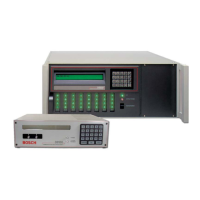
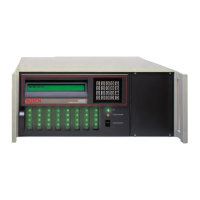
Figure 1: D6600 Communications
Receiver/Gateway (front view)
1
2
1 - LCD - Shows up to 80 characters of information
(two lines of up to 40 characters each)
2 - Keypad - The D6600 has a 20-button keypad
for easy user interface.
Table 2 shows the state of the D6600’s Power LED
using AC or battery power.
Table 2: Battery Supervision
Present Power LED Status
Green
AC Battery
Solid Blinking
Clear
X X
X
X
On
X X
X
X
Off
Table 3: System Trouble
System Trouble LED Status
Solid Red Clear
No System Trouble
Any System Trouble*
* Refer to Appendix B: D6600 Internal Messages in the D6600
Computer Interface Manual (P/N: 4998122703). The
following items cause system trouble. Depending on the
supervision setting, the items indicated by ** might or might
not cause system trouble.
Battery Missing**
UPS AC Fail
Battery Bad**
UPS Battery Low
AC Fail
System Temperature High
External Printing Error**
Line Fault**
COM# Error**
Line Card Trouble**
COM3 Trouble**
3.2 Line Cards and Modules
Table 4: D6600 Line Cards and Modules
Name Model Description
Telephone
line card
D6640
Up to eight line cards can be installed
in one D6600 Receiver, for up to 32
telephone line connections.
Telephone
line card
D6641
Functions like the D6640. Includes
improved Public Switched Telephone
Network (PSTN) processing,
additional memory for future
enhancements, and single firmware
upgrade package.
CPU card D6610
The D6600 uses one CPU card. The
CPU card takes the incoming
information from the line card and
routes the information to an
automation port, the LCD on the front
of the receiver, and an external printer.
Power
supply
modules
D6630
and
D6631
The power supply modules regulate
the power used by the D6600. These
are not field serviceable.
Telephone
line
terminator
card
D6645
Located behind the line card, the tele-
phone line terminator card isolates
and protects the line card against out-
side voltage surges that might come
over the telephone line. Each line card
must have a line terminator card.
CPU
terminator
card
D6615
Located behind the CPU card, the
CPU terminator card provides the
D6600 with two serial ports (COM3
and COM4), a parallel port (parallel
printer), and a general I/O port (I/O).
The serial ports can be used for
computer automation, PC connection
for programming, or NetCom
connection with a D6680.


 To Next Page