D6600 | Operation and Installation Guide | 10.0 D6600 Operation
.
Bosch Security Systems | 2/05 | 4998122704E 21
4.
1
D6600
5.
D6600
M/E
Table 9: Testing Communication Links
Printer
DD/DDsTT:TTsL08sACCTs888sss[TES
T]sZNsss8
D6500
Mode
h1rr8sssssss888s[sss8t
Automation
SIA Mode
<header>[NVX]
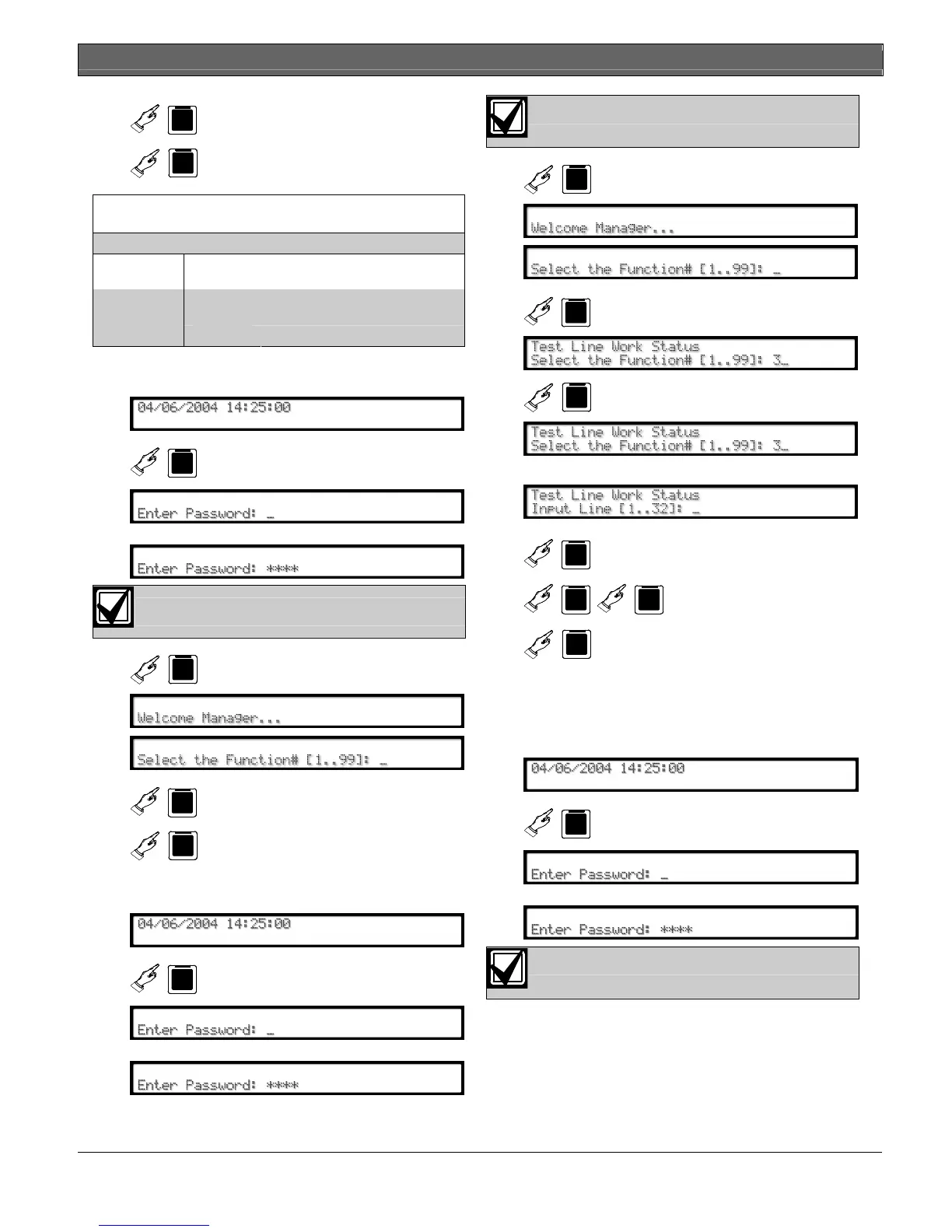
10.4.7 Skip Current Automation Event
Use this option to skip the current Automation event.
1.
F
D6600
2. Enter password.
D6600 default password: 6600
3.
D6600
M/E
4.
2
D6600
5.
D6600
M/E
10.4.8 Line Test
Use this option to test the line operation.
1.
F
D6600
2. Enter password.
D6600 default password: 6600
3.
D6600
M/E
4.
3
D6600
D6600
M/E
5.
D6600:
6.
1
D6600
to
3
D6600
2
D6600
Selects the line to test.
7.
D6600
M/E
The line disconnects, the receiver sends the
handshakes, and the line reconnects.
10.4.9 Clear Pending Events
Use this option to clear all pending events.
1.
F
D6600
2. Enter password.
D6600 default password: 6600


 To Next Page