D6600 | Operation and Installation Guide | 10.0 D6600 Operation
20 Bosch Security Systems | 2/05 | 4998122704E
3.
D6600
M/E
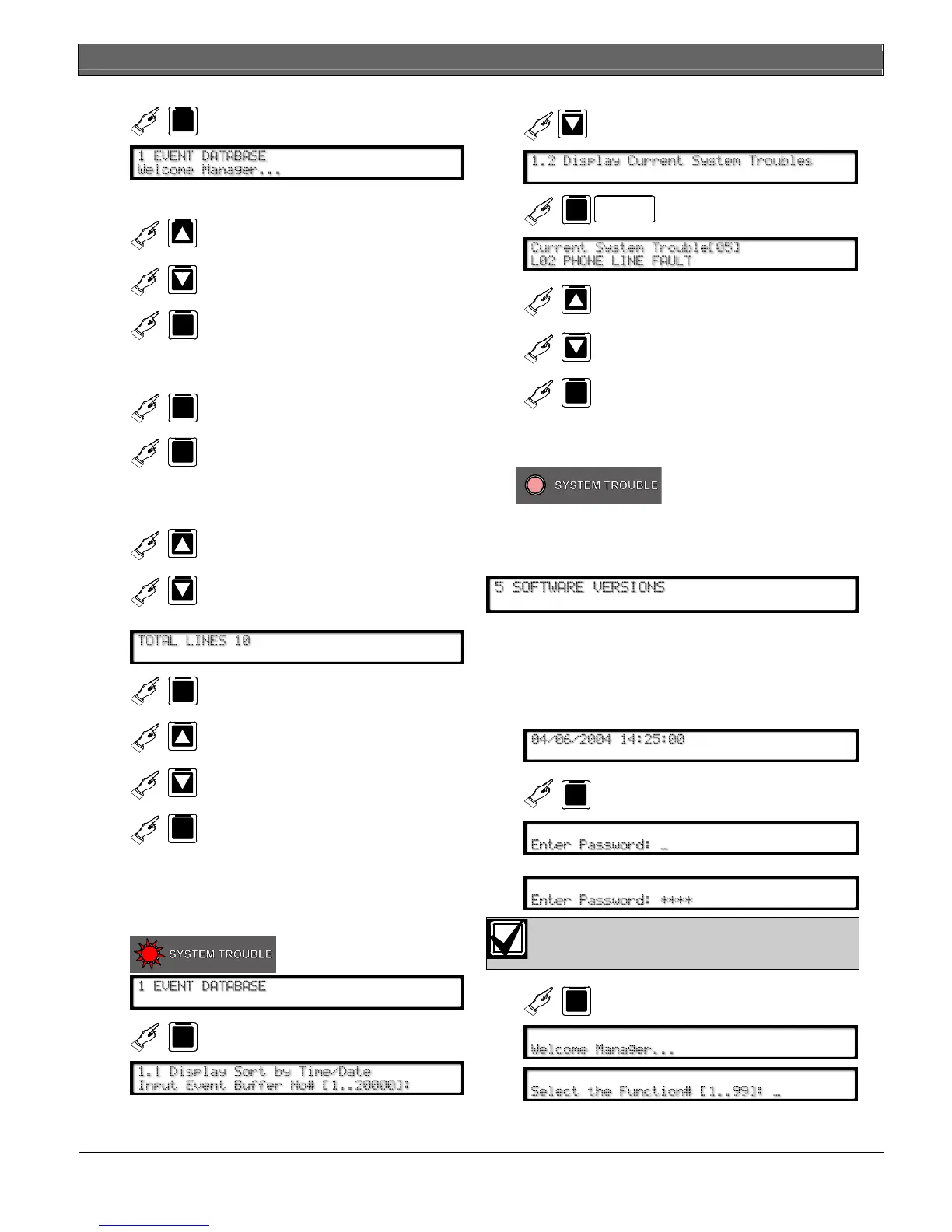
10.4.2 Using the Keypad
D6600
D6600
Scrolls up or down to the
appropriate menu.
D6600
M/E
Enters a particular menu.
Continue making changes to options until all
changes are complete.
D6600
M/E
Accepts the change.
CAN
D6600
Cancels the change and
returns to previous menu.
The new data takes affect upon exiting the menu.
10.4.3 Event Buffer Display
D6600
D6600
Shows event buffer contents in
the order the events are
received.
If multiple lines of text are received,
D6600
M/E
Views the remaining lines of
each message.
D6600
D6600
Continues to browse the
events in the buffer.
CAN
D6600
Exits this menu.
Refer to Section 10.1.1 Event Database on page 16 for
more information.
10.4.4 Current System Trouble Display
D6600
System troubles in the
buffer.
D6600
M/E
D6600
MENU
D6600 D6100
M/E
D6600
D6600
Browse the system troubles in
the buffer.
CAN
D6600
Cancels this menu
As you correct system troubles, the receiver
removes them from this list.
D6600
No more system
troubles remain
Refer to Section 15.0 Troubleshooting Guide on
page 28
for more information.
10.4.5 Software Version Display
Shows the current software versions of the CPU and
each line card.
10.4.6 Keypad Functions
Use this option to test the communication links to the
automation firmware and printer.
1.
F
D6600
2. Enter password.
D6600 default password: 6600.
3.
D6600
M/E


 To Next Page