PI - 32.15aProduct Documentation of the LSN Radio Fire Detection System
Seite 22 von 32
601-F.01U.002.708
A3.en / 28.12.2004
ST-FIR/ PRM1 / deh
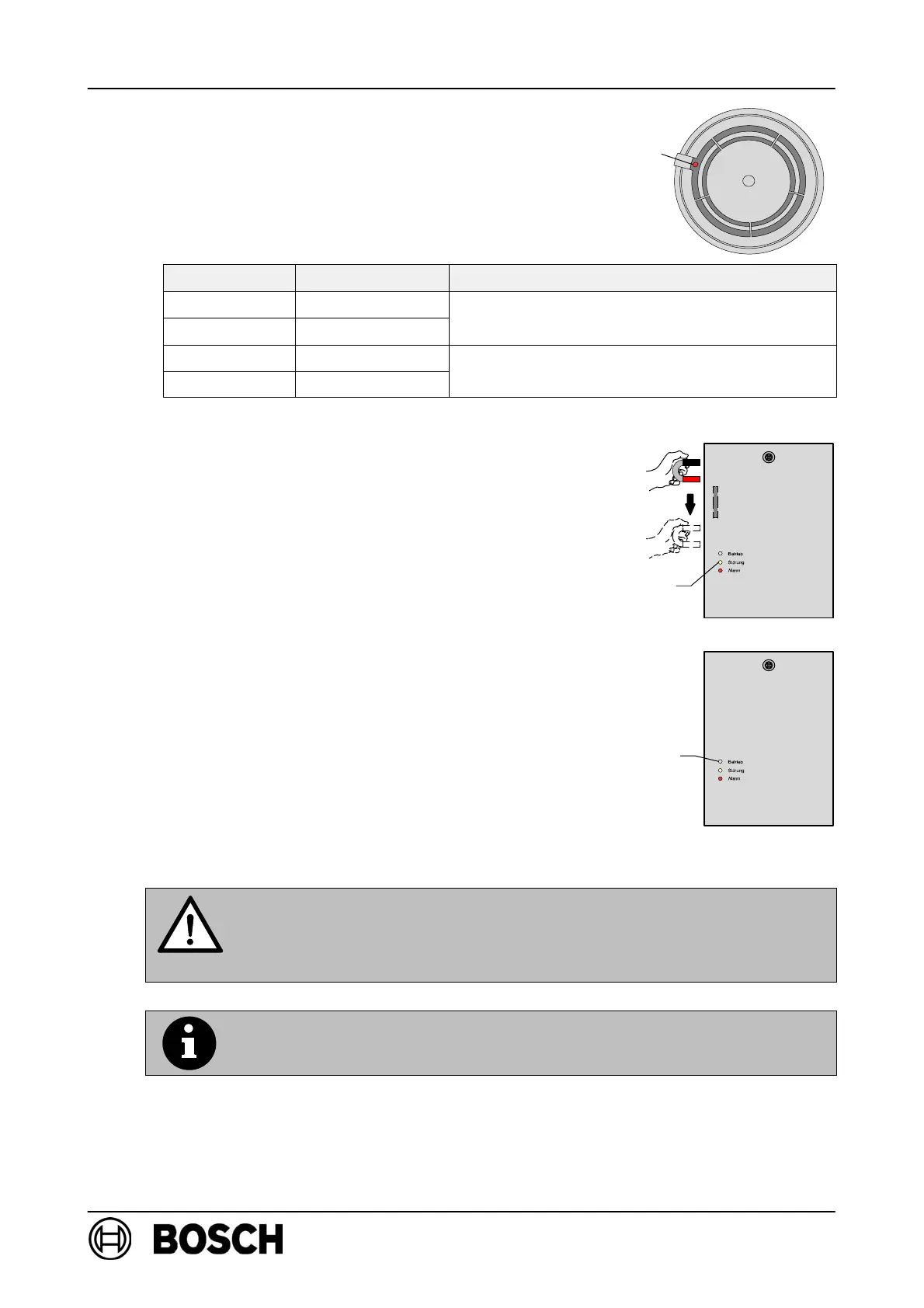
⇒ Following a successful system logon (duration:
15 seconds to a max. of 10 minutes), the LED will
go out and then flashes again for two minutes to
indicate the field strength.
Flashes/sec. Field strength Effect
4 High
Within field stren
th ran
e ade
uate for
3 Moderate
Within field strength range adequate for
detector use!
2 Low
Im
ermissible field stren
th ran
e!
1 Very low
Impermissible field strength range!
Improve detector positioning!
⇒ The yellow LED lights up briefly to acknowledge
each successful logon.
D All RF detectors (maximum of 30) are logged on to
FK 100 LSN in this way one after the other.
D Wait until the LED (flashing to indicate field
strength) on the last detector goes out.
D Activate the RF expansion module by moving the
magnets along the left-hand side of FK 100 LSN
housing.
⇒ The green LED flashes slowly, indicating that
FK 100 LSN has started system configuration.
⇒ Following successful system configuration, the
green LED lights up permanently, indicating that
the radio cell is in standard mode.
Avoid disconnecting the expander power supply after initial set-up
of the radio cell, as all detectors search for their RF expansion mod-
ules during power off condition and are therefore constantly trans-
mitting, which substantially reduces the service life of the batteries.
If it is necessary to disconnect the power supply for a long period
(> 1 hour), remove the batteries from the RF detectors.
red
LED
Reed switch
yellow
LED
green
LED



 To Next Page