PI - 32.15aProduct Documentation of the LSN Radio Fire Detection System
Seite 25 von 32
601-F.01U.002.708
A3.en / 28.12.2004
ST-FIR/ PRM1 / deh
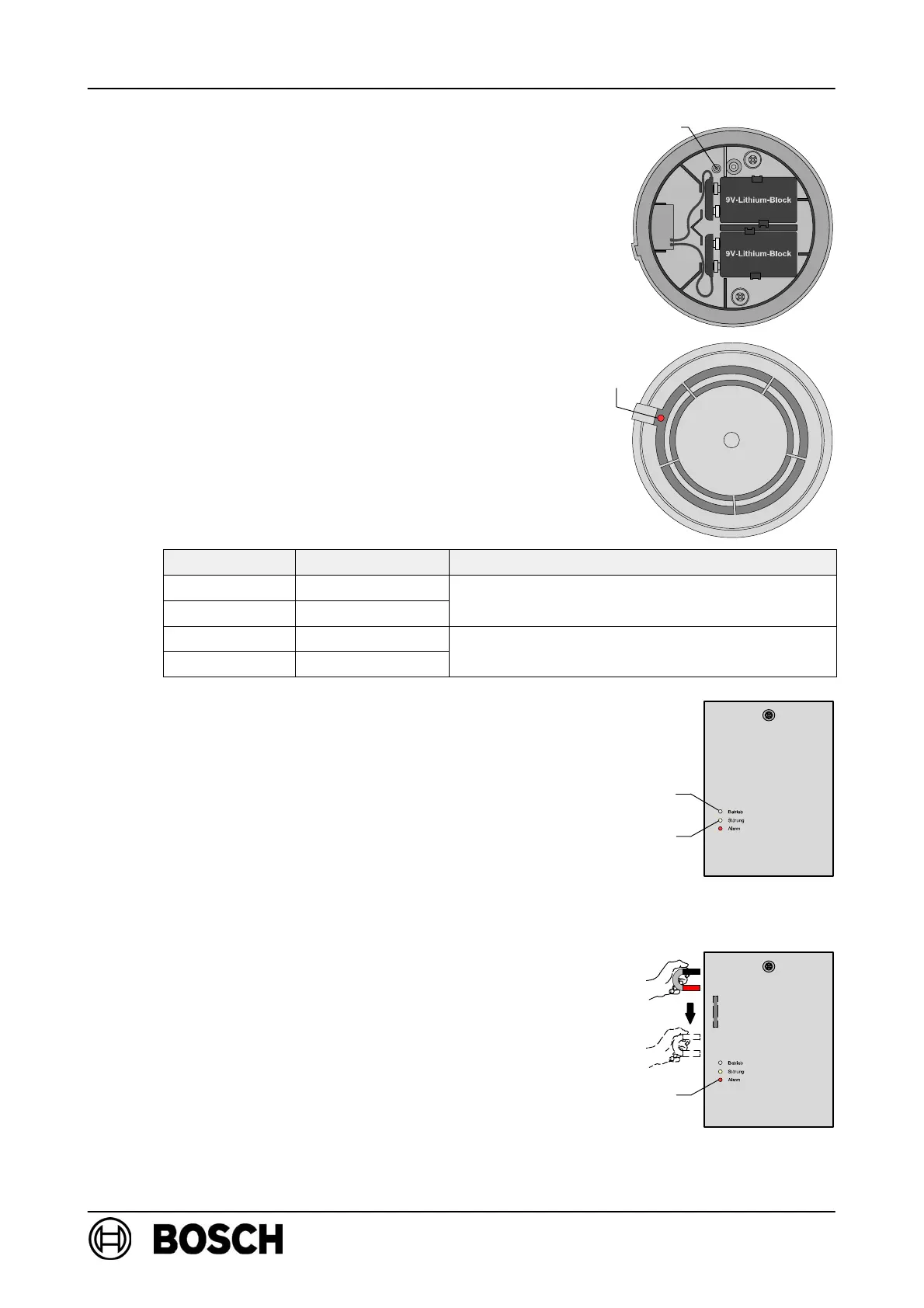
Log RF detector on to RF expansion module:
D Insert the batteries and secure the cables,
as shown in the diagram on the right.
⇒ The red LED must flash slowly.
D If the LED is flashing rapidly, press the new button
and hold it for at least 3 seconds.
⇒ The detector will be reset to its delivery status and
the red LED will flash slowly.
D Insert the detector in the base within 10 minutes
of inserting the batteries!
⇒ Following a successful system logon (duration:
15 sec. to a max. of 10 mins), the red LED will go
out and then flashes again for two minutes to
indicate the field strength.
Flashes/sec. Field strength Effect
4 High
Within field stren
th ran
e ade
uate for
3 Moderate
Within field strength range adequate for
detector use!
2 Low
Im
ermissible field stren
th ran
e!
1 Very low
Impermissible field strength range!
Improve detector positioning!
⇒ The yellow LED on the RF expansion module
lights up briefly to acknowledge successful logon
of the DOW 1171 to the RF expansion module.
D All additional RF detectors (up to a maximum of
30) are logged on to FK 100 LSN in this way one
after the other.
D Wait until the red LED (flashing to indicate field
strength) on the last detector goes out.
D Activate the reed contact on FK 100 LSN by mov-
ing the magnets along the left-hand side of the
housing.
⇒ The green LED flashes slowly, indicating that
FK 100 LSN has started system configuration.
⇒ Following successful system configuration, the
green LED lights up permanently, indicating that
the radio cell is in standard mode.
Button new
LED
red
yellowLED
greenLED
Reed switch
LED red



 To Next Page