CAN Configuration | 7
Bosch Motorsport Engine_Control_Unit_MS_6.x_Manual 59/76
Representation: Bit
Some CAN devices need to be addressed by a bit represented CAN channel. The address
can be assigned in this window and is illustrated by a matrix table.
a)
b)
c)
d)
e)
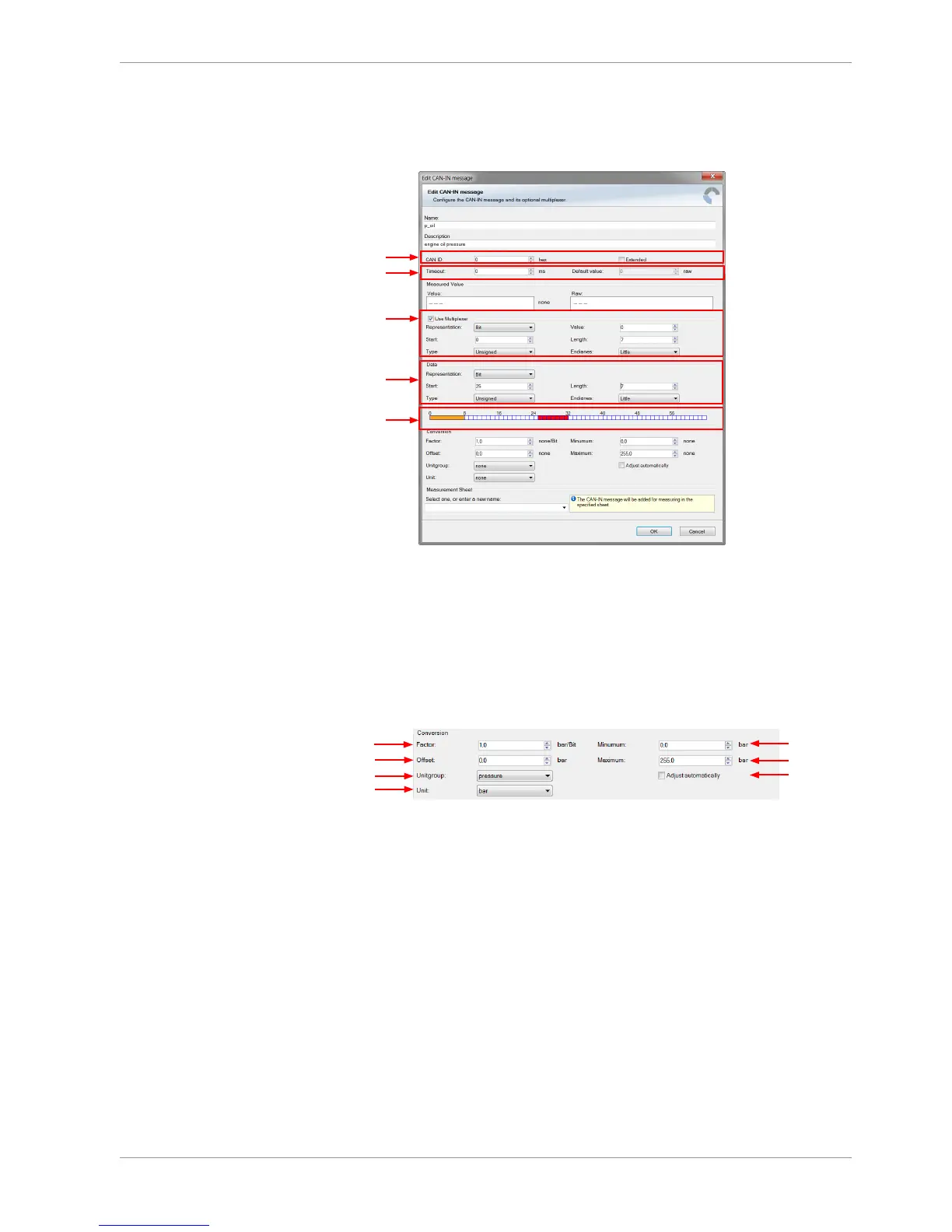
a) Enter CAN message ID. If extended IDs (29 bit) are used, check the box.
b) If replacement values are used, specify time-out period and raw value.
c) If a multiplexer (row counter) is used, check the box.
d) Enter data position, length and format.
e) The bargraph shows the assignment of the bits.
- Red colored fields show the assignment of the data bits.
- Orange colored fields show the assignment of the multiplexer bits.
7.2.5 Conversion to physical values
a)
b)
c)
d)
e)
f)
g)
a) Enter factor (gain) for conversion to physical value.
b) Enter offset for conversion to physical value.
c) Select type of physical value.
d) Select unit of physical value.
e) Enter minimum physical limit of the channel. (for manual setup)
f) Enter maximum physical limit of the channel. (for manual setup)
g) Check the box to automatically adjust the limits of the channel.



 To Next Page