Pack201 | Operator Interface | Section 4
EN | 8
© Bosch Packaging Technology, Inc.
All rights reserved 2012
4.4 Navigation
4.4.1 Access level
When the panel is operated, a distinction is made
between “Operator”, “Maintenance”, “Supervisor” and
“Factory” access levels� The manual does not cover
those settings that can only be made in “Factory”�
An access security feature has been built into the
system to prevent unauthorised persons changing the
settings and set values�
A number of settings can be changed in “Operator”
during production, but they cannot be saved� “Main-
tenence” gives limited access and “Supervisor” gives
free access to settings�
The “Factory” access level contains factory and ma-
chine settings�
If a level other than “Operator” is selected, a password
will be needed to access that level�
This password can be changed in levels higher than
“Operator”�
The machine will start with the last recipe saved�
Changing access level
Proceed as follows to go to another access level:
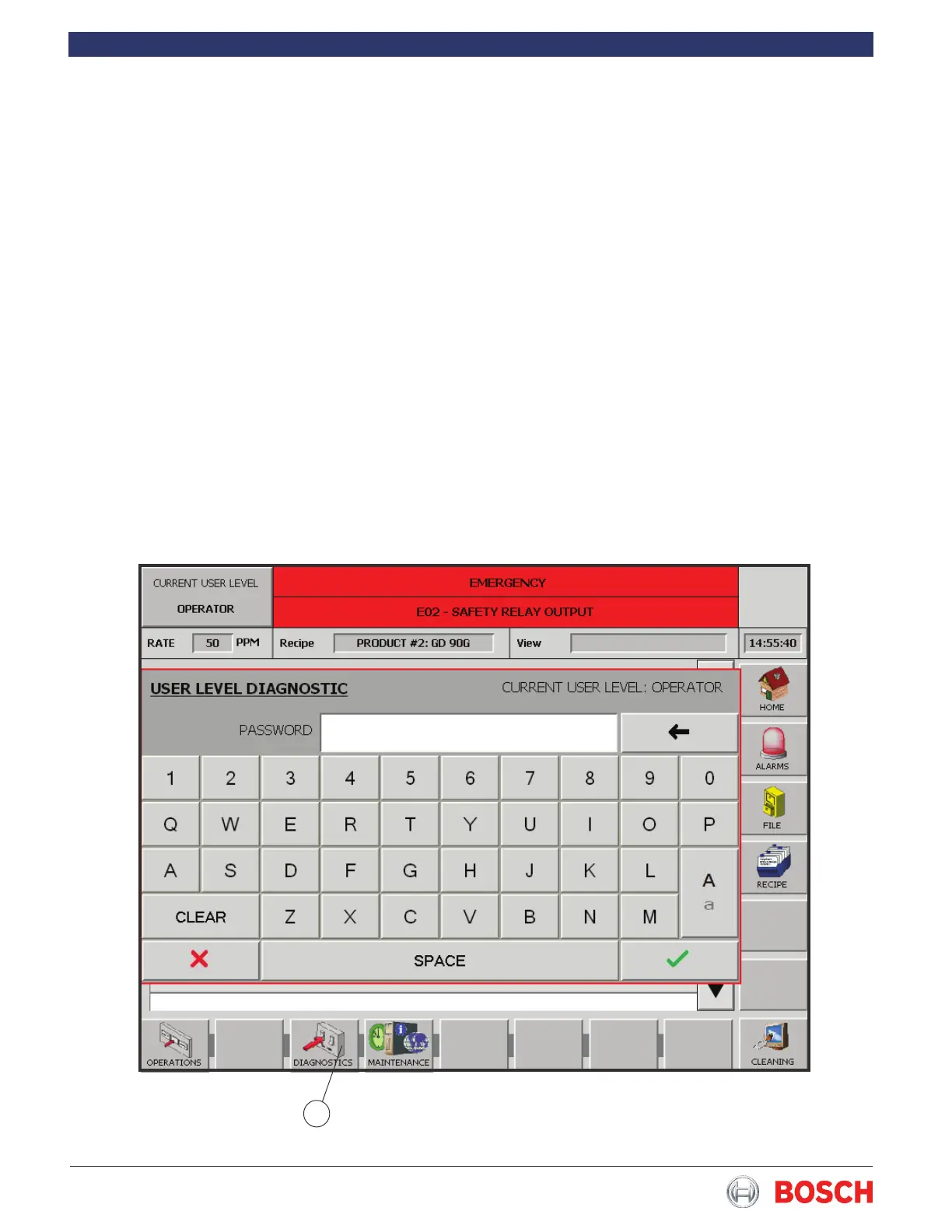
1 Press the Diagnostics button at the bottom of the
screen� See 1, Fig� 6�
2 Select “User Level” from the Diagnostics list� A pop-
up screen now appears�
3 Type in the code corresponding to the level and
press the green check to enter� The Red X will cancel
and return you to the Diagnostics screen� The button
in the top left of the screen shows the access level
selected�
Figure 6
1


 To Next Page