page heading
16
Assembly
Inserting and Removing
the Battery Pack
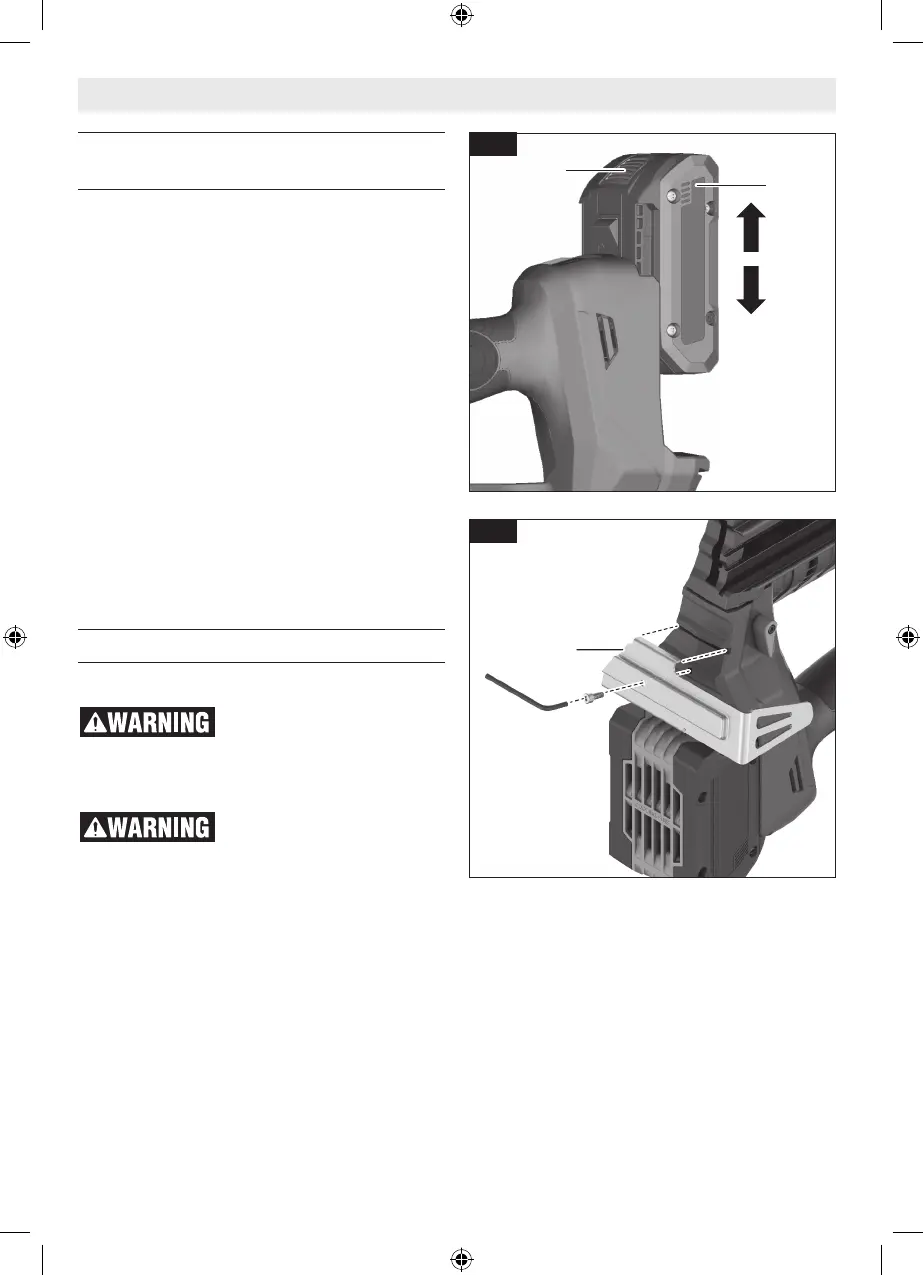
To Insert the Battery Pack
(Fig. 1, 10)
1. Set Trigger Lock 3 to the locked position.
2. Slide charged Battery Pack 17 into the hous-
ing until the battery pack locks into position.
Your tool is equipped with a secondary locking
latch to prevent the battery pack from complete-
ly falling out of the handle, should it become
loose due to vibration.
To Remove the Battery Pack
(Fig. 10)
1. Press the Battery Pack Release Button 18 and
slide the Battery Pack 17 from the housing.
2. Press the Battery Pack Release Button 18
again and slide the Battery Pack 17 com-
pletely out of tool housing.
Utility Hook
(Fig. 11)
Do not use the utility hook
or its mounting location for
tether attachments. The utility hook and its
mounting location are not intended to support
tethering loads.
Do not use the utility hook if
it appears damaged or de-
formed. A damaged or deformed utility hook
may result in unstable hanging and the tool un-
expectedly falling, causing property damages
and personal injury.
Install the Utility Hook 16 using the screw in-
cluded with this nailer into the bottom of the
nailer (Fig. 11).
18
17
Fig. 10
16
Fig. 11
1605A001CD GNB18V-12 202301.indd 16 1/9/23 2:07 PM


 To Next Page