Overall Settings (Menu)
14
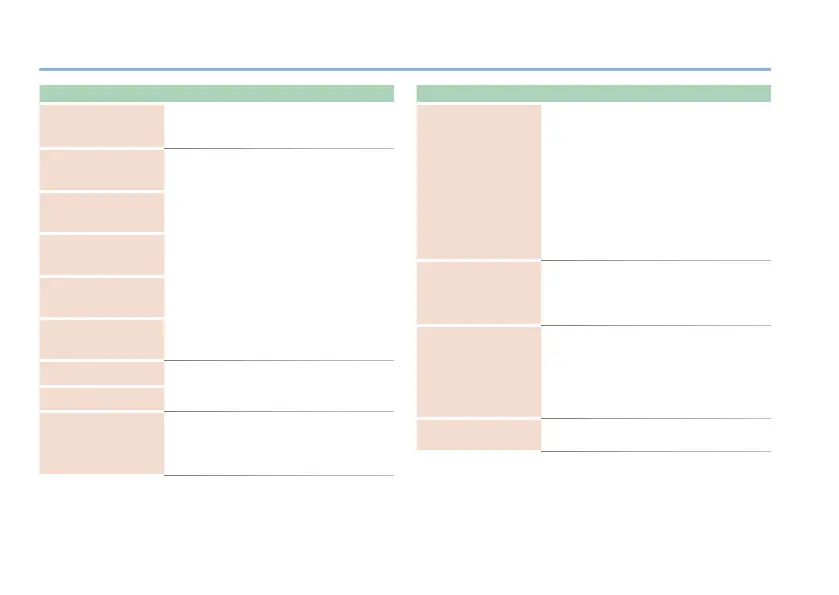
Parameter Explanation
INS
(INSERT LOOP SWITCH)
Turns the insert loop function on/o.
OFF, ON
SWP
(ON/OFF SWITCH FUNCTION
PREFERENCE)
MEM (MEM) : The setting in memory is used.
SYS
(SYS) : The controller’s function is xed
regardless of memory.
MEP
(MEMORY SWITCH
FUNCTION PREFERENCE)
C1P
(CTL1 FUNCTION
PREFERENCE)
C2P
(CTL2 FUNCTION
PREFERENCE)
EPP
(EXPRESSION FUNCTION
PREFERENCE)
ETF (EXTENT FROM)
Specify the memory switching range
(MEMORY EXTENT FROM–TO).
Man
(MANUAL), 1–4
ETT (EXTENT TO)
G/B
(GUITAR/BASS MODE)
Species the response of the FLANGER,
PHASER, and AUTO WAH.
GTR
(Guitar): Settings suitable for guitar.
BAS
(Bass): Settings suitable for bass.
Parameter Explanation
CMD
(CHORUS CONTROL MODE)
Species the function of E.LEVEL when
CHORUS or CE-1 CHORUS are selected as
the mode.
If this is set to ELV (EFFECT LEVEL), the
E.LEVEL knob adjusts the balance between
the direct sound and the eect sound.
If this is set to TTL (TOTAL LEVEL), the
E.LEVEL knob adjusts the combined
volume of the direct sound and the eect
sound. In this case, the direct sound and
eect sound are mixed at a ratio of 1:1.
RCH
(MIDI RECEIVE CHANNEL)
Species the MIDI receive channel.
If this is “oFF,” MIDI messages are not
received.
1–16, oFF
TCH
(MIDI TRANSMIT CHANNEL)
Species the MIDI transmit channel.
If this is “oFF,” MIDI messages are not
transmitted.
If this is RECEIVE, the same setting as the
receive channel is used.
1–16, RCv
(RECEIVE), oFF
Pin (PC IN)
Species whether program changes are
received (on) or not received (oFF).



 To Next Page