Restoring the factory settings (Factory Reset)
18
Restoring the factory settings (Factory Reset)
1.
Turn the SDE-3 off.
2.
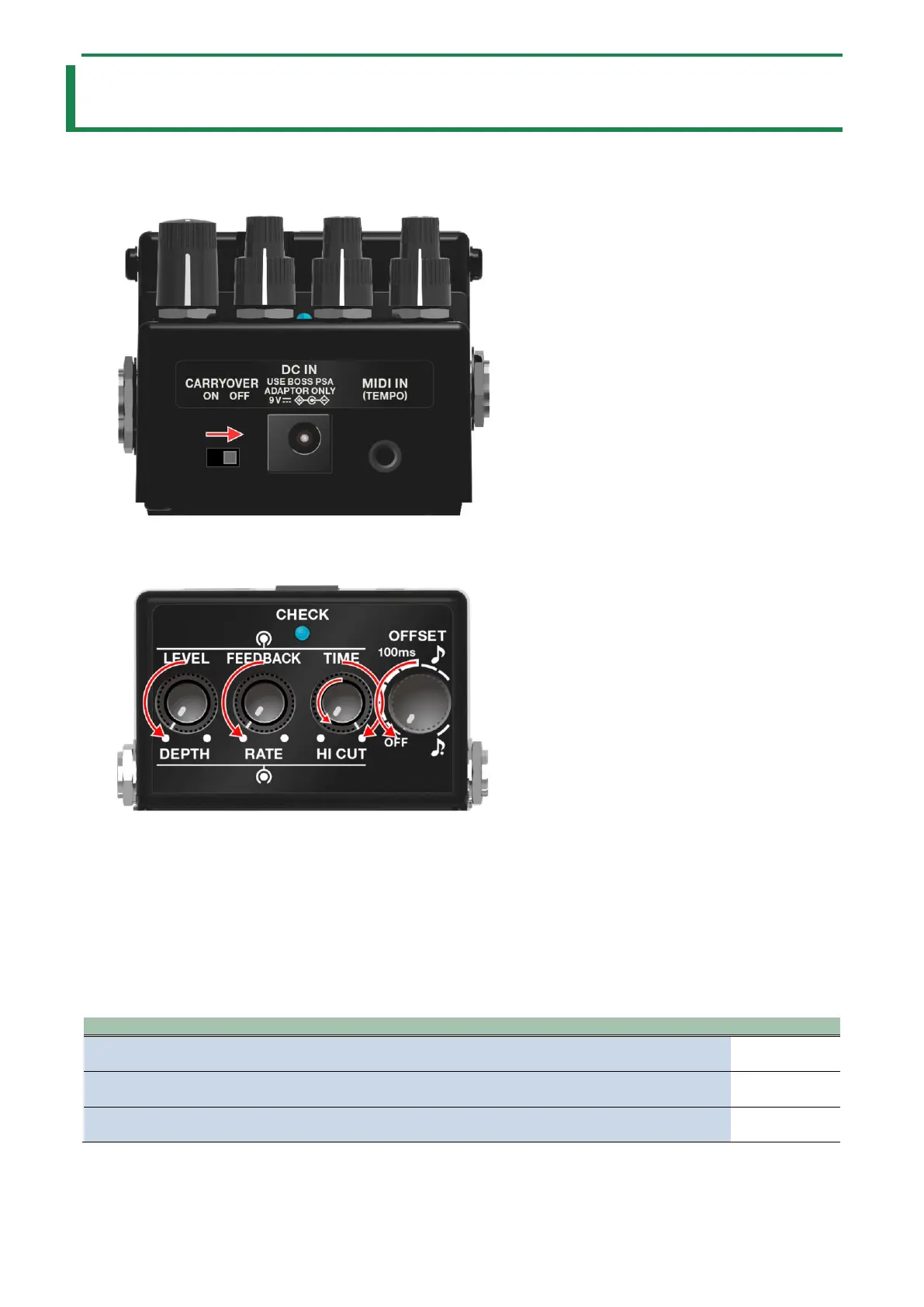
Set the [CARRYOVER] switch to OFF.
3.
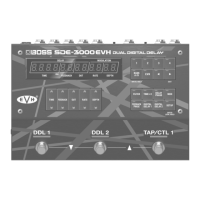
Turn the [HI CUT] knob to the maximum (MAX) setting.
4.
Turn all other knobs besides the [HI CUT] knob to the minimum (MIN) setting.
5.
Turn on the power by connecting a plug to the INPUT A (MONO) jack while holding down the pedal
switch.
The CHECK indicator blinks pink.
6.
Press the pedal switch.
The CHECK indicator rapidly blinks pink.
Once the CHECK indicator lights up pink continuously, the SDE-3 is restored to its factory settings.
7.
Turn off the power (unplug the cable from the INPUT A (MONO) jack).
This sets the SDE-3 as follows.
EXP FUNCTION
Ø “Controlling the knobs using an expression pedal (EXP FUNCTION)(P.10)”
Output mode
Ø “Changing the output mode(P.13)”
Stereo delay effect
Ø “Configuring the stereo delay effect(P.16)”


 To Next Page