Panel descriptions
7
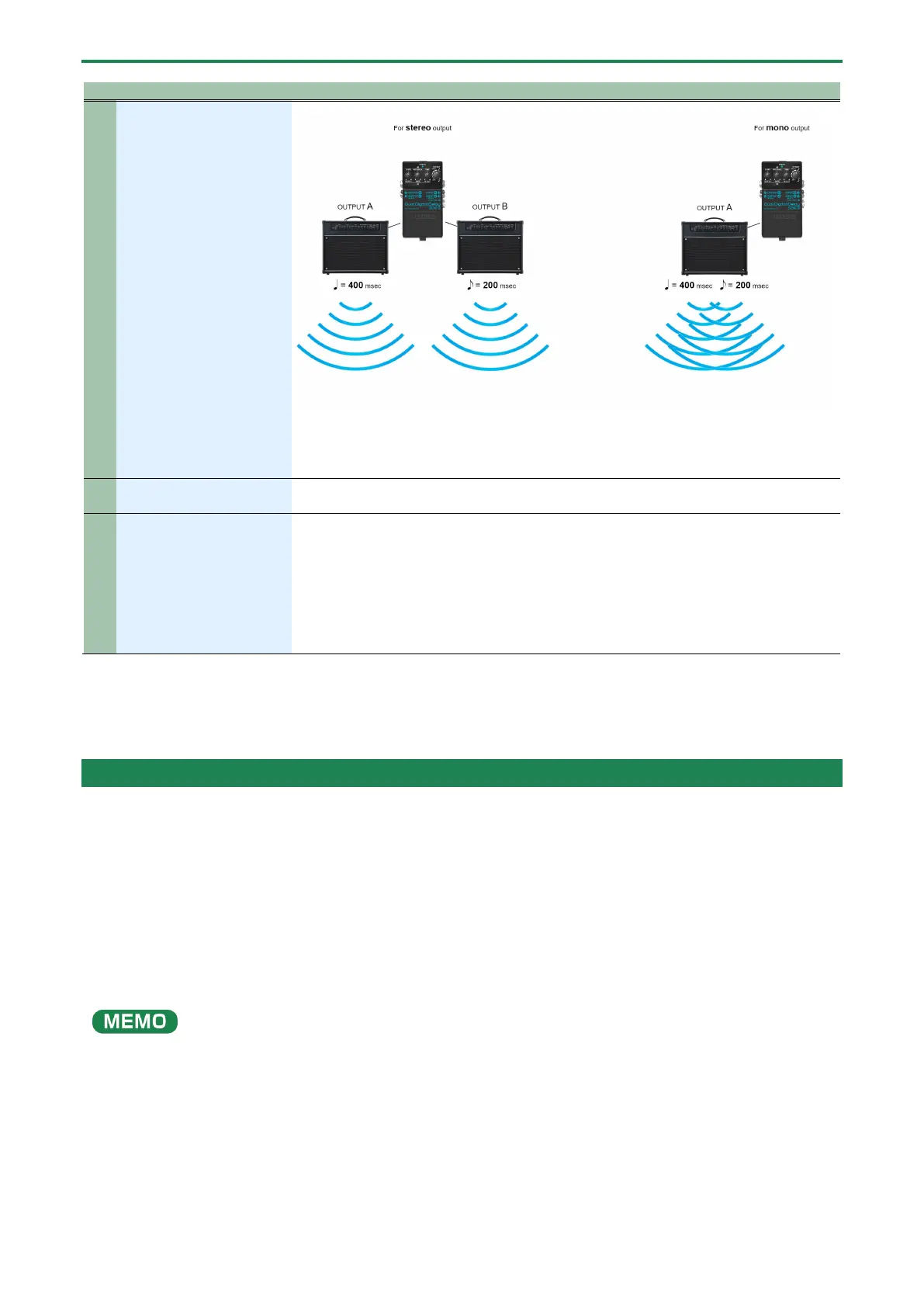
When TIME is set to 400 msec and OFFSET is set to dotted eighth notes (Ň), the sound from
OUTPUT A is delayed by a quarter note (ņ, 400 msec) and OUTPUT B is delayed by a dotted
eighth note (Ň, 300 msec).
The delay between notes changes according to the ň and Ň setting on the [OFFSET] knob.
14
Set this switch to ON if you want the delay to carry over even after the effect turns off, and
select OFF if you don’t want the delay to carry over.
15
Receives timing clocks from external devices.
Normally, this unit synchronizes to the internal tempo. However, if a MIDI clock is input via
the MIDI IN jack, the tempo synchronizes to that MIDI clock.
In this case, you can’t use tap tempo to set the tempo.
● Use a TRS/MIDI connecting cable (BMIDI or BCC series, sold separately) to connect an
external MIDI device.
● Do not use these connectors for connecting to audio devices. Doing so may cause a
* To prevent malfunction and equipment failure, always turn down the volume, and turn off all the units before making any
connections.
* Do not use connection cables that contain a built-in resistor.
Turning the power on/off
* Once everything is properly connected, be sure to follow the procedure below to turn on their power. If you turn on
equipment in the wrong order, you risk causing malfunction or equipment failure.
* Before turning the unit on/off, always be sure to turn the volume down all the connected units. Even with the volume turned
down, you might hear some sound when switching the unit on/off. However, this is normal and does not indicate a
malfunction.
When turning the power on
1.
Connect a plug to the INPUT A (MONO) jack.
Turn on the SDE-3.
The unit turns on with the effect off (the indicator is unlit).
The indicator briefly lights up when this unit is turned on.
2.
Turn on your amp or other audio equipment.
When turning the power off
1.
Turn off your amp or other audio equipment.
2.
Unplug the cable from the INPUT A (MONO) jack.
Turn off the SDE-3.


 To Next Page