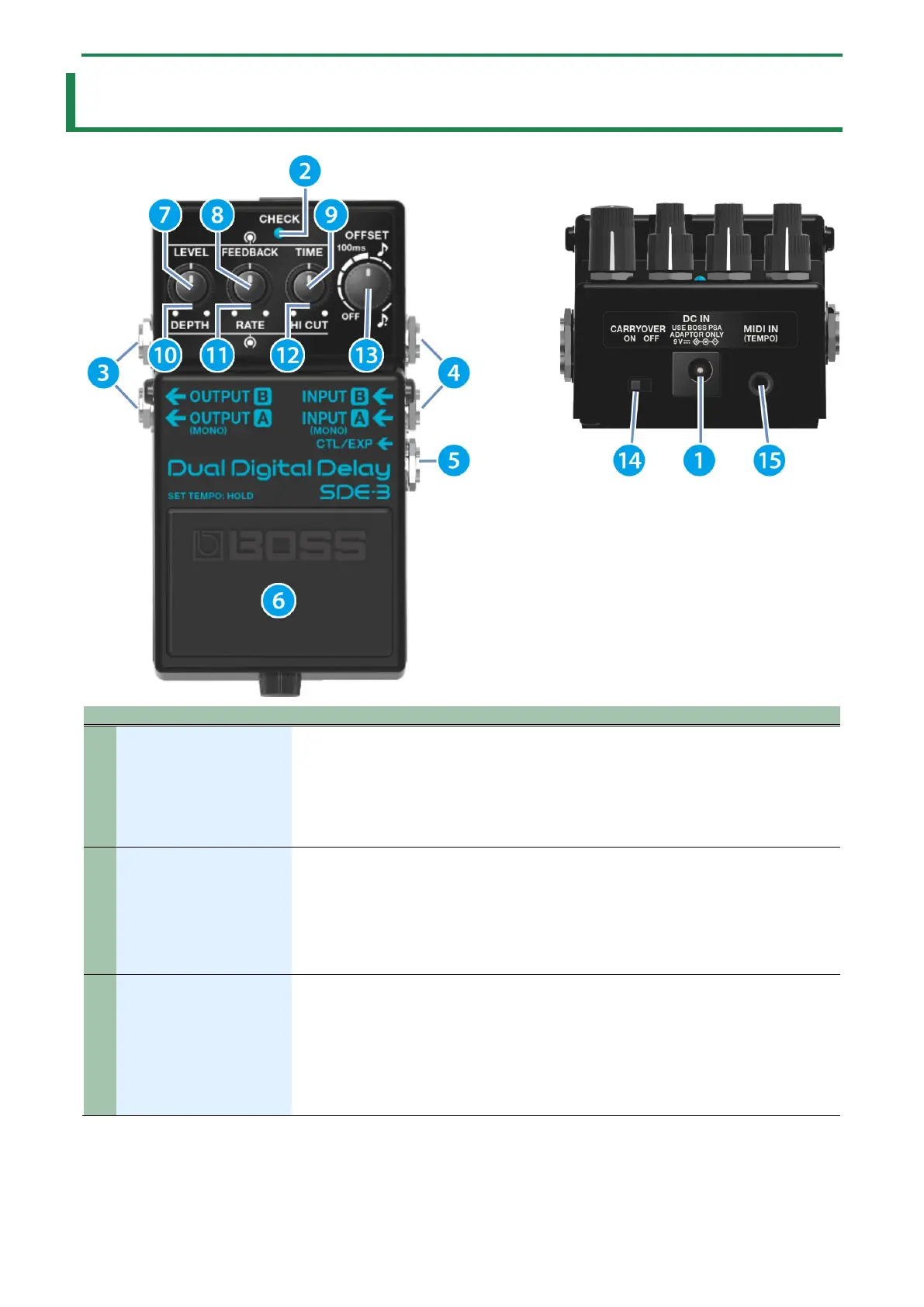
Panel descriptions
4
Panel descriptions
1
Accepts connection of an AC adaptor (PSA series; sold separately).
* Use only the specified AC adaptor (PSA series; sold separately), and connect it to an AC
outlet of the correct voltage.
* If the AC adaptor is connected while power is on, the power supply is drawn from the
AC adaptor.
2
This indicator shows whether the effect is ON/OFF, and also shows the channel as well as the
battery state (battery check).
The indicator lights up when the effect is on, and goes dark when the effect is off.
* The brightness of the CHECK indicator (LED) will dim as the battery lowers. Replace the
battery when the LED is dim or does not light.
“Changing the batteries(P.8) ”
3
OUTPUT B jack
Connect these jacks to your amp or monitor speakers.
If you’re using this unit in mono, connect only the A (MONO) jack.
* If you’re using a stereo setup, use the OUTPUT A (MONO) and OUTPUT B jacks.
* When you connect to both the OUTPUT A (MONO) and OUTPUT B jacks, an effect is
produced according to the OUTPUT MODE settings.
“Changing the output mode(P.13)”


 To Next Page