Panel descriptions
5
4
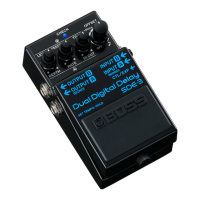
INPUT B jack
Connect your guitar or effect unit here.
Use a 1/4” phone type (TS) Ð 1/4” phone type (TS) cable to connect to this jack.
* The INPUT A (MONO) jack doubles as the power switch. The power turns on when you
insert a plug into the INPUT A (MONO) jack.
“Turning the power on/off(P.7)”
5
Using the jack as CTL (control) jack
Connect a footswitch (FS-5U, FS-6, FS-7; sold separately) to control the tap tempo or momentary
switch functions.
For more about footswitch settings, refer to “Footswitch functions (CTL FUNCTION)(P.9)”.
● Using the jack as EXP (expression) jack
Connect an expression pedal (EV-30, Roland EV-5, etc.; sold separately) to continuously change
the effect settings for the expression pedal’s pushed-up (horizontal) position and for the pushed-
down (slanted) position.
For more about function settings, refer to “Controlling the knobs using an expression pedal
(EXP FUNCTION)(P.10)”.
* Use only the specified expression pedal. By connecting any other expression pedals,
you risk causing malfunction and/or damage to the unit.
6
Switches the effect on/off and controls the various functions. This switch toggles the effects
on/off.
Long-press this switch to use tap tempo (tap tempo mode).
Tap tempo mode
Press the pedal switch for at least two seconds to switch to tempo mode (the CHECK
indicator alternately lights up blue / red).
Press the pedal switch in time with the tempo in quarter note intervals.
Press the pedal switch for at least two seconds to exit the settings.
7
Adjusts the volume of the effect sound.
Turn the knob clockwise to increase the effect sound.
8
Adjusts the amount of feedback.
Turn the knob clockwise to increase the number of delay repeats.
9
Turn the knob clockwise for a longer delay time.
You can set the delay time to a value from 0 to 800 msec.
* Connect only the OUTPUT B jack for a delay time of up to 1,600 msec (long delay).
“Long delay(P.13)”
Sets the modulation depth.
Sets the modulation speed.
Adjusts how much the high-frequency components of the feedback sound are cut.
13
Offsets the OUTPUT B delay time to get different delay times for the left and right channels
(OFFSET). When you use tap tempo to change the delay time, the offset stays the same. The
OUTPUT B value is only offset from the OUTPUT A value by the amount you set in OFFSET.
When OFFSET is set to “OFF”, the left and right delays sound at the same time.
An offset value of 10 msec results in a very slight delay time, giving you an expansive,
spatially synthesized delay sound. By using slight delays, you can create sounds that add
expansiveness to the sound, or create a doubling effect.
Try using this effect when you want to add thickness to your backing guitar sound or give
your sound more impact when playing in a band.
Example 1:
When TIME is set to 500 msec and OFFSET is set to 10 msec, this results in a spacious sound
with the OUTPUT A sound (500 msec) and OUTPUT B sound (500 msec + 10 msec OFFSET)


 To Next Page