EasyManua.ls Logo

Bridgeport Interact 2 - Quick Change Locknut Assembly

Default Icon
95 pages
Print Icon
To Next Page IconTo Next Page
To Previous Page IconTo Previous Page
Loading...
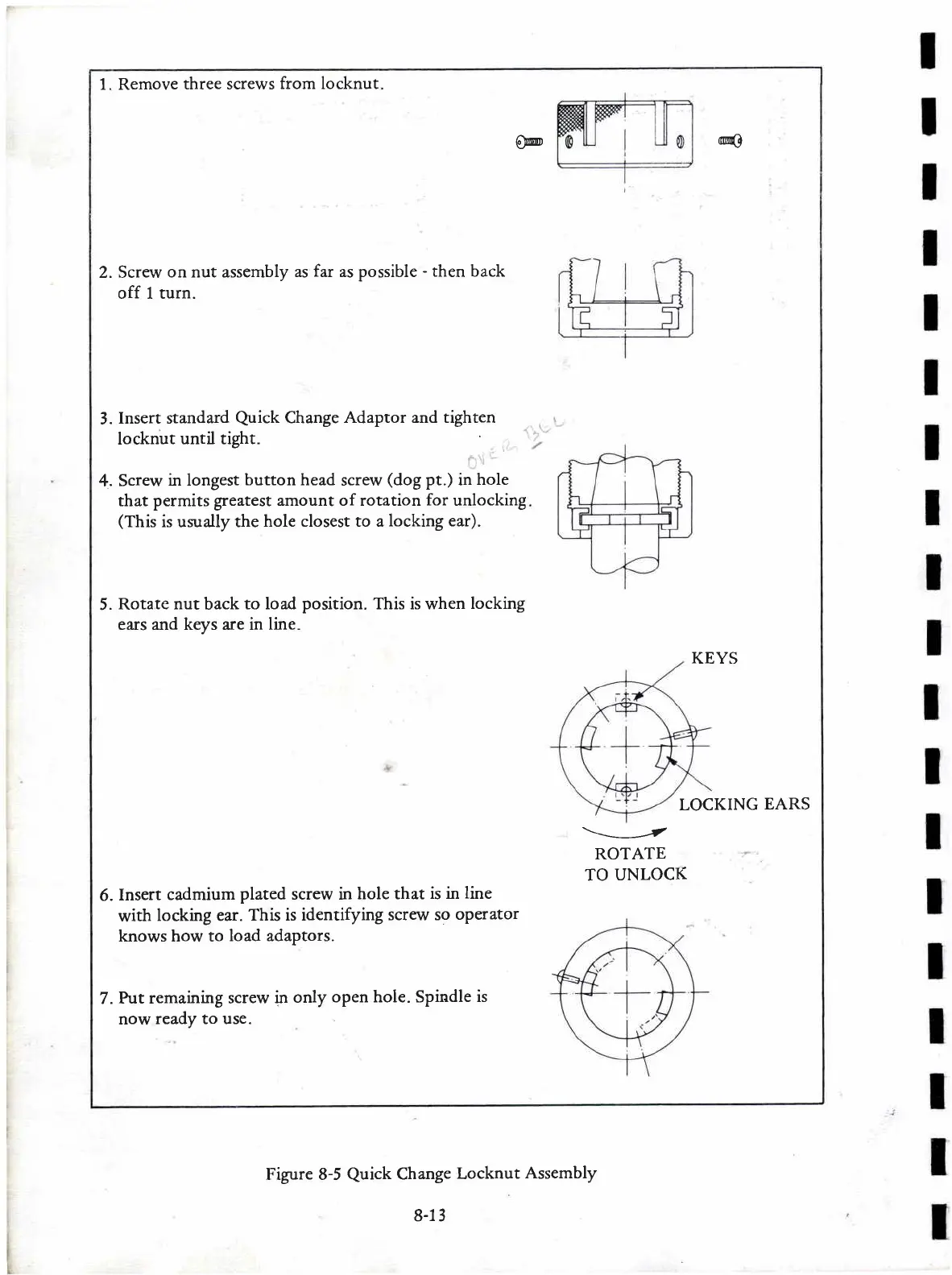
1. Remove three screws
from locknut
@
@
2. Screw
on nut assembly
as
far
as possible
-
then back
off 1 turn.
3.
Insert standard
Quick
Change
Adaptor and tighten
locknut
until tight.
4.
Screw
in longest
button head
screw
(dog
pt.)
in
hole
that
permits greatest amount of rotation
for
unlocking
(This
is usually the
hole closest to a
locking ear).
5.
Rotate
nut
back
to load
position.
This is when
locking
ears and keys are in
line.
KEYS
LOCKING
EARS
\-\___--t
ROTATE
TO
UNLOCK
6.
Insert
cadmium
plated
screw in
hole that
is in
line
with
locking ear.
This is identifying
screw so
oPerator
knows how to
load adaptors.
7.
Put remaining screw
in
only
open hole. Spindle
is
now
ready to use.
Figure 8-5
Quick
Change
Locknut
Assembly
8-13

Table of Contents

Related product manuals