23
4.3.5 Disconnecting from Brigade Backsense
®
System
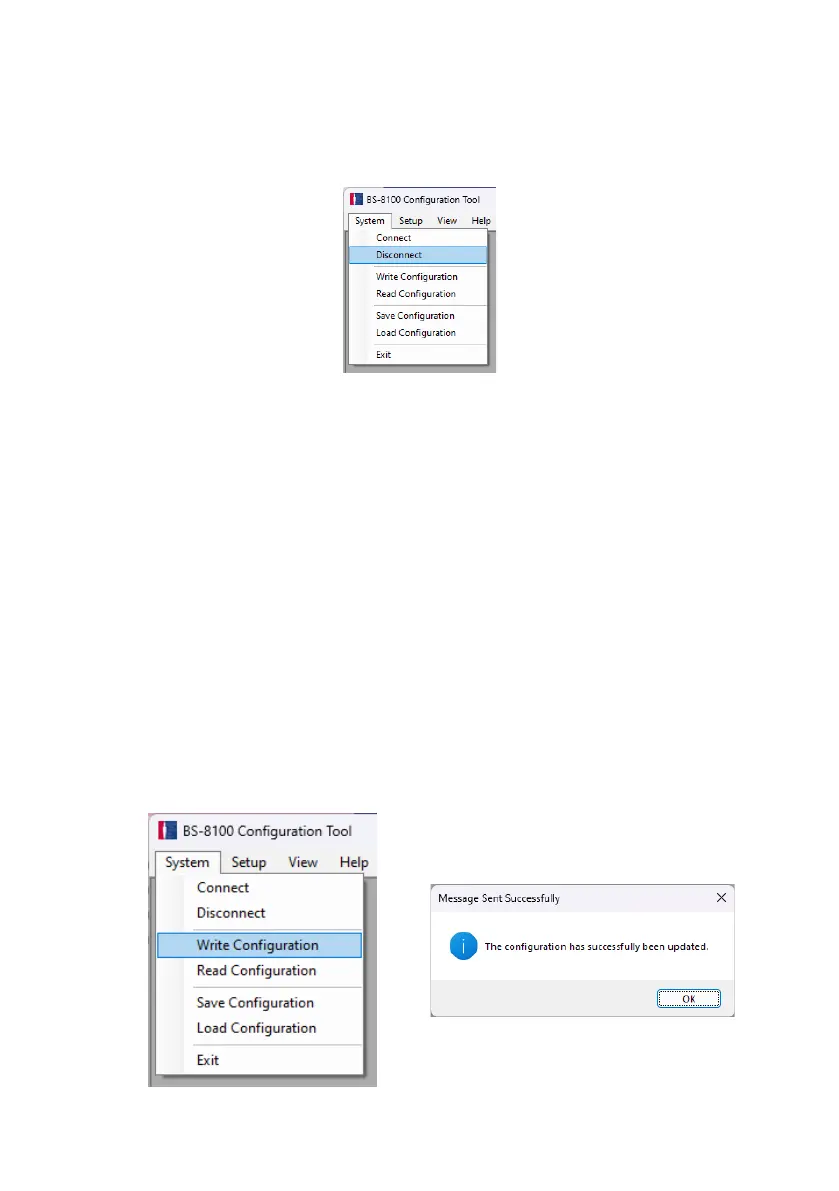
Before physically disconnecting the USB cable from the display or PC a disconnect
operation in the Configuration Tool must be completed. In the toolbar, select “System”
and then “Disconnect”, as per the image below.
Warning
• If the Brigade Backsense
®
System is physically disconnected from the USB cable
or the PC while the Configuration Tool is in a connected state, a power cycle of
the system is required for recovery: disconnect the system from the power
supply, e.g., switch ignition off then on again. A re-activate cycle via the activation
input alone does not recover the system.
• All written configuration data will be deleted in such a case.
4.3.6 Writing a configuration to the Brigade Backsense
®
System
Make sure the Configuration Tool is in a connected state as per Section 4.3.4 “Connecting to
the Brigade Backsense
®
System”. Once all the required configurations are complete all the
settings can be programmed into the Brigade Backsense
®
System. Click in the menu area
“System” then “Write Configuration”; this will upload the configuration to the Brigade
Backsense
®
System. Once configuration is written a confirmation window will appear, click
“OK”. See images below.
Warning
• Make sure a Configuration Tool disconnection is performed before removing the
USB cable from the display or PC. See details in section “4.3.5 Disconnecting
from Brigade Backsense
®
System”.



 To Next Page