55
© 2020 Brivo Systems LLC. All rights reserved. P-MAN-PUB-Panel Networking Guide
Panel Networking Guide
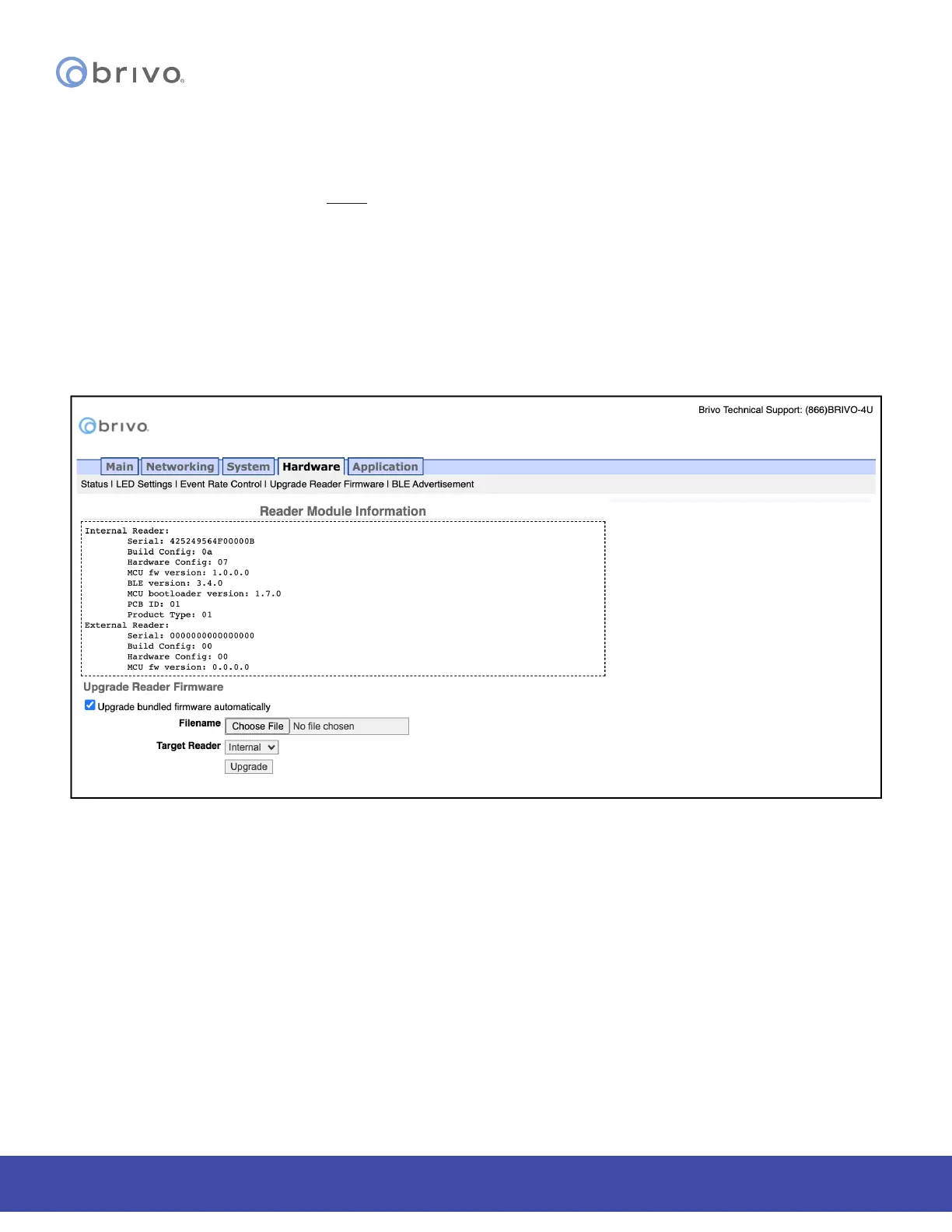
Upgrade Reader Firmware
The Upgrade Reader Firmware page allows the administrator to upgrade the rmware for the built-in OSDP reader
and optional OSDP peripheral device attached to the control panel. To access this page:
NOTE: The rmware upgrade le will ONLY be sent by Brivo to the administrator. Do not use any other rmware
upgrades les provided from other sources.
1. Click Hardware to access the Hardware menu bar.
2. Click Upgrade Reader Firmware to access the Reader Module Information page.
3. Firmware upgrades to the ACS100 may also include rmware upgrades to the OSDP reader(s). To enable the
automatic upgrade of bundled rmware, check the Upgrade bundled rmware automatically checkbox.
4. To upgrade the rmware of a reader manually, click on Choose File and select the rmware upgrade le
you wish to use from your local storage device. Select the Target Reader from the dropdown menu and
then click the Upgrade button to begin the rmware upgrade process.
Figure 57: Upgrade Reader Firmware



 To Next Page