EasyManua.ls Logo

Brother BAS-415 - Adjusting Picker

Brother BAS-415
134 pages
Print Icon
To Next Page IconTo Next Page
To Previous Page IconTo Previous Page
Loading...
1§1
Adjusting
picker
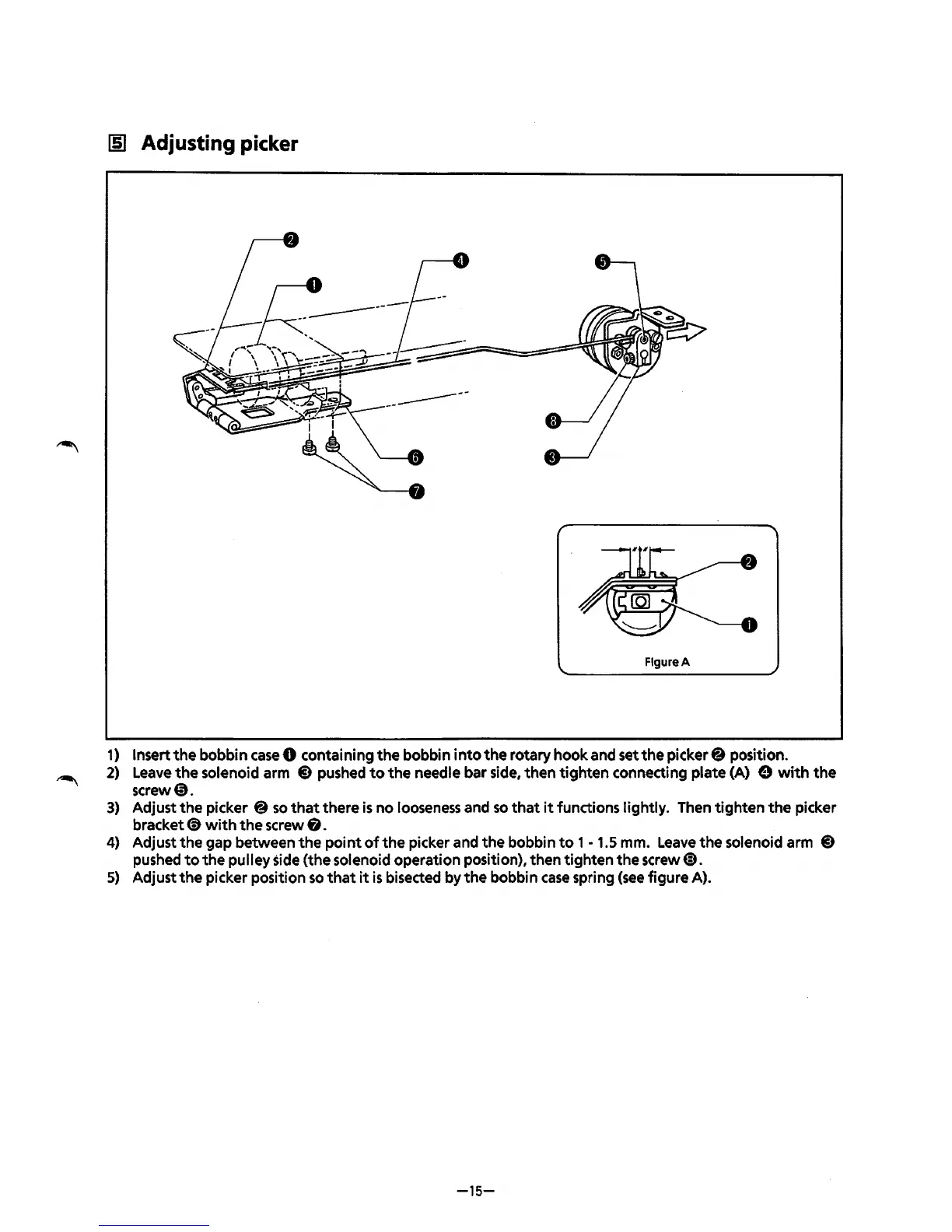
Figure A
1)
Insert
the
bobbin
case
0 containing
the
bobbin
into
the
rotary hook and set
the
picker@ position.
2)
Leave
the
solenoid arm
@)
pushed
to
the
needle bar side, then
tighten
connecting plate (A) e
with
the
screw0.
3)
Adjust
the
picker @
so
that
there
is
no
looseness and
so
that
it
functions lightly. Then
tighten
the
picker
bracket(!)
with
the
screw
8.
4)
Adjust
the
gap between
the
point
of
the
picker and
the
bobbin
to
1
-1.5
mm.
Leave
the
solenoid arm
@)
pushed
to
the
pulley side (the solenoid operation position), then tighten
the
screw@).
5)
Adjust
the
picker position
so
that
it
is
bisected by
the
bobbin
case
spring
(see
figure A).
-15-
From the library of: Superior Sewing Machine & Supply LLC

Table of Contents

Related product manuals