EasyManua.ls Logo

Brother BAS-415 - Positioning over limit sensor

Brother BAS-415
134 pages
Print Icon
To Next Page IconTo Next Page
To Previous Page IconTo Previous Page
Loading...
!nl
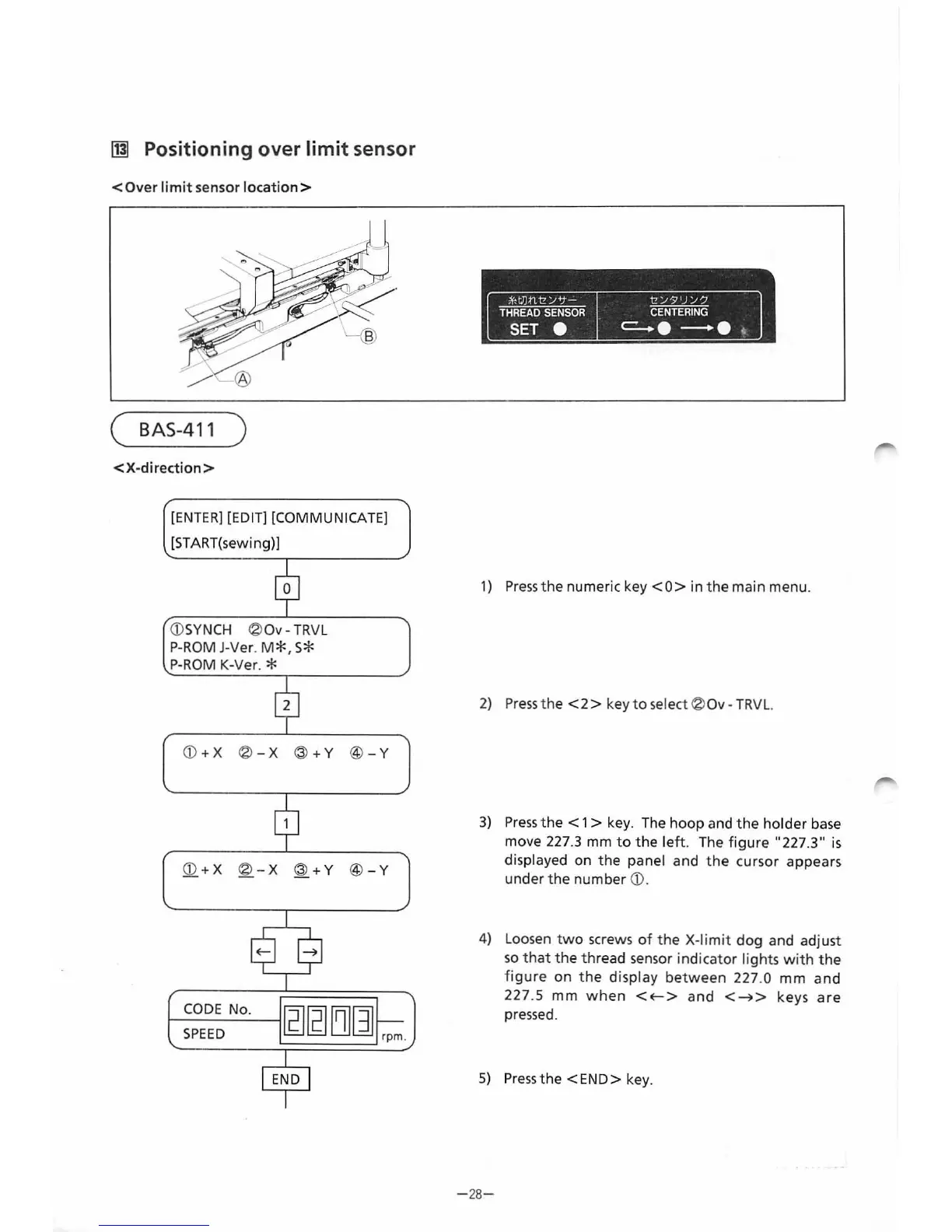
Positioning over
limit
sensor
<Over
limit
sensor
location>
(
BAS
-4
11
)
<X-direction
>
[ENTER]
[EDIT] [COMMUNICATE]
[ST
ART(sewi ng)]
CD
SYNCH
®
Ov-
TRV
L
P-
ROM
J-Ver.
M*,
S*
P-ROM
K-Ver. *
CD
+X
®
-X
@
+Y
@
-Y
CD
+X
®
-X
@
+Y
@
-Y
1---C_OD_E
N_o
.
~'21
'21
ffilljl
SPEED
l!;_][g
L!JQJ
rpm.
1)
Press
the
numeric key
<0>
in
the
main menu.
2)
Press
the
<2
> key to select ® Ov -
TRVL.
3)
Press
the
< 1 > key. The
hoop
and
the
holder
base
move 227
.3
mm
to
the
left
. The
figure
"227
.3"
is
displayed on
the
panel and
the
cursor appears
under
the
number
CD
.
4) Loosen
two
screws
of
the
X-limit
dog
and adjust
so
that
the
thread sensor
indicator
lights
with
the
figure
on
the
display
between
227.0
mm
an
d
227.5
mm
when
<E-->
and
<~>
keys
are
pressed.
5)
Pressthe
<E
ND
> key.
-
28-
From the library of: Superior Sewing Machine & Supply LLC

Table of Contents

Related product manuals