EasyManua.ls Logo

Brother BAS-415 - Replacing Jump Solenoid

Brother BAS-415
134 pages
Print Icon
To Next Page IconTo Next Page
To Previous Page IconTo Previous Page
Loading...
[§]
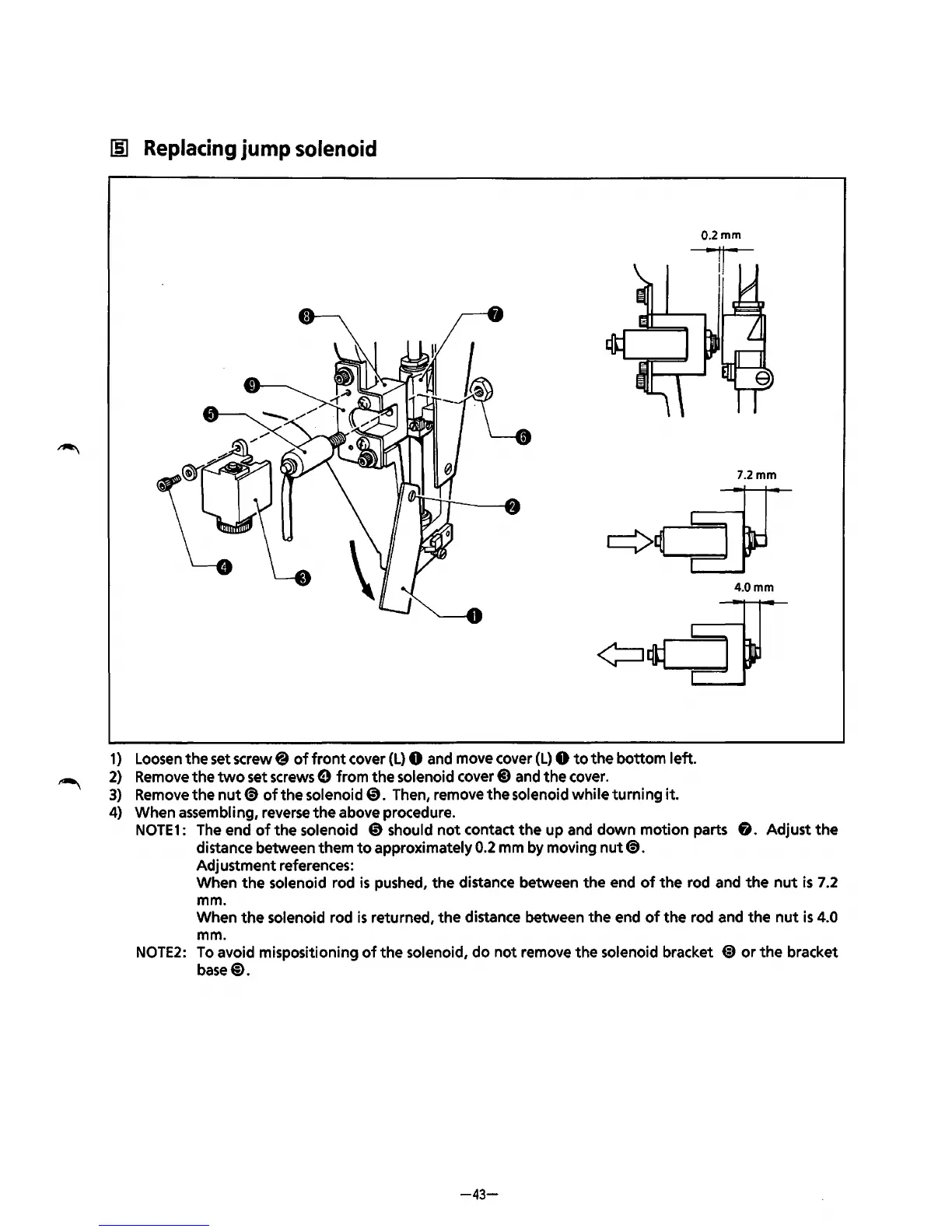
Replacing
jump
solenoid
0.2mm
..
1,
..
I
7.2mm
4.0mm
1)
Loosen
the
set screw@
of
front
cover
(L)
0 and move cover
(L)
0
to
the
bottom left.
2)
Remove
the
two
set screws e from
the
solenoid
cover@)
and
the
cover.
3) Remove
the
nut~
of
the
solenoid @. Then, remove
the
solenoid
while
turning
it.
4) When assembling, reverse
the
above procedure.
NOTE1:
The end
of
the
solenoid
@should
not
contact
the
up and
down
motion parts
fi.
Adjust
the
distance between them
to
approximately 0.2 mm by moving
nut~.
Adjustment references:
When
the
solenoid rod
is
pushed,
the
distance between
the
end
of
the
rod and
the
nut
is
7.2
mm.
When
the
solenoid rod
is
returned,
the
distance between the end
of
the
rod and
the
nut
is
4.0
mm.
NOTE2:
To
avoid mispositioning
of
the
solenoid,
do
not
remove
the
solenoid bracket
@)
or
the
bracket
base@).
-43-
From the library of: Superior Sewing Machine & Supply LLC

Table of Contents

Related product manuals