rml
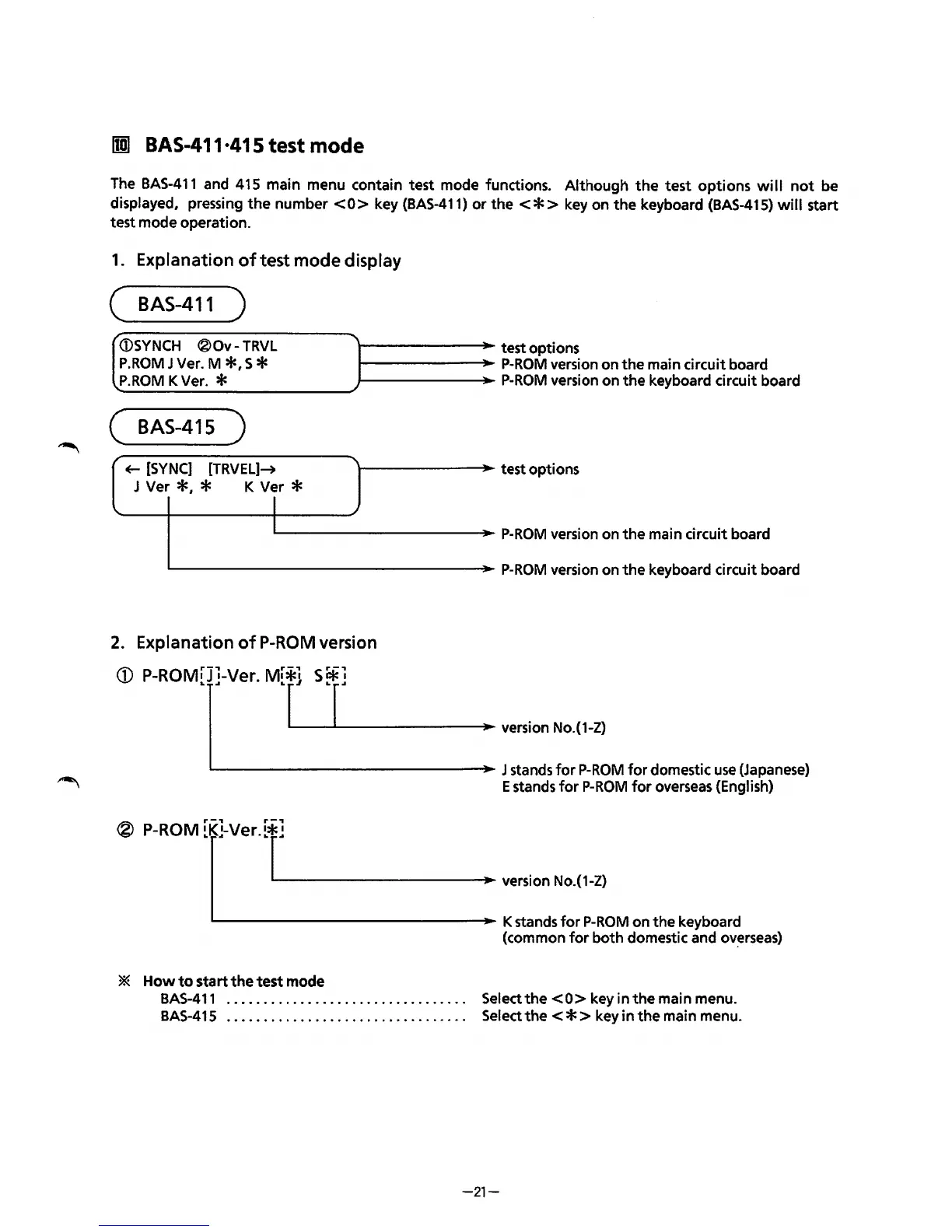
BAS-411·415 test mode
The
BAS-411
and 415 main menu contain test mode functions. Although
the
test
options
will
not
be
displayed, pressing
the
number
<0>
key
(BAS-411)
or
the<*>
key on
the
keyboard
(BAS-415)
will
start
test mode operation.
1.
Explanation
of
test mode display
(
BAS-411
)
/
(i)SYNCH
®Ov-
TRVL
P.ROM
J Ver. M
*•
S *
P.ROM
K Ver. *
( BAS-415 )
~
[SYNC]
[TRVEL]~
J Ver
*,
* K Ver *
I
l--------J~~oo-
test options
1------~_..~
P-ROM
version on
the
main circuit board
1--------J~~oo-
P-ROM
version on the keyboard circuit board
\--------"'JIIoo-
test options
IL...------------J~~oo-
P-ROM
version on
the
main circuit board
'------------------J~~oo-
P-ROM
version on
the
keyboard circuit board
2.
Explanation
of
P-ROM
version
CD
P-ROM[]J]-Ver.
M[*r.j_S~.....__r]
___
....,.
- - •: version No.(1-Z)
- J stands
for
P-ROM
for
domestic
use
(Japanese)
E stands
for
P-ROM
for
overseas (English)
®
P-ROM
[K[}Ver.[r.__]
_______
_....,..
- : version
No.(1-Z)
'---------------~-
K stands
for
P-ROM
on the keyboard
(common
for
both domestic and
ov~rseas)
*
Howtostartthetestmode
BAS-411
.................................
Selectthe<O>keyinthemainmenu.
BAS-41
5 . . . . . . . . . . . . . . . . . . . . . . . . . . . . . . . . . Select
the
< * > key in
the
main menu.
-21-



 To Next Page