EasyManua.ls Logo

Brother BAS-415 - Page 30

Brother BAS-415
134 pages
Print Icon
To Next Page IconTo Next Page
To Previous Page IconTo Previous Page
Loading...
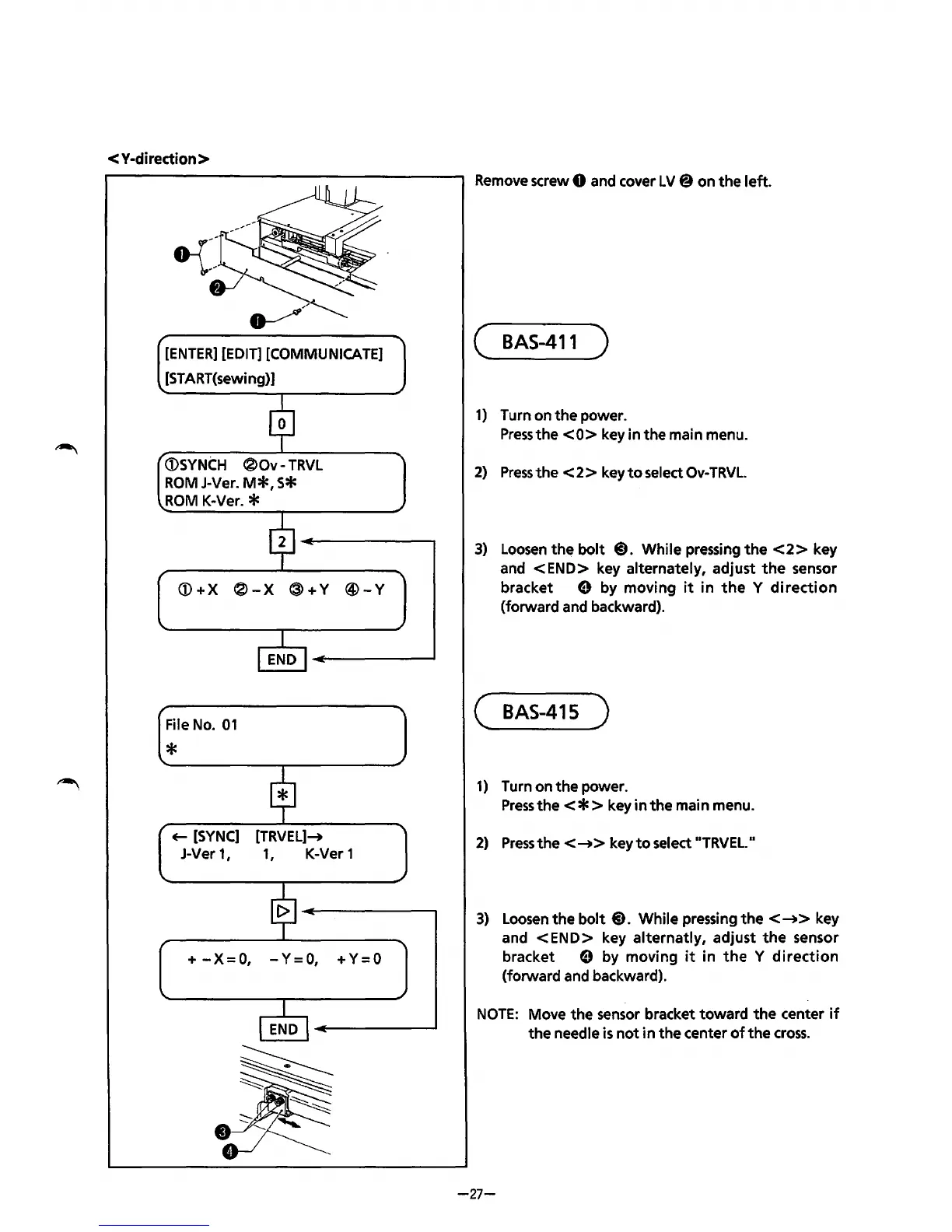
< Y·diredion >
[ENTER]
[EDIT]
[COMMUNICATE]
[START(sewing)]
<DSYNCH
®Ov-
TRVL
ROM
J-Ver.
M*,
S*
ROM
K-Ver. *
<D+X
®-X
®+Y
@-Y
File
No.
01
*
~
[SYNC]
[TRVEL]-+
J-Ver 1 I 1
1
K-Ver 1
+
-X=
0,
- Y =
0,
+ Y = 0
Remove
screw 0 and cover LV@ on the left.
(
BAS-411
)
1)
Turn on the power.
Press
the
<0>
key in the main menu.
2)
Press
the
< 2 > key
to
select
Ov-
TRVL.
3)
Loosen
the
bolt
@).
While pressing
the
<2>
key
and
<END>
key alternately, adjust
the
sensor
bracket
e by moving
it
in
the
y
direction
(forward and backward).
(
BAS-415
)
1)
Turn on
the
power.
Press
the<*>
key
in
the main menu.
2)
Press
the<-+>
key
to
select
..
TRVEL.
..
3)
Loosen
the bolt@). While pressing
the<-+>
key
and
<END>
key alternatly, adjust
the
sensor
bracket
e by moving
it
j n
the
y
direction
(forward and backward).
NOTE:
Move the sensor bracket toward
the
center
if
the
needle
is
not
in
the center
of
the
cross.
-27-
From the library of: Superior Sewing Machine & Supply LLC

Table of Contents

Related product manuals