EasyManua.ls Logo

Brother BAS-415 - Page 92

Brother BAS-415
134 pages
Print Icon
To Next Page IconTo Next Page
To Previous Page IconTo Previous Page
Loading...
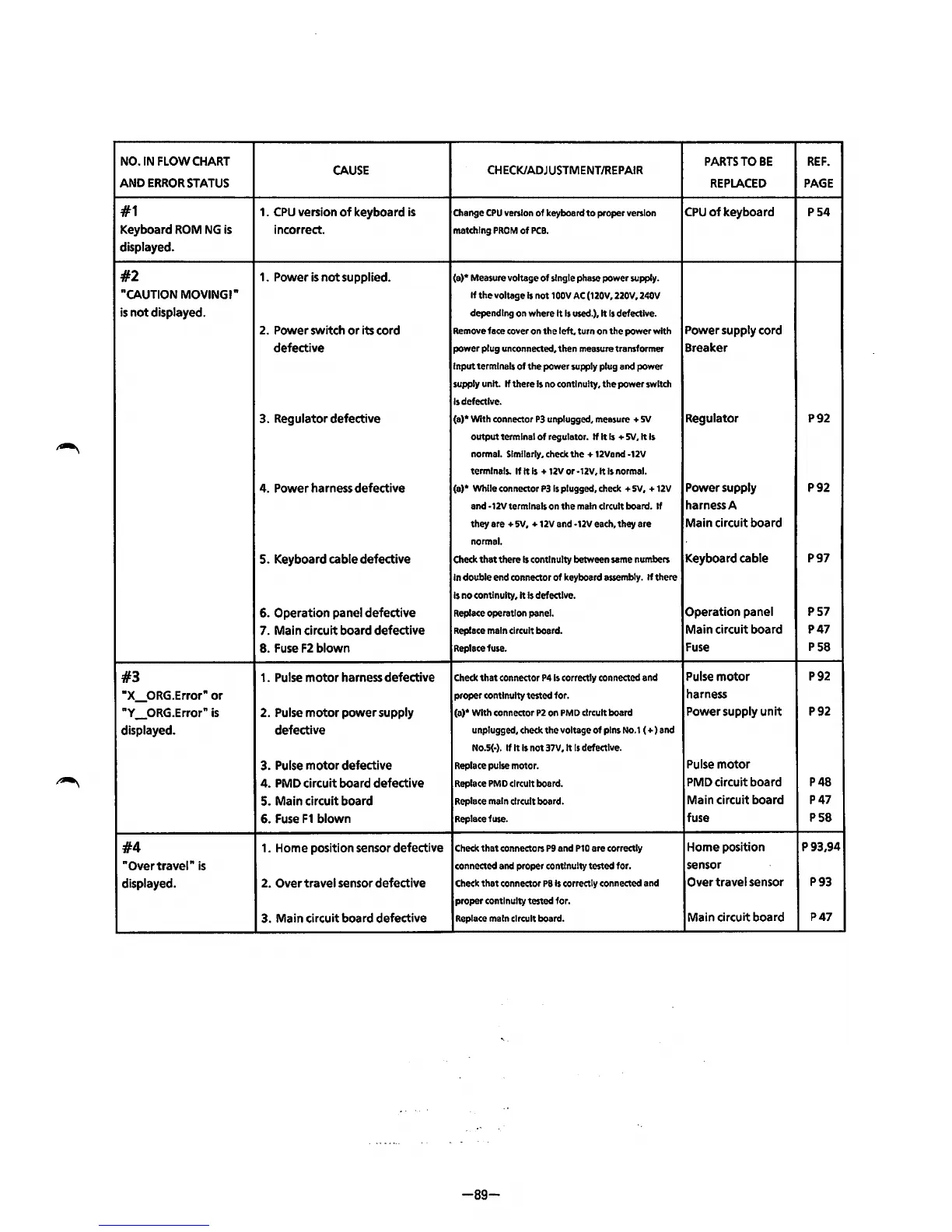
NO.IN
FLOW
CHART
CAUSE
CHECK/ADJUSTMENT/REPAIR
PARTS
TO
BE
REF.
AND
ERROR
STATUS
REPLACED
PAGE
#1
1.
CPU
version
of
keyboard
is
Change
CPU
version
of
keyboard
to
proper
version
CPU
of
keyboard P54
Keyboard
ROM
NG
is
incorrect.
matching
PROM
of
PCB.
displayed.
#2
1.
Power
is
not supplied.
(a)*
Measure
voltage of
single
phase
power
supply.
"CAUTION
MOVINGI"
If
the voltage
Is
not
100V
AC
(120V,
220V,
240V
is
not displayed.
depending
on
where
It
Is
used.), It
Is
defective.
2.
Power switch or its
cord
Remove
face
cover
on
the left. turn
on
the power with
Power supply
cord
defective
power plug
unconnected,
then
measure
transformer Breaker
Input terminals
of
the power
supply
plug
and
power
supply
unit.
If
there
Is
no
continuity. the power
switch
Is
defective.
3.
Regulator defective
(a)* With
connector
P3
unplugged.
measure
+
sv
Regulator P92
Output
terminal
of
regulator.
If
It
Is
+ SV,It
Is
normal.
Similarly.
check
the+
12Vand
-12V
terminals.
If It
Is
+ 12Vor-12V,It
Is
normal.
4.
Power
harness
defective
(a)* While
connector
P3
Is
plugged.
check
+
sv.
+
12V
Power supply P92
and
·12V
terminals
on
the
main
circuit
board.
If
harness
A
they
are
+
sv.
+
12V
and
·12V
each.
they
are
Main circuit board
normal.
5.
Keyboard
cable
defective
Check
that there
Is
continuity
between
same
numbers
Keyboard
cable
P97
In
double
end
connector
of
keyboard
assembly.
If
there
Is
no
continuity
,It
Is
defective.
6.
Operation panel defective
Replace
operation
panel.
Operation panel
P57
7.
Main circuit board defective
Replace
main
circuit
board.
Main circuit board
P47
8.
Fuse
F2
blown
Replace
fuse.
Fuse
P58
#3
1.
Pulse
motor
harness
defective
Check
that
connector
P41s
correctly
connected
and
Pulse
motor
P92
"X_ORG.Error"
or
proper continuity
tested
for.
harness
"Y _ORG.Error"
is
2.
Pulse
motor power supply
(a)*
With
connector
P2
on
PMD
circuit
board
Power
supply
unit
P92
displayed. defective
unplugged.
check
the voltage of
pins
No.1
(
+)
and
No.5(·).
If It
Is
not 37V,It
Is
defective.
3.
Pulse
motor defective
Replace
pulse
motor.
Pulse
motor
4.
PMD
circuit board defective
Replace
PMD
circuit
board.
PMD
circuit board P48
5.
Main circuit board
Replace
main
circuit
board.
Main circuit board P47
6.
Fuse
F1
blown
Replace
fuse.
fuse
P58
#4
1.
Home
position
sensor
defective
Check
that
connectors
P9
and
P10
are
correctly
Home
position
P93,94
"Overtravel"
is
connected
and
proper continuity
tested
for.
sensor
displayed.
2.
Over travel
sensor
defective
Check
that
connector
PSis
correctly
connected
and
Over travel
sensor
P93
proper continuity
tested
for.
3.
Main circuit board defective
Replace
main
circuit
board.
Main circuit board
P47
-89-
From the library of: Superior Sewing Machine & Supply LLC

Table of Contents

Related product manuals