6-14 Confidential
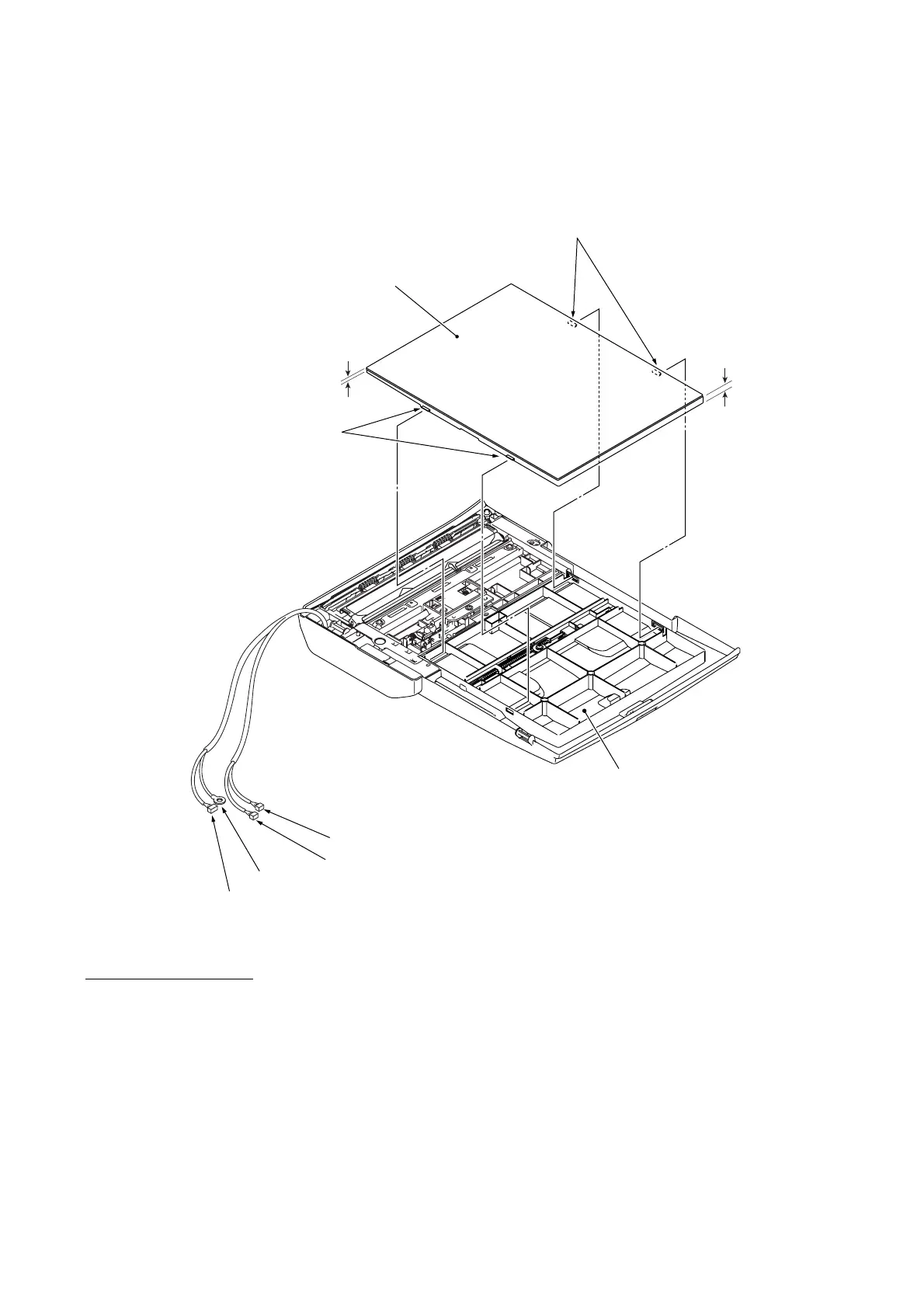
(4) Models with ADF: Remove the document sponge ASSY by releasing the four latches with a
flat screwdriver.
*For models with ADF
(6_14)
Thick
Latches "A"
Document sponge ASSY*
Thin
Latches "B"
(Rear)
ADF motor harness*
Grounding wire*
Document rear sensor harness*
Document front sensor harness*
ADF & document cover ASSY*
(Right)
Assembling Notes
• Models with ADF: When mounting the document sponge ASSY on the ADF & document cover
ASSY, face the thick side towards the right and insert latches "A" into the document cover first,
and then set latches "B" as shown above.
• Models with ADF: When mounting the ADF & document cover ASSY on the scanner cover, be
sure to route a bundle of harnesses (ADF motor harness*, grounding wire*, and document front
and rear sensor harnesses*) through the cable guide provided in the left rear corner of the scanner
cover as shown on page 6-12.



 To Next Page