9-16 Confidential
9.4.7 Operational Check of Control Panel PCB (Function code 13)
Function
This function allows you to check the control panel PCB for normal operation.
Operating Procedure
(1) Enter 1 and 3 in the initial stage of the maintenance mode using the / and OK keys.
The "00 " will appear on the LCD.
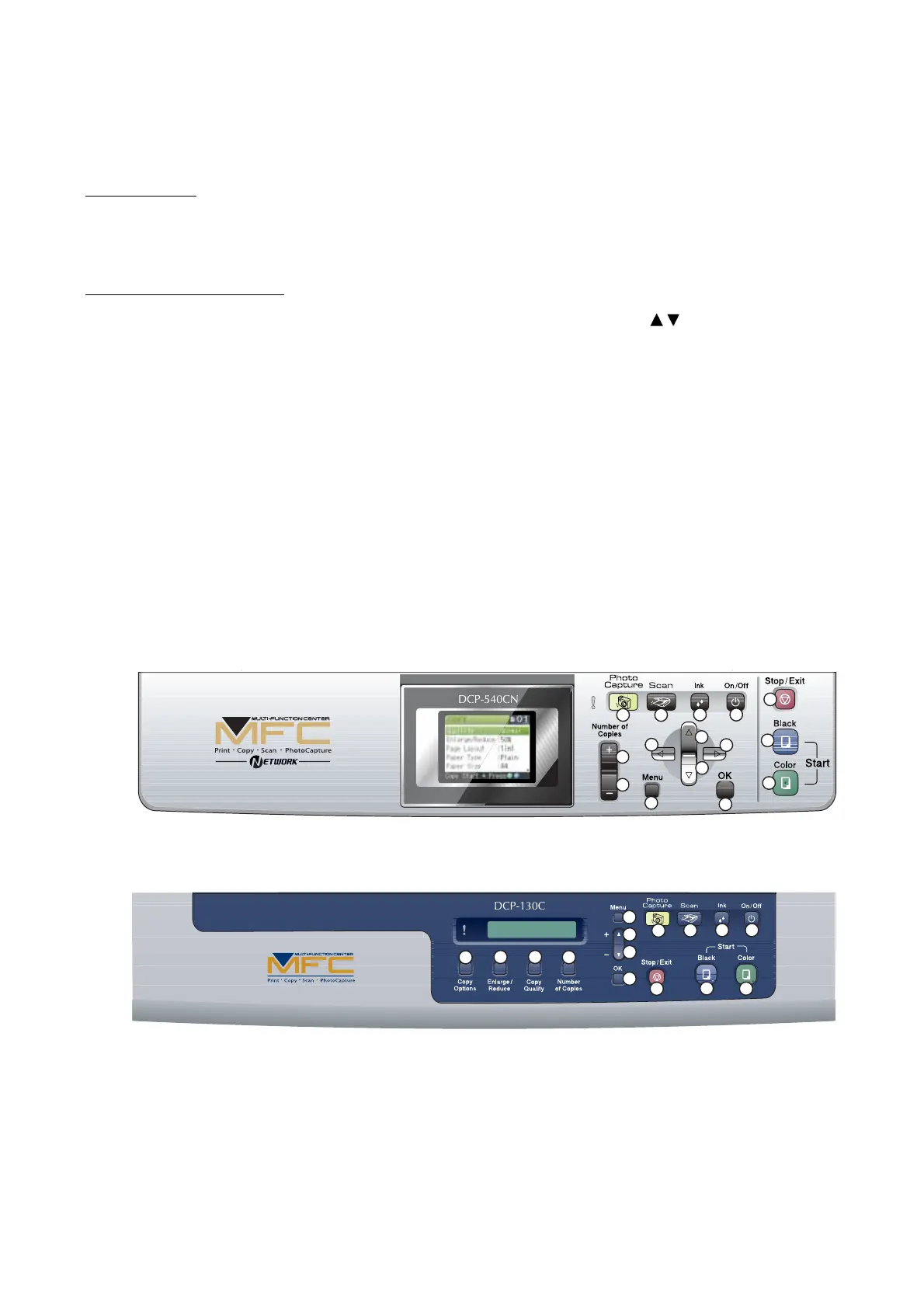
(2) Press the keys in the order designated in the illustration shown below.
The LCD shows the corresponding number in decimal notation each time a key is pressed.
Check that the displayed number is correct by referring to the illustration below.
If a key is pressed out of order, the machine displays the "INVALID OPERATE" on the LCD.
To return to the status ready to accept key entry for operational check, press the Stop/Exit key.
(3) After the last number key is pressed, the machine returns to the initial stage of the maintenance
mode.
To terminate this operation, press the Stop/Exit key. The machine returns to the initial stage of
the maintenance mode.
For models with color LCD
1
2
3
4
6
5
7
11
12
13
8
14
15
9
10
For models with monochrome LCD
1
2
3
4
6
5
7
11
12
13
8
14
15
9
10
Key Entry Order



 To Next Page