6-39 Confidential
Assembling Notes
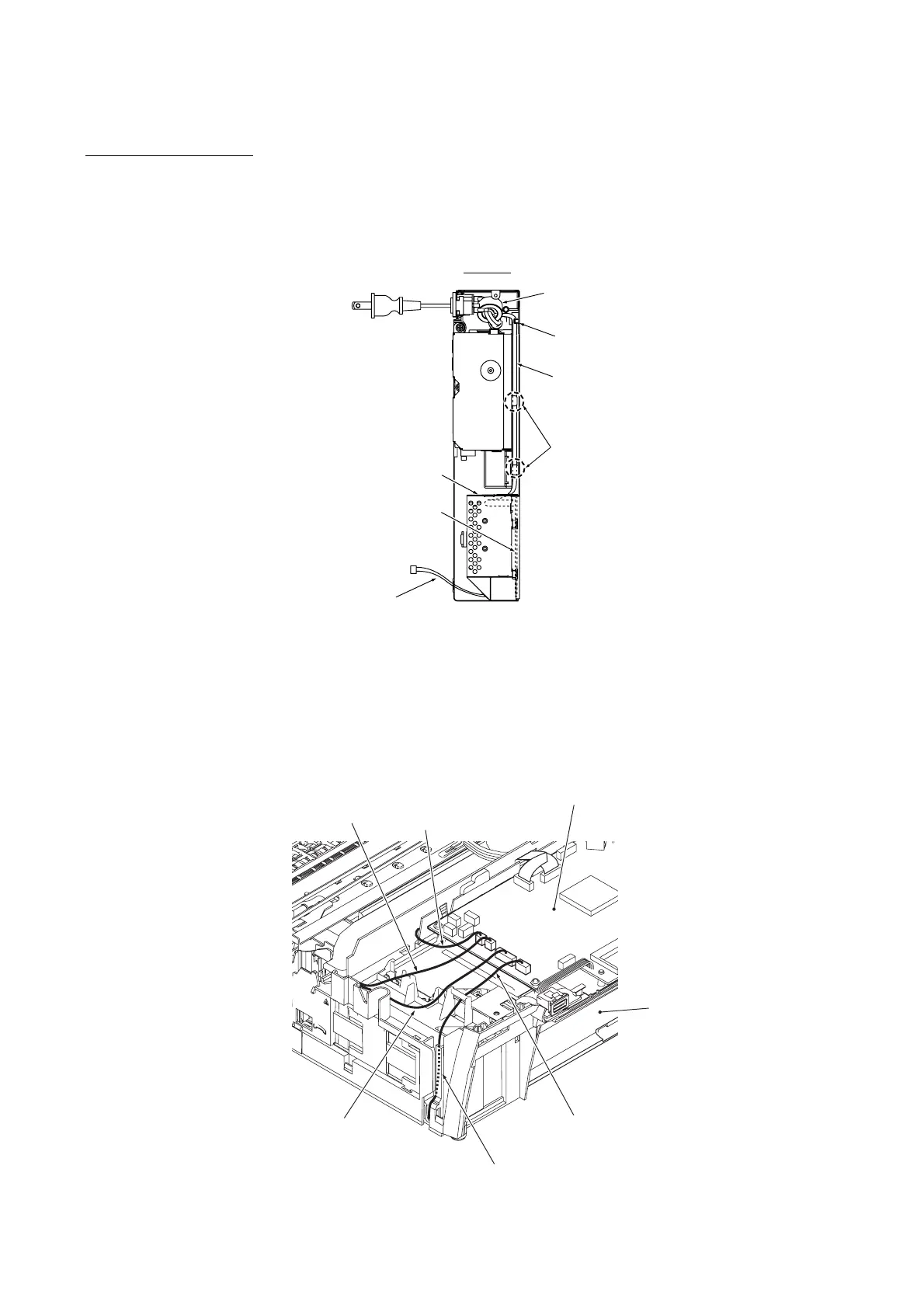
• When securing the power supply PCB, tighten four screws in the order of , , and as
shown on the previous page.
• Secure the power cord to the two holes provided in section "Y" (shown on the previous page) of
the lower MJ/PS shield with a cable tie. After that, route the power cord through the cable guides
as shown below.
Power cord
Cable guide
Ferrite core
Power supply shield
Power supply PCB
Top view
Cable guides
(6_39_1)
Power supply harness
• When mounting the power supply shield on the lower MJ/PS shield, insert three tabs into three
slits. Make sure that section "X" of the lower MJ/PS shield is fitted over the power supply shield.
(See the previous page.)
• When mounting the MJ/PS shield box, route the power supply harness through the U-shaped
cutout (shown on page 6-37) in the lower MJ/PS shield.
After mounting the MJ/PS shield box, route the power supply harness through the channel as
shown below.
(6_39_2)
(Paper feed motor harness)
(Carriage motor harness)
(PF encoder/registration
sensor harness)
Power supply harness
Lower cover
Main PCB
Channel



 To Next Page