LCD Operation
GETTING READY
11
1
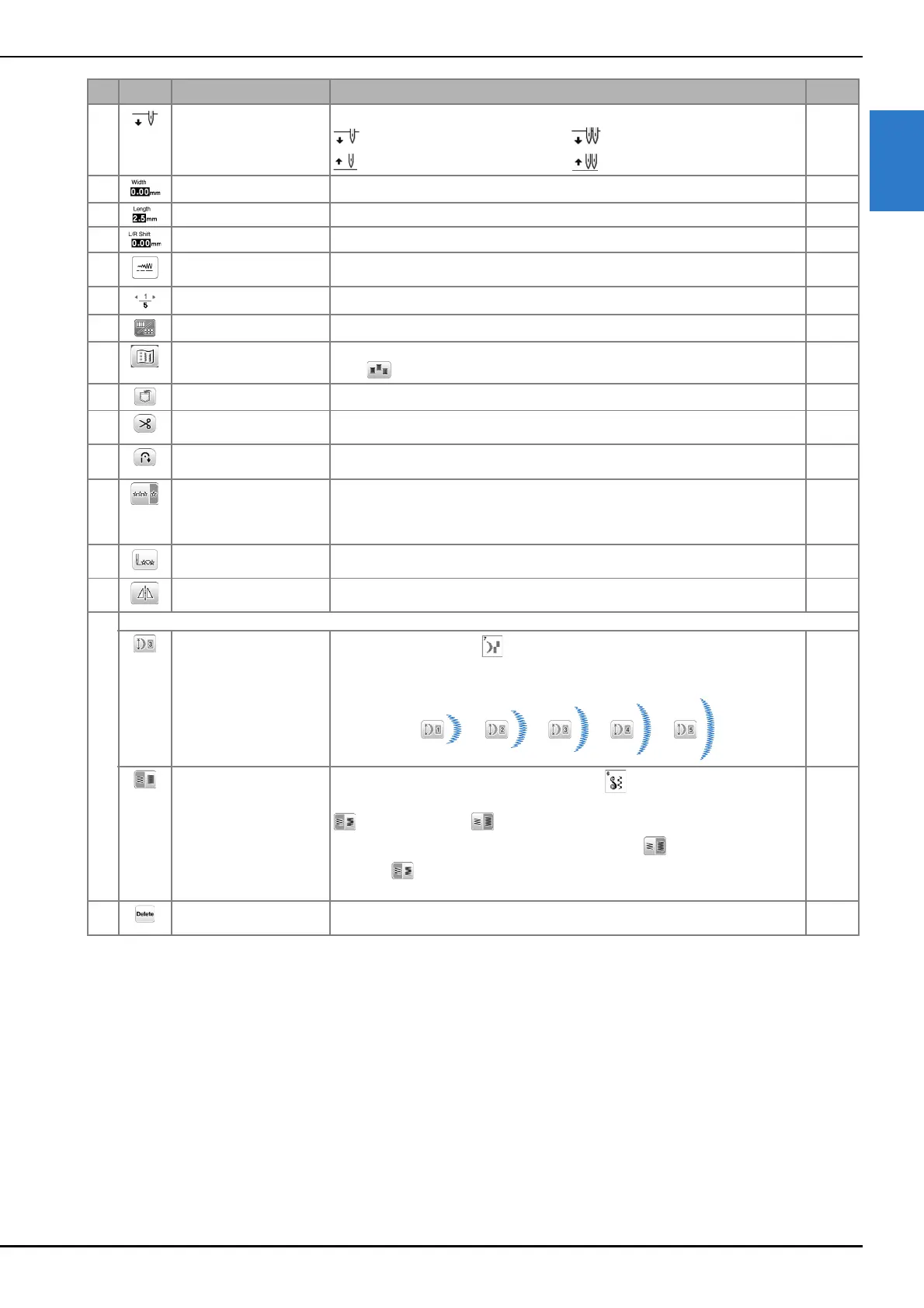
5 Needle position setting Shows single or twin needle mode setting, and the needle stop position. 12
: Single needle/down position
: Twin needle/down position
: Single needle/up position : Twin needle/up position
6 Stitch width Shows the stitch width of the currently selected stitch pattern. 29
7 Stitch length Shows the stitch length of the currently selected stitch pattern. 29
8 L/R Shift Shows the tendency of left/right of the center line for the original zigzag stitch. 29
9 Manual adjustment key Press this key to display the adjustment screen of the stitch width, stitch length and
“L/R Shift”.
29
0 Page display Shows additional pages that can be displayed. –
A Edit/stitch switching key Press this key to toggle between the stitch editing screen and the stitch screen. 27
B Image key Shows a preview of the sewn image.
Press to change the thread color in the image to red, blue, or black.
–
C Memory key Press this key to save combined stitch patterns. 55
D Automatic thread cutting
key
Press this key to set the automatic thread cutting function. 28
E Automatic reverse/
reinforcement key
Press this key to use the automatic reverse/reinforcement stitch function. 28
F Single/repeat sewing key Press this key to choose single stitch pattern or continuous stitch patterns.
Depending on the selected stitch, this key may be disabled. To finish a complete
motif while sewing the stitch pattern continuously, you can press this key while
sewing. The machine will automatically stop when the motif is finished.
–
G Back to beginning key When sewing is stopped, press this key to return to the beginning of the stitch
pattern.
–
H Mirror image key After selecting the stitch pattern, use this key to create a horizontal mirror image of
the stitch pattern.
–
I Some of the following keys will appear, depending on the selected stitch pattern.
Elongation key
When satin stitch patterns are selected, press this key to choose from 5
automatic length settings, without changing the stitch zigzag width or stitch length
settings.
–
Thread density key
After selecting the decorative satin stitch pattern , use this key to change the
thread density of the stitch pattern.
: Low density
: High density
If the stitches bunch when thread density is changed to , return the thread
density to . If you continue sewing when the stitches are bunched, the needle
may bend or break.
–
J Delete key Press this key to delete the selected stitch pattern. When you make a mistake in
combining stitch patterns, use this key to delete stitch patterns.
–
No. Display Key Name Explanation Page


 To Next Page