LCD Operation
12
Settings screen
Press to change the default machine settings (needle stop
position, opening display, etc.). Press or , after you
changed necessary settings.
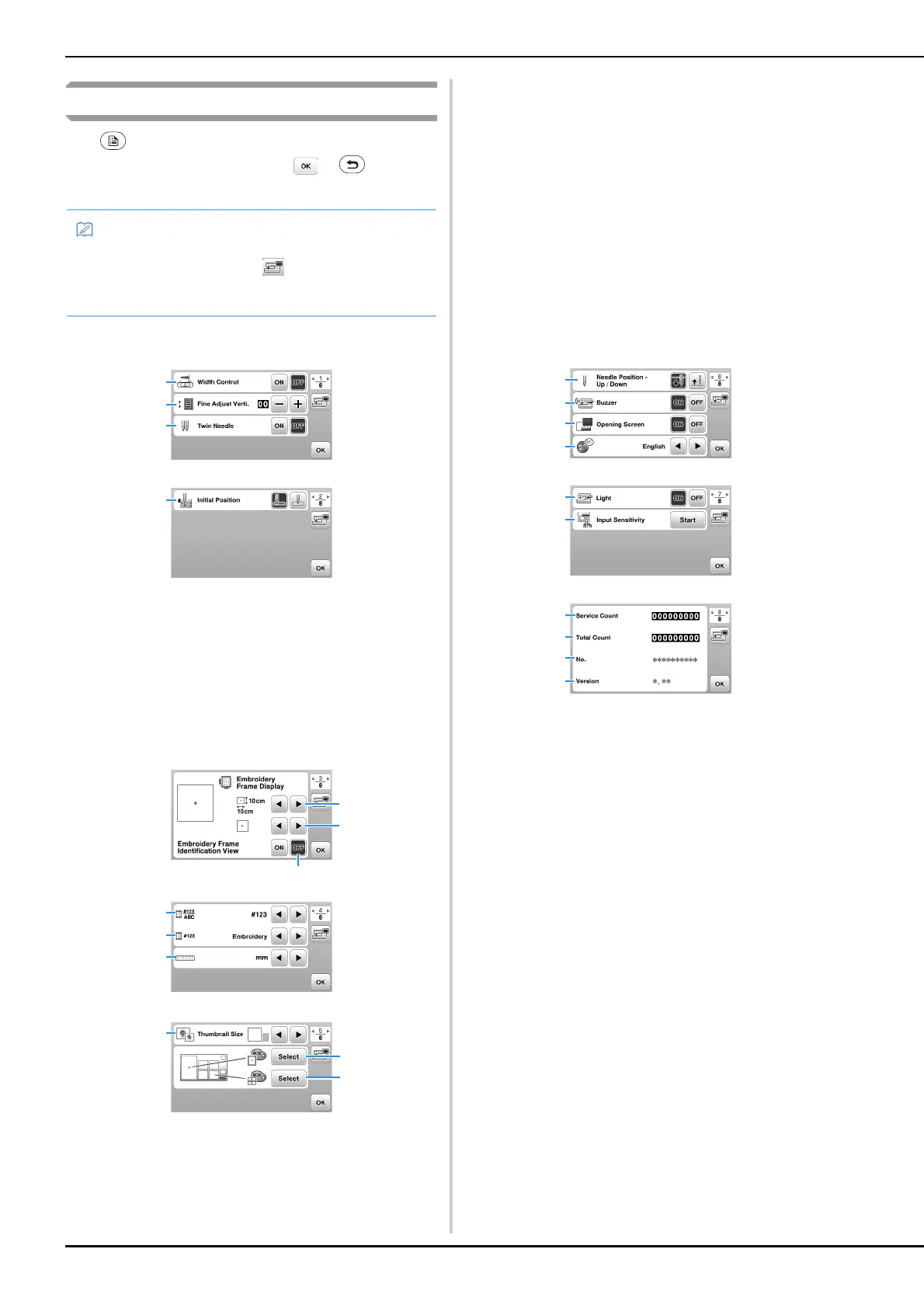
■ Sewing settings
1 Select whether to use the sewing speed controller to
determine the zigzag width. (page 48)
2 Make adjustments to decorative stitch patterns. (page
54)
3 Set to [ON] when using twin needle. (page 52)
4 Select either “1-01 Straight stitch (Left)” or “1-03 Straight
stitch (Middle)” as the utility stitch that is automatically
selected when the machine is turned on.
■ Embroidery settings
5 Select the embroidery frame to be used.
6 Select the center mark and grid lines that are displayed.
7 When set to [ON], the embroidery pattern can be
selected according to the embroidery frame size that you
have selected in number
5. (page 64)
8 Change the thread color display on the embroidery
screen; thread number, color name. (page 66)
9 When the thread number [#123] is selected, select from
thread brands. (page 66)
0 Change the display units (mm/inch).
A Press to specify the size of pattern thumbnails.
B Change the color of the background for the embroidery
display area.
C Change the color of the background for the thumbnail
area.
■ General settings
D Select the needle stop position (the needle position for
when the machine is not being operated) to be up or
down.
E Select whether to hear the beep operation sound.
F Select whether to display the opening screen when the
machine is turned on.
G Select the display language.
H Select whether to turn work area light on or off.
I Select the level of the input sensitivity for operation keys.
(page 13)
J Display the service count which is a reminder to take
your machine in for regular servicing. (Contact your
authorized Brother dealer for details.)
K Display the total number of stitches sewn on this
machine.
L The [No.] is the internal machine number for your
machine.
M Display the program version installed on your machine.
• You can save the current settings screen image in a
USB flash drive by pressing when the USB flash
drive is inserted into the USB port. The files are saved in
a folder labeled “bPocket”.


 To Next Page