Troubleshooting
78
i
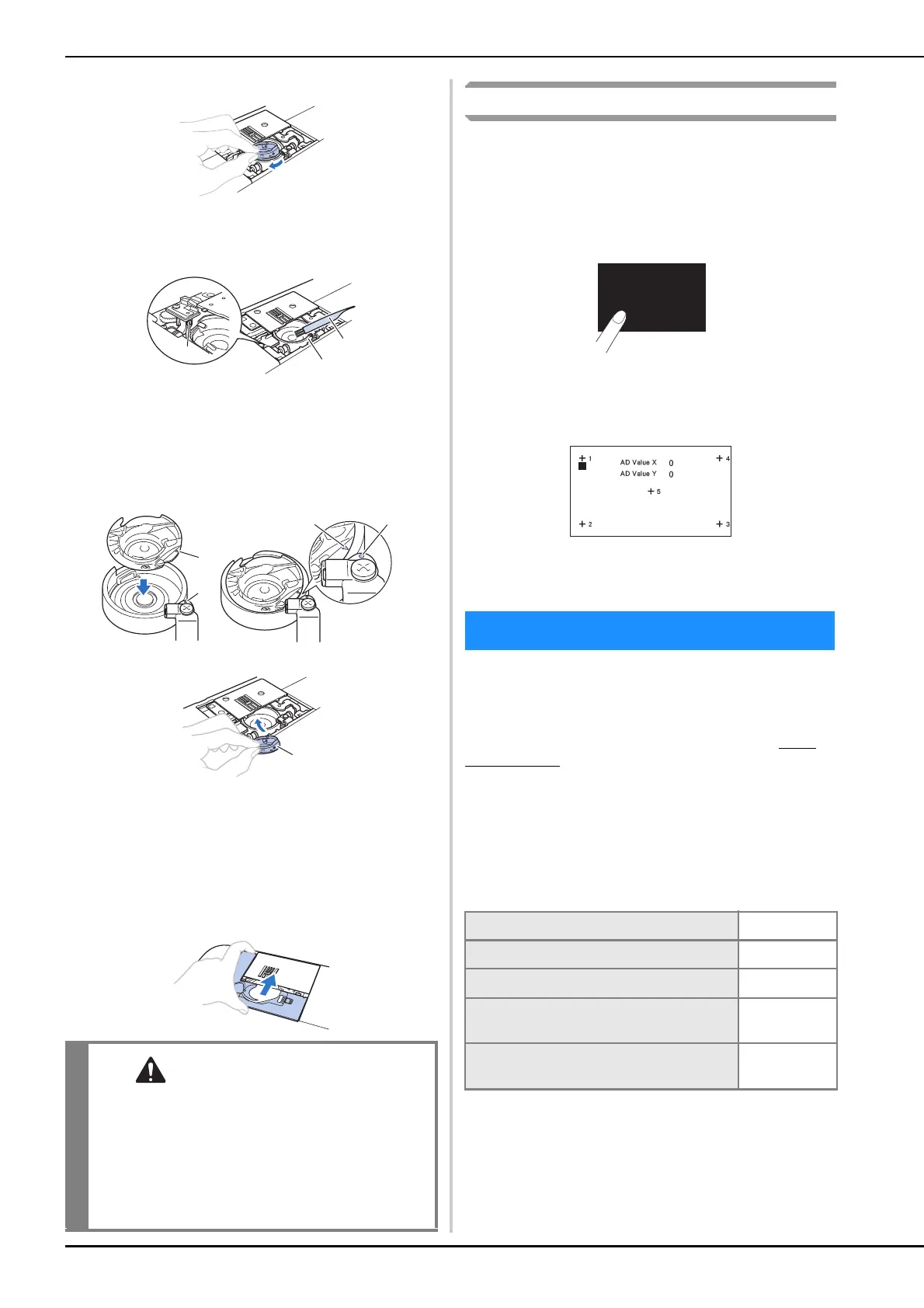
Grasp the bobbin case, and then pull it out.
j
Use the cleaning brush or a vacuum cleaner to remove
any lint and dust from the race and bobbin thread
sensor and the surrounding area.
1 Cleaning brush
2 Race
3 Bobbin thread sensor
• Do not apply oil to the bobbin case.
k
Insert the bobbin case so that the
mark on the
bobbin case aligns with the mark on the machine.
• Align the and
marks.
1 mark
2
mark
3 Bobbin case
• Make sure that the indicated points are aligned
before installing the bobbin case.
l
Insert the tabs on the needle plate cover into the
needle plate, and then slide the cover back on.
Reattach the bobbin cover.
Touch panel is malfunctioning
If the screen does not respond correctly when you touch a key
(the machine does not perform the operation or performs a
different operation), follow the steps below to make the
proper adjustments.
a
Holding your finger on the screen, turn the main
power switch to OFF and back to ON.
→ The touch panel adjustment screen is displayed.
b
Lightly touch the center of each +, in order from 1 to 5.
c
Turn the main power to OFF, then turn it back to ON.
If the machine stops operating correctly, check the
following possible problems before requesting service.
You can solve most problems by yourself. If you need
additional help, the Brother Solutions Center offers the
latest FAQs and troubleshooting tips. Visit us at “ http://
s.brother/cpjab ”.
If the problem persists, contact your Brother dealer or the
nearest Brother authorized service center.
■ Frequent troubleshooting topics
Detailed causes and remedies for common troubleshooting
topics are described below. Be sure to refer to this before
contacting us.
• Never use a bobbin case that is scratched,
otherwise the upper thread may become tangled,
the needle may break or sewing performance
may suffer. For a new bobbin case, contact your
nearest Brother authorized service center.
• Be sure that the bobbin case is correctly
installed, otherwise the needle may break.
a
b
c
a
b
ab
c
Troubleshooting
Upper thread tightened up page 79
Tangled thread on wrong side of fabric page 79
Incorrect thread tension page 79
Fabric is caught in the machine and cannot
be removed
page 80
If the thread becomes tangled under the
bobbin winder seat
page 82


 To Next Page