Utility stitches
38
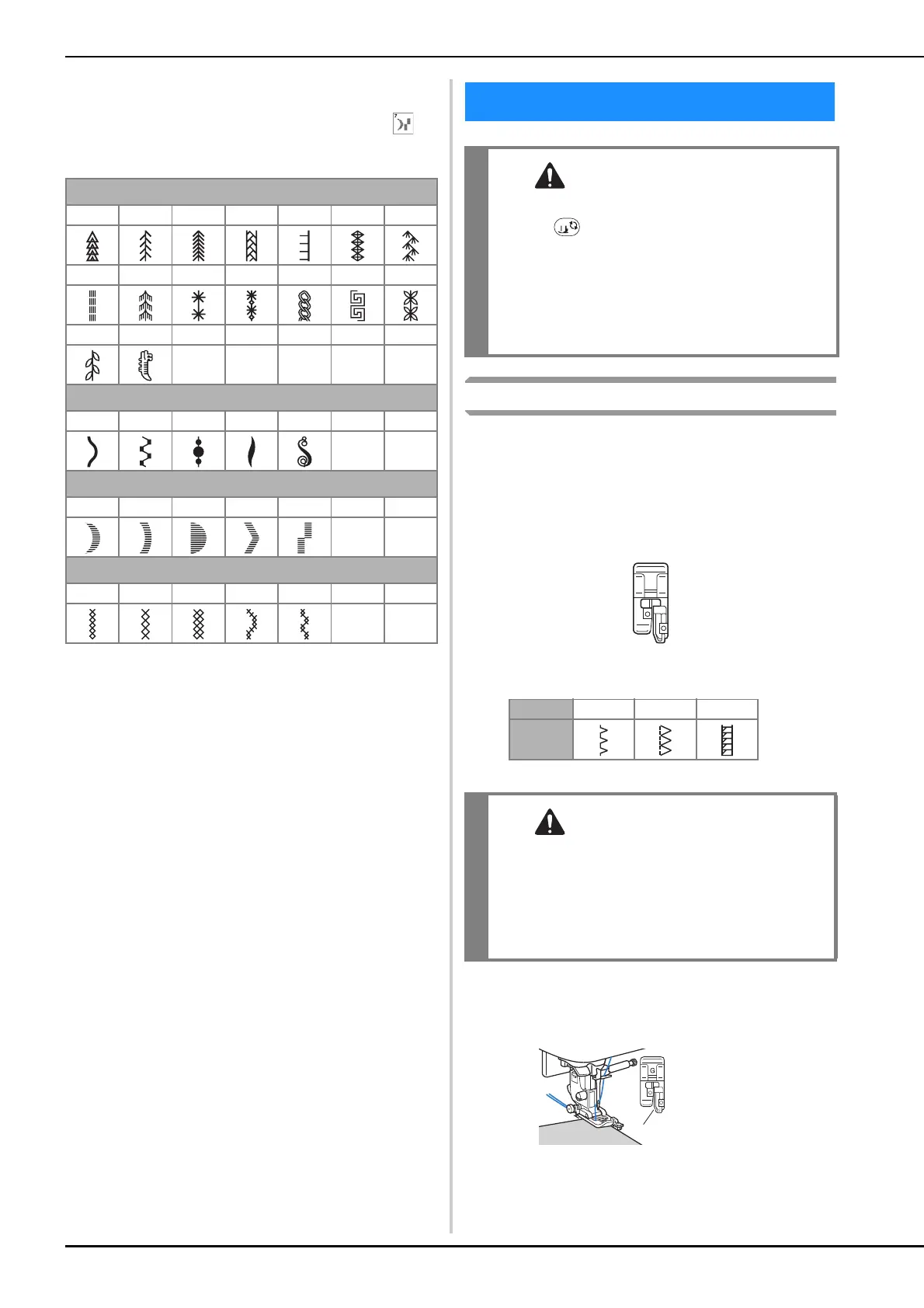
■ Decorative stitches
Use monogramming foot “N”.
The twin needle can only be used with satin stitch . In
addition, be sure to attach zigzag foot “J” when using the
twin needle.
Overcasting Stitches
Sew overcasting stitches along the edges of cut fabric to
prevent them from fraying.
■ Using overcasting foot “G”
a
Attach overcasting foot “G”.
b
Select a stitch.
• For details, refer to “Stitch Chart” on page 35.
c
Position the fabric with the edge of the fabric against
the guide of the presser foot, and then lower the
presser foot lever.
Decorative stitches
5-01 5-02 5-03 5-04 5-05 5-06 5-07
5-08 5-09 5-10 5-11 5-12 5-13 5-14
5-15 5-16
Decorative satin stitches
6-01 6-02 6-03 6-04 6-05
Satin stitches
7-01 7-02 7-03 7-04 7-05
Cross stitch stitches
8-01 8-02 8-03 8-04 8-05
Utility stitches
• Before replacing the presser foot, be sure to
press (Presser foot/Needle exchange key)
on the operation panel to lock all keys and
buttons, otherwise injuries may occur if the
“Start/Stop” button or any other button is
pressed and the machine starts. For details on
changing the presser foot, refer to “Replacing
the Presser Foot” on page 23.
No. 1-13 1-14 1-15
Stitch
• When using overcasting foot “G”, be sure
select a stitch that can be used with
overcasting foot “G”. If you sew with the
incorrect stitch, the needle may hit the presser
foot, bending the needle or damaging the
presser foot.
1 Guide
a


 To Next Page