Embroidering
67
EMBROIDERY
4
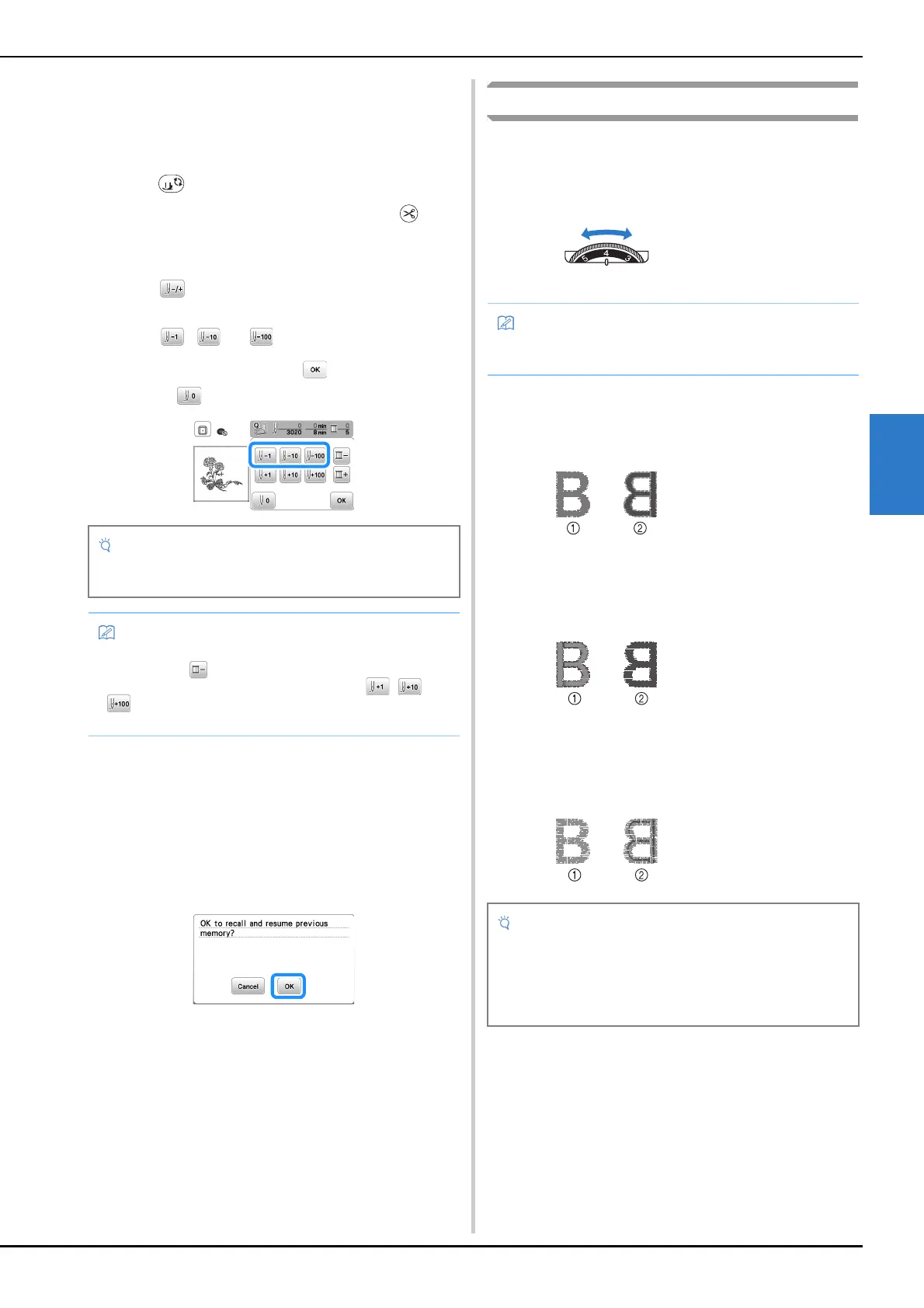
■ If the thread breaks or the bobbin runs out of
thread during embroidering
a
Press the “Start/Stop” button to stop the machine.
b
Press and set the upper thread or bobbin thread.
• If the bobbin thread is almost empty, press
(Thread cutter button) to cut the upper and bobbin
threads, remove the embroidery frame, and then
replace the bobbin with one wound with thread.
c
Press .
d
Press , , or to move the needle back the
correct number of stitches before the area where the
thread broke, and then press .
• Press to restart from the beginning.
e
Lower the presser foot and press the “Start/Stop”
button to continue embroidering.
■ Resuming embroidery after turning off the
power
The current color and stitch number are saved when
embroidery is stopped. The next time the machine is turned
on, you have the option to continue or delete the pattern.
Adjusting thread tension
The upper thread tension is changed using the thread tension
dial.
When doing machine embroidery, the tension dial should be
set somewhere between 2 to 6.
■ Correct thread tension
The thread tension is correct when upper thread is just visible
on the wrong side (bottom) of the fabric.
■ Upper thread is too tight
The bobbin thread will be visible on the right side (top) of the
fabric. In this instance, decrease the upper thread tension.
■ Upper thread is too loose
The upper thread has slack. In this instance, increase the
upper thread tension.
• It is recommended to stitch over the top of the last two
or three stitches for complete coverage.
• If you cannot move back to the area where the thread
broke, press to select the color and move to the
beginning position of that color, then use , or
to move ahead to slightly before where the thread
broke.
1 Loosen (Decrease the
number)
2 Tighten (Increase the
number)
3 Thread tension dial
• If the stitches appear loose, turn the tension up one
notch and embroider again.
1 Right side (top) of
fabric
2 Wrong side (bottom)
of fabric
1 Right side (top) of
fabric
2 Wrong side (bottom)
of fabric
1 Right side (top) of
fabric
2 Wrong side (bottom)
of fabric
• If the upper thread is not threaded correctly or the
bobbin is not installed correctly, it may not be possible
to set the correct thread tension. If the correct thread
tension cannot be achieved, rethread the upper thread
and insert the bobbin correctly.


 To Next Page