Specifications
203
D
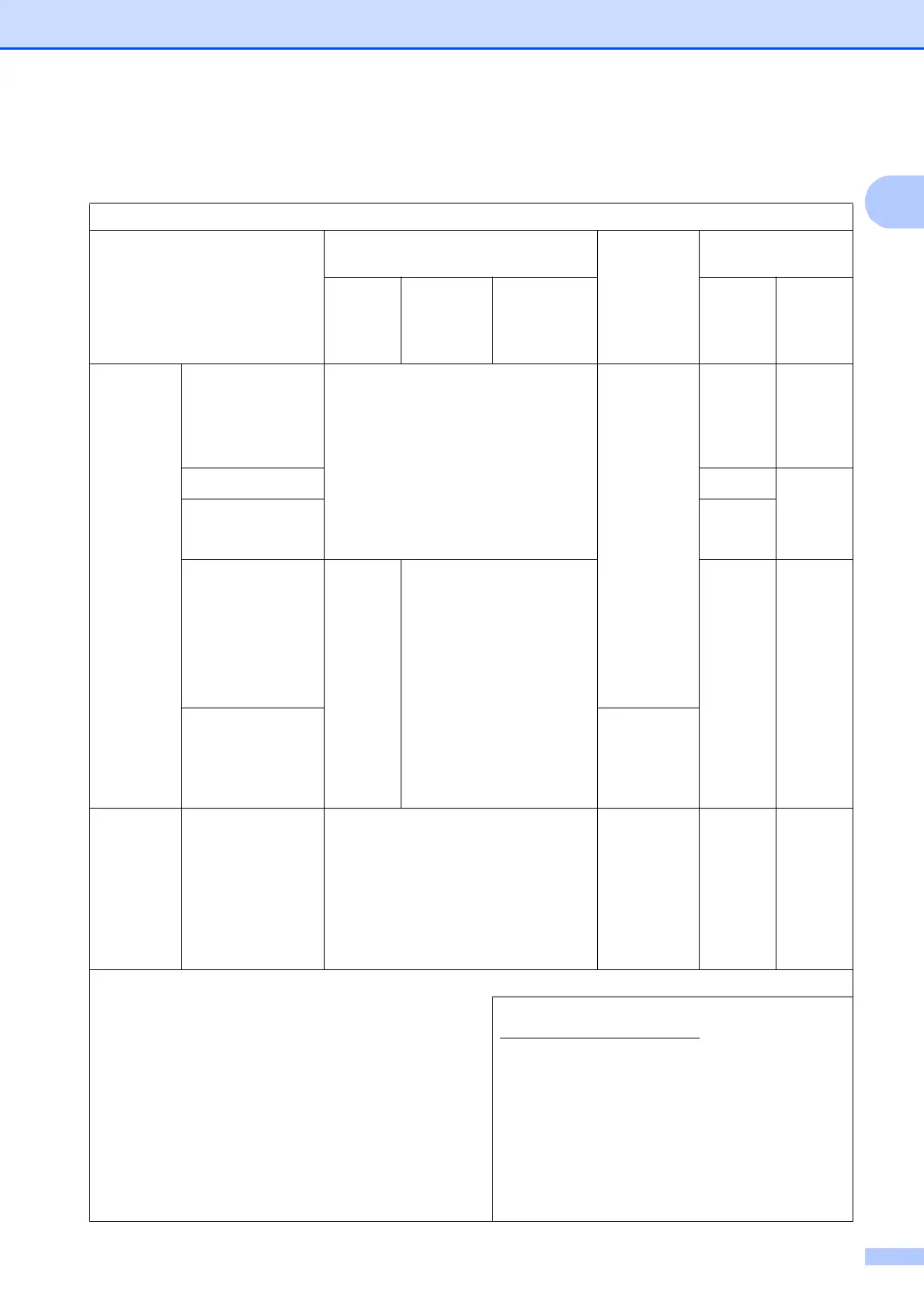
Computer requirements D
SUPPORTED OPERATING SYSTEMS AND SOFTWARE FUNCTIONS
Computer Platform &
Operating System Version
PC Interface
Processor
Hard Disk Space
to install
USB
2
10/100
Base-TX
(Ethernet)
Wireless
802.11b/g/n
For
Drivers
For
Applications
(including
Drivers)
Windows
®
Operating
System
Windows
®
XP
Home
14
Windows
®
XP
Professional
14
Printing
PC Fax
3
Scanning
Removable Disk
(USB or Memory card)
5
Network Media Access (LAN)
5
32bit (x86)
or 64bit
(x64)
processor
150 MB 1 GB
Windows Vista
®14
500 MB 1.3 GB
Windows
®
7
14
Windows
®
8
14
650 MB
Windows Server
®
2003
Windows Server
®
2003 R2
Windows Server
®
2008
N/A Printing 50 MB N/A
Windows Server
®
2008 R2
Windows Server
®
2012
64bit (x64)
processor
Macintosh
Operating
System
Mac OS X v10.6.8
OS X v10.7.x
OS X v10.8.x
Printing
PC Fax (Send)
3
Scanning
Removable Disk
(USB or Memory card)
5
Network Media Access (LAN)
5
Intel
®
Processor
80 MB 550 MB
Conditions:
1
For WIA, 1200 1200 resolution. Brother Scanner Utility
enables to enhance up to 19200 19200 dpi.
2
Third party USB ports are not supported.
3
PC Fax supports black and white only.
4
PaperPort™ 12SE supports Windows
®
XP Home (SP3 or
greater), XP Professional (SP3 or greater), XP
Professional x64 Edition (SP2 or greater), Windows
Vista
®
(SP2 or greater), Windows
®
7 and Windows
®
8.
5
Removable disk and Network Media Access are functions
of PhotoCapture Center™.
For the latest driver updates, visit us at
http://solutions.brother.com/
.
All trademarks, brand and product names are the
property of their respective companies.



 To Next Page
 Loading...











