BASIC SETUP 6
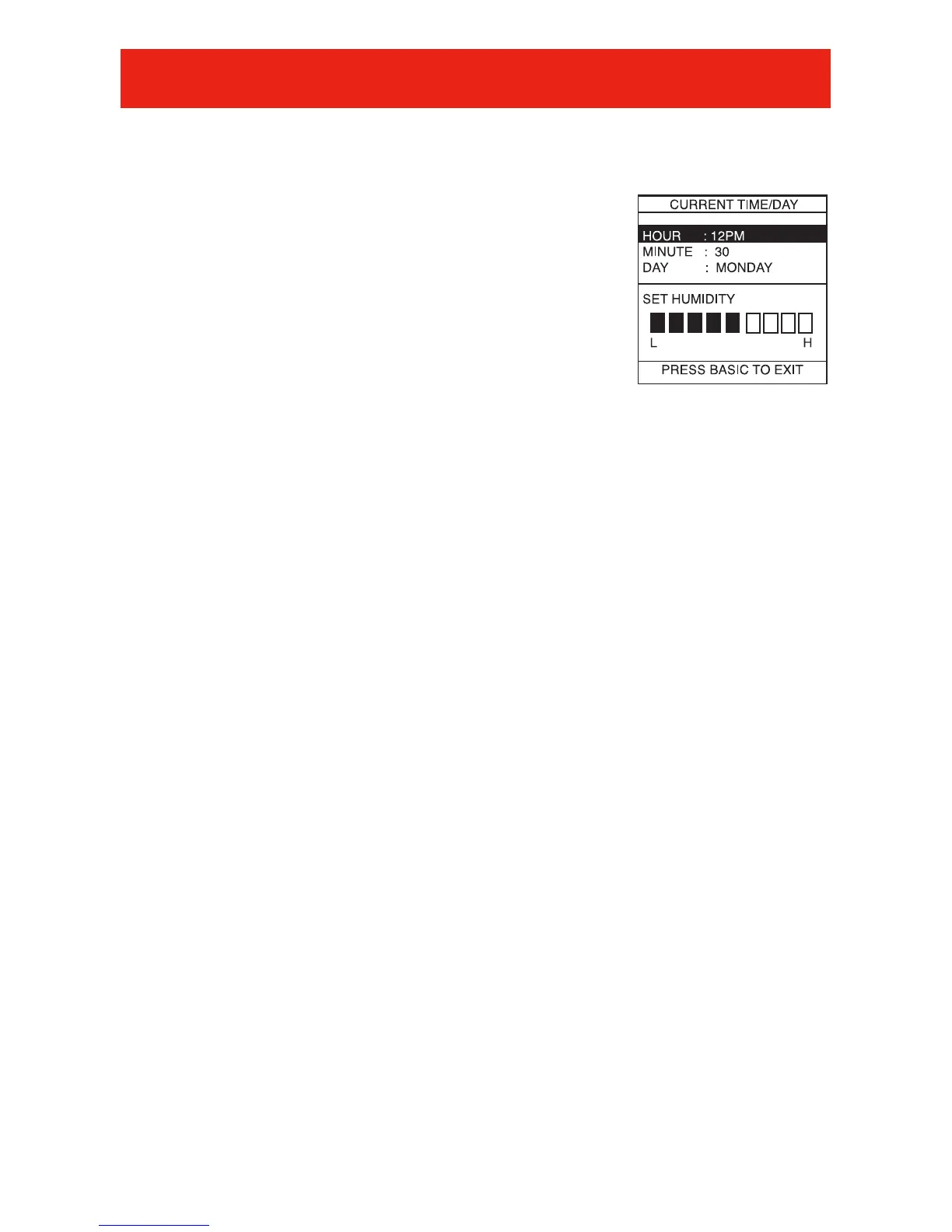
Set Day, Time & Desired Humidity
1
Open the door of the Evolution
®
Control.
2 Press the BASIC button.
3 Adjust the highlighted HOUR setting using
the Left Up/Down button.
4 Press SCROLL to highlight MINUTE.
5 Adjust the MINUTE setting using the Left
Up/Down button.
6 Press SCROLL to highlight DAY.
7 Adjust the current DAY setting, using the Left Up/Down button,
until the correct day is displayed.
8 Press SCROLL to highlight HUMIDITY.
9 Press the red HEAT button to set the heating humidity.
10 Adjust the desired heating humidity using either Up/Down
button.
11 Press the blue COOL button to set the cooling humidity.
12 Adjust the desired cooling humidity using either Right
Up/Down button.
13 If a ventilator has been installed, press scroll to highlight
FRESH AIR.
14 Adjust your desired FRESH AIR setting using the Right
Up/Down button. For a description of fresh air settings, see
FRESH AIR VENTILATION on page 24 in this manual.
15 Press the BASIC button to exit.
- OR -
If you need to readjust one of your settings, use the SCROLL
button to highlight the desired setting, then make your changes.













 To Next Page