Manual EVOTOUCH v.5 92 / 104
4.1.4 Configuration Menu
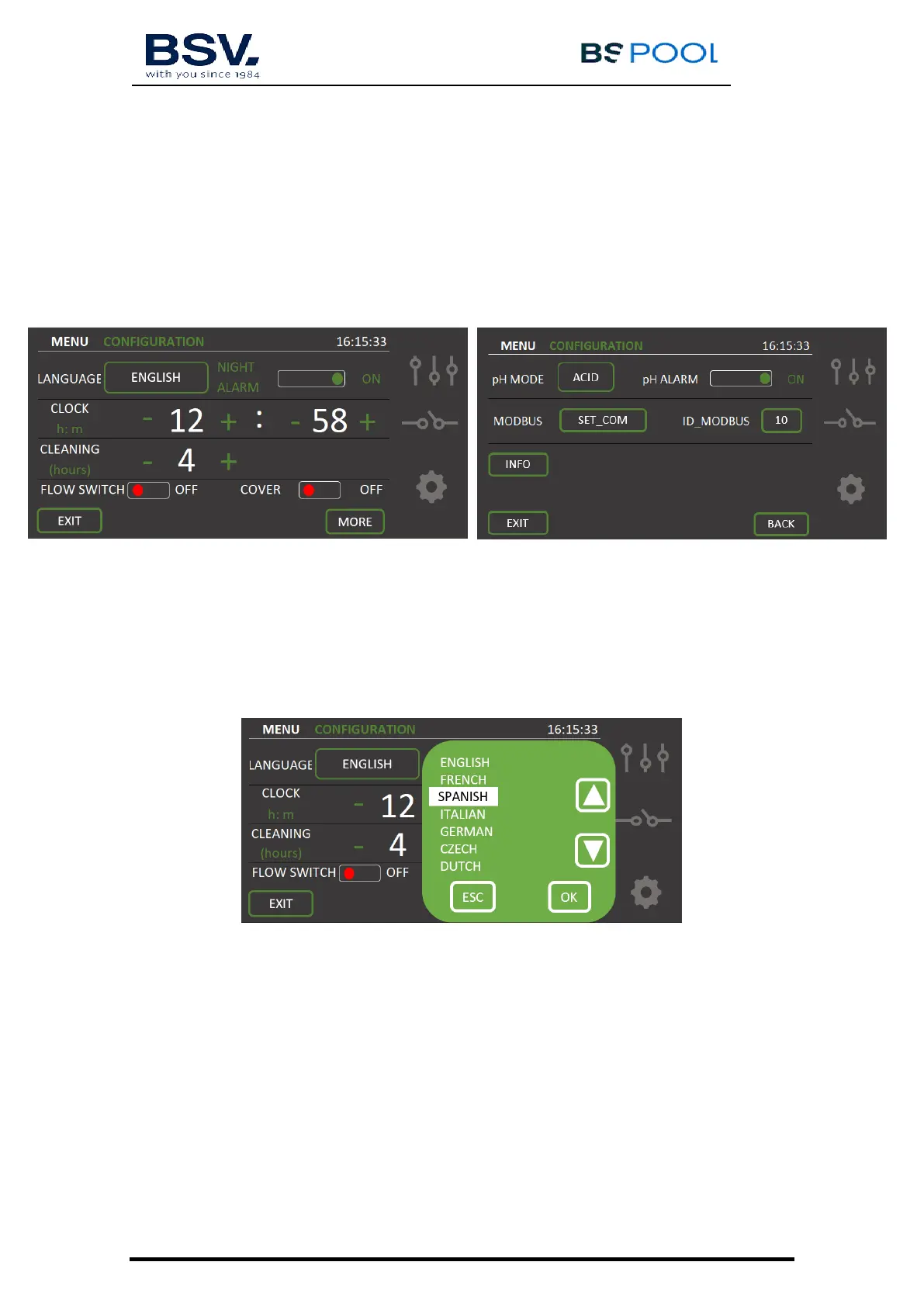
When the equipment is installed, all features must set in Configuration Menu. In
order to complete your setup, browse through both pages of the
Configuration Menu, using MORE or BACK. Configure your parameters
according to your needs.
4.1.4.1 Language selection
From Configuration Menu, It is possible to select the most suitable language.
Click on the language displayed and a list of languages available will appear.
Use arrows button to go up or down on the selection. When it is done, tap
OK and then EXIT.
4.1.4.2- Night Alarm
When an alarm occurs, the unit stops its production and shows an acoustic and
visual alarm to indicate that it’s necessary to correct the problem.
However, it is possible to mute the alarm between 22:00 and 9:00, selecting
the option Night Alarm = OFF.
If the user wishes an acoustic sound if any alarm occurs. Night Alarm = ON
4.1.4.3- Cleaning


 To Next Page