BSWA 308/309 BSWA Technology Co., Ltd
108
Can’t save the measurement
data.
Check logger settings.
Format SD to FAT32.
Replace new MicroSD card with maximum capacity 4G.
The Printer can’t print the
measurement data.
Check the settings related to printer.
Make sure the print-paper is installed correctly.
6.3 Calibration
Sound level meter has been calibrated before sales. Keep regular calibration can ensure the
accuracy of the measurement. BSWA provide the calibration service for acoustic products.
6.4 Firmware Update
BSWA 308/309 firmware can be update via USB port. Following items need to be prepared:
BSWA 308/309 sound level meter (HWID: P0274 or above) and keep power off;
MiniUSB cable (include in sales package);
External power supply (include in sales package);
Firmware for update (download from BSWA website);
USB driver (Silicon Labs CP210x driver), can be find in CD-ROM or BSWA website;
Firmware update tool: FlashTool Wizard, can be find in CD-ROM or BSWA website.
6.4.1 Install USB Driver
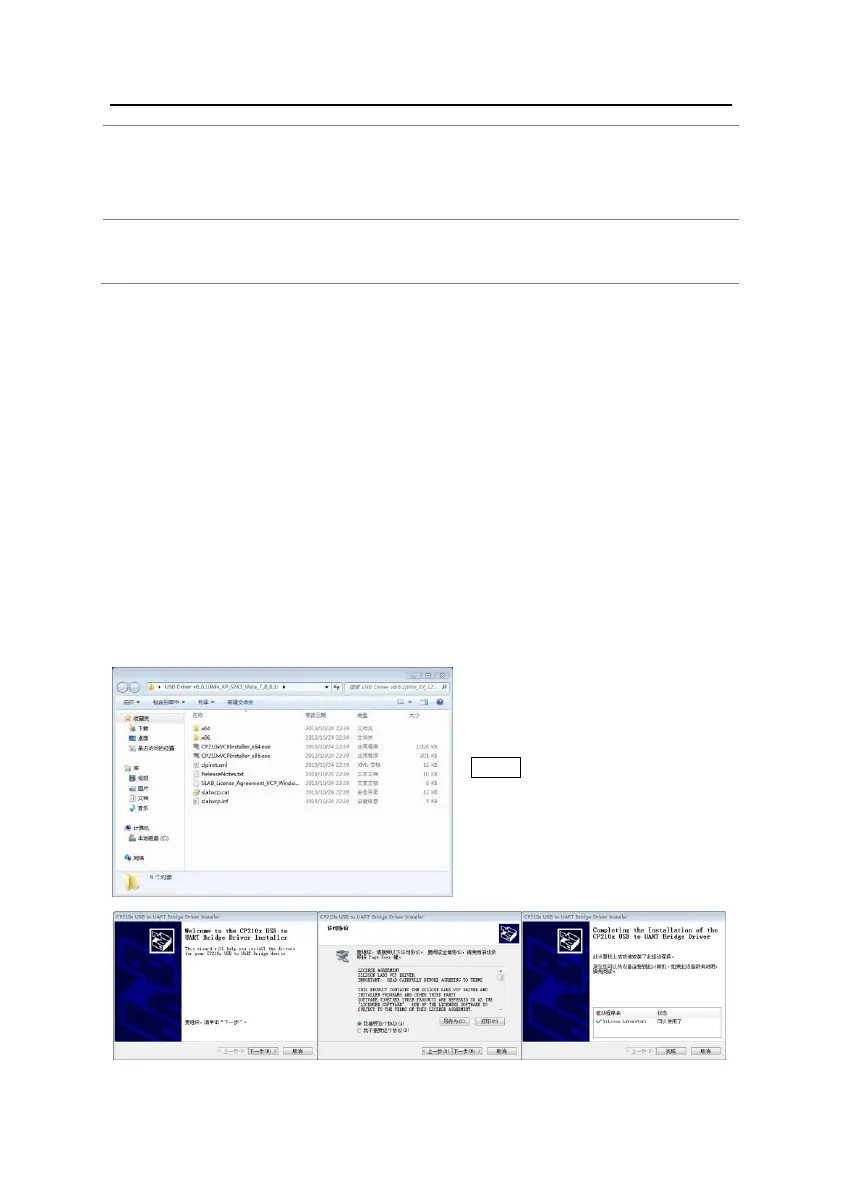
Unzip and install driver step by step.
Note that select X86 for 32-bit OS and
select X64 for 64-bit OS.
★Note: Do not connect sound level
meter to computer when install driver.
Follow the prompt to install, accept the
license agreement and then click next
until the driver installation is complete.


 To Next Page